
Exit
  • Global community
    • Language:
      • Deutsch
      • English
      • Español
      • Français
      • Português
  • 日本語コミュニティ
  • 한국 커뮤니티
6

Can use Adobe Express, says my browser is unsupported

Community Beginner ,
Aug 16, 2023 Aug 16, 2023

I was using Adobe Express on Chrome yesterday with no problem but now I'm trying to load the page and it says my browser is unsupported. My Chrome is updated, I even downloaded Microsoft Edge to try there but it shows me the same message. I already cleared cookies and caché and it still doesn't work. I don't know what to do.
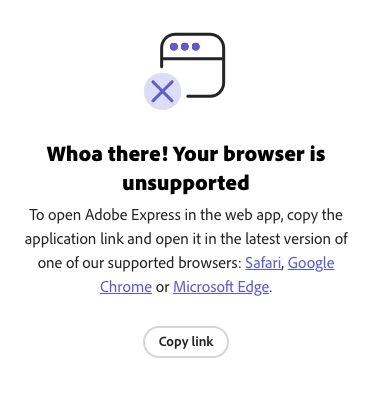
Captura de pantalla 2023-08-16 a la(s) 6.23.55 p. m..png

Bug Started
TOPICS
Desktop Web
9.3K
Translate
Report
Community guidelines
Be kind and respectful, give credit to the original source of content, and search for duplicates before posting. Learn more
community guidelines

correct answers 1 Pinned Reply

Adobe Employee , Aug 18, 2023 Aug 18, 2023

"Browser not supported" issue has been investigated and is in the process of getting fixed. 

Status Started
Translate
20 Comments
Community Beginner ,
Aug 17, 2023 Aug 17, 2023

Good luck getting any reply, i have been on support to adobe for 2 days and still cant use it

Translate
Report
Adobe Employee ,
Aug 18, 2023 Aug 18, 2023

Hi, there are a couple of other of areas you can check to confirm minimum requirements:

- hardware acceleration is enabled. Here's one resource that explains how to check that: https://help.scoot.app/how-do-i-enable-my-browsers-hardware-acceleration
- Navigate to https://webglreport.com/?v=2 and confirm that it shows as green (✓ This browser supports WebGL 2)

Translate
Report
Adobe Employee ,
Aug 18, 2023 Aug 18, 2023

Adding to @Risa Shen response,

@rachel5DD1 & @VR Photography, can you please check if the Javascript is enabled for the browsers you use (Google Chrome, Edge, or Safari)? Also, ensure you're not on any VPN or have an active firewall.


Translate
Report
Community Beginner ,
Aug 18, 2023 Aug 18, 2023
Yes as mentioned in previous comments this has been checked
Translate
Report
Adobe Employee ,
Aug 18, 2023 Aug 18, 2023

Thanks for letting us know, We have raised this with the concerned team and it is being worked on. Once the fix is available, we'll let you know. 

Translate
Report
Adobe Employee ,
Aug 18, 2023 Aug 18, 2023

"Browser not supported" issue has been investigated and is in the process of getting fixed. 

Status Started
Translate
Report
Community Beginner ,
Aug 21, 2023 Aug 21, 2023

Hi. I am having the same error message today and have followed all the steps suggested! This isn't great!

Translate
Report
New Here ,
Aug 21, 2023 Aug 21, 2023

Same! It was working and then it just gave me this error

Translate
Report
New Here ,
Aug 21, 2023 Aug 21, 2023

Waiting since Aug 18th. It's 21st already. Issue has not been fixed it appears.

Translate
Report
Adobe Employee ,
Aug 21, 2023 Aug 21, 2023

Hi, if you've followed all other steps, could you please try the following and share a screenshot of what you see, similar to the example shared? This will allow us to investigate your specific case


  1. Open devtools:  Mac :  Cmd + Option + I       win:  Ctrl + Shift + I or right click and select inspect
  2. Go to console and filter with "Browser"
  3. Reload the website
  4. verify the console logs:


Screenshot 2023-08-21 at 3.52.13 PM.png

Translate
Report
New Here ,
Aug 26, 2023 Aug 26, 2023

I am having the same issue! It just became "unsupported" out of the blue - it worked fine yesterday. My browser, Chrome, is up to date. Cookies and cache are cleared. Restarted my browser. Tried using in other browsers - also up to date - Safari and Firefox. Getting the same "unsupported" error. Adobe this is not good. You should have 24 hour support. Thousands of people around this world depend on Adobe to do their job. I may jeopardize client relationships and lose work because of this.

Translate
Report
New Here ,
Aug 27, 2023 Aug 27, 2023
Hello, I feel your pain! I've had it twice now! It does seem to eventually
sort itself out but it's not good at all! Hopefully a fix will come out
soon!
Translate
Report
New Here ,
Dec 26, 2023 Dec 26, 2023

I am getting this same error message, windows is up to date, Javascript is on, no vpns. Has a solution been found? I see these other messages are from back in August thats a bit concerning it is still an ongoing issue. 

Translate
Report
New Here ,
Dec 27, 2023 Dec 27, 2023
I've been getting it again. It's not working on Brave but does work on
Chrome.
Translate
Report
Adobe Employee ,
Jan 08, 2024 Jan 08, 2024

Hey @N219764798ynb, The Brave browser is not one of the recommended ones for Adobe Express as of now! It may come soon, though; I'd suggest you use the recommended browsers like Google Chrome, Microsoft Edge, Safari & Firefox. Ensure that you use the official build of these browsers. You may also want to refer to the Adobe Express system requirements

Translate
Report
New Here ,
Feb 10, 2024 Feb 10, 2024

Experiencing this issue as of today 2/10/24. Everything was working fine one moment, the next I had an unsupported message. No updates for Google Chrome in queue or anything different from moments ago 😞 

Translate
Report
New Here ,
Apr 05, 2024 Apr 05, 2024

??????????????????????????????????????????????????????????????????????????????????????????????????????????????????????Know what?

Translate
Report
New Here ,
Jul 13, 2024 Jul 13, 2024

Now I'm getting this message too....is there a fix or are we aiming for a full year of this? 

Translate
Report
Community Beginner ,
Jul 15, 2024 Jul 15, 2024

llevo semanas con el mismo problema no he posiso trabajar nada en Adobe Express en ningun dispositivo

Translate
Report
New Here ,
Oct 08, 2024 Oct 08, 2024
LATEST

Hi

This is my problem.

https://new.express.adobe.com/unsupported-browser

How can i do?

Translate
Report