


Amitej S
Community Manager
Community Manager
April 8, 2025
Answered

FIXED -❗Adobe Express outage - 'You're offline' error ❗April 8th, 2025

  • April 8, 2025
  • 43 replies
  • 3577 views

Hi Everyone!!

Adobe Express experienced an outage, and the app stuck on "Getting everything ready for you," with a message displaying "You're offline."
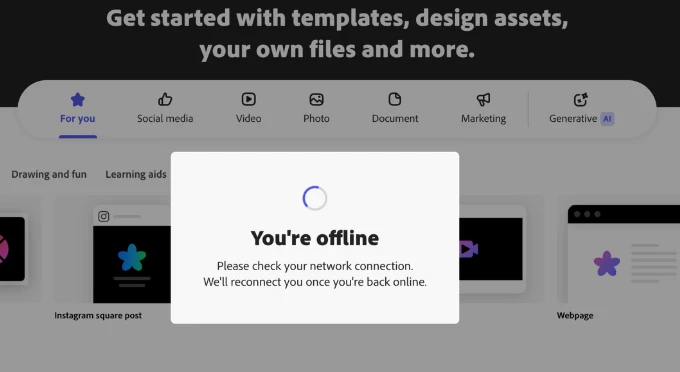


Our team worked on fixing the issue. If you're still experiencing it, let us know.


We apologize for the frustration and thank you for your patience.

Correct answer Abhi.G @ ADBE

@rachael_3007 @Grace Presbyt36105630rs4j 


We are actively investigating this issue. Thanks for your patience.


Abhi G

43 replies

Participant
April 8, 2025

I’m trying to edit a video in Adobe Express, but the platform keeps telling me I’m offline—even though my internet connection is stable and working fine.

Here’s what I’ve already tried:

Cleared my cache and cookies (for all time). Tried both normal and incognito/private browsing modes. Switched browsers (Chrome, Edge). Disabled all browser extensions. Did a hard refresh (Ctrl+Shift+R / Cmd+Shift+R). Logged out and back into Adobe Express. Checked your server status page—everything shows as operational.

Despite all this, Adobe Express still won’t let me edit and insists I’m offline.

Could you please help resolve this? Thanks in advance for your support!

Participant
April 8, 2025

Samething, but working with a designed pdf...any suggestions of opening an exisiting project(s)?

Participant
April 8, 2025


Participant
April 8, 2025

Same here! Any help is appreciated.

Participant
April 8, 2025

I am also having the same issue. I've done basic trouble shooting, cleared my cache and cookies, and tried opening adobe express on other browsers. My internet is also working perfect for all other applications. None have resolved the problem. How can i fix this? 

Phantaseas
Participant
April 8, 2025

Same issues for me, can't work on anything. Usual troubleshoot steps don't help. 😞

Participant
April 8, 2025

Amitej S
Community Manager
Amitej SCommunity ManagerAuthor
Community Manager
April 8, 2025

Hey @Claudio37716230vy12, Welcome to our Adobe Express community!! 

We understand the frustration it is causing you but I'd like to inform you that our teams are aware of the issue and are investigating it. A fix for this will be released soon. Until then we appreciate your patience and support. 


Best!

Amitej

Participant
April 8, 2025

It has happened to me. Steps take:

1. Shut Down and restart (nope)

2. Check Firewall Settings (Nope, program allowed)

3. Clear Browser Data (nope)

4. Switch Browsers from Chrome to Edge (nope)


I am not sure what to do next. 


Participant
April 8, 2025

Same issue. I got some momentary relief like 5 minutes ago before the issue started up all over again. It has to be something server side that they're refusing to admit to.

Participant
April 8, 2025

Adding to the onslaught - same issue occuring all morning. Tried Chrome & Safari - I was able to "work" in Safari and make changes to a template I had pre-created, but now when I try and download the file, it's exporting the old basic template, so its clear no changes are actually being saved online. 

Participant
April 8, 2025

I keep getting the following error in Adobe Express:

You're offline

Please check your network connection.
We'll reconnect you once you're back online.


It worked fine until weeks ago and now this. And of course the internet is connected.

Erasing cookies, working on secret mode, using a different browser all didn't work.


What do I do?


Participant
April 8, 2025

Same issue. Just started today for me.

Amitej S
Community Manager
Amitej SCommunity ManagerAuthor
Community Manager
April 8, 2025

Hey @collin_5966, Welcome to our Adobe Express Community! 


Our teams are aware of the issue and have worked on a fix for this. Can you please try again and let us know if it works fine for you now?


Best!

Amitej

Participant
April 8, 2025

i am having the same issue when using google chrome and the app i download for my computer from adobe express chrome extension. i checked online for adobe services and it doesn't say anything about maintenance with adobe express.