
Participant
November 21, 2024
Answered

Adobe Firefly grammar issues

  • November 21, 2024
  • 2 replies
  • 266 views

I am trying to create an AI image of protestors holding up signs that read specific quotes. In this particular case, "TAX THE RICH" and "TAXATION IS THEFT"

Unfortunately, when I do, the AI generates gramatically incorrect words despite my attempts at being unambigious and precise. 

An example of a prompt I use is as follows:

Create a detailed cinematic image of protestors holding up signs that read "TAX THE RICH" 


To then try and counter the consequent errors I've tried different variations, which include Please be gramatically precise and do not add or change any words but nothing seems to be working. A few other AI generators seem to be a bit better although this problem appears to be fairly common across the board.

If anyone can look into this, or perhaps provide a more efficient input that supercedes my own, it would be greatly appreciated.


Please see attached...
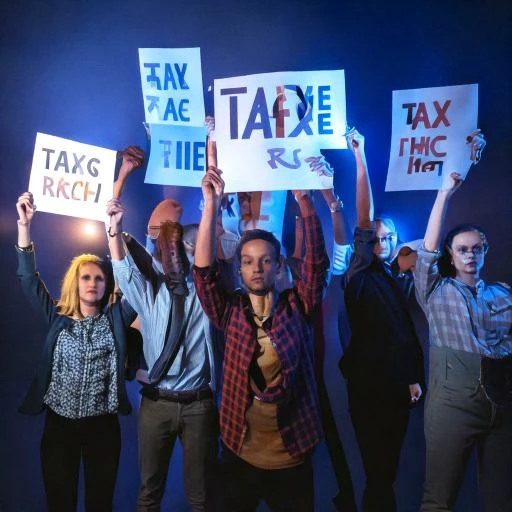

Correct answer Kartika Rawat

Sorry about that. Text generation is currently a limitation in the Text to Image feature. Please use the Report icon to report images with distorted or unclear text, which appears when you hover over a generated image.


Let us know if you have any questions.

Thanks,
KR

2 replies

Kartika Rawat
Community Manager
Kartika RawatCommunity ManagerCorrect answer
Community Manager
November 21, 2024

Sorry about that. Text generation is currently a limitation in the Text to Image feature. Please use the Report icon to report images with distorted or unclear text, which appears when you hover over a generated image.


Let us know if you have any questions.

Thanks,
KR

droopydog500
Community Manager
Community Manager
November 21, 2024

Hello @gavinn62733152,

Thank you for your message. I am sorry you are having this problem. 


While it has gotten better, Firefly (and most other AI image generators) is generally not good at putting exact text from a prompt into an image. Sometimes it is perfect, but usually, it does not get it right. The model will not understand instructions like "use correct grammar" or "do not change words".


If you need the text on the signs to be perfect, the best option is to have Firefly generate a blank sign and then use Adobe Express or Photoshop to add text in.  The more complicated the angle or perspective of the text, the more likely you will need Photoshop to get what you want.


Please see this article on why generating text in AI image generators is hard:

If AI image generators are so smart, why do they struggle to write and count?


Thanks,
    droopy

Adobe Community Expert (not an Adobe employee)