Participant
November 30, 2024
Answered

Gallery submission

  • November 30, 2024
  • 4 replies
  • 469 views
  1. Hello

i want to know why I am not able to submit my images to the gallery. Thanks 

This topic has been closed for replies.
Correct answer Oh.N8

Hey @Koda Kodalina 
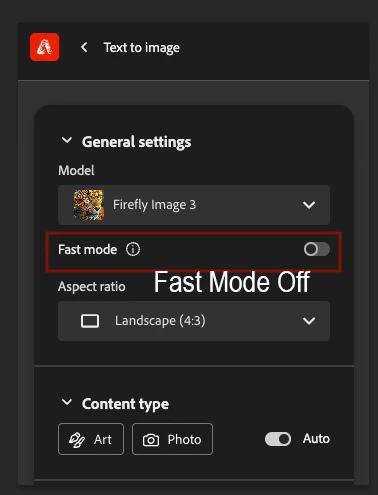
You might be using Fastmode in Firefly. If that is the case, just turn Fastmode off and you should be able to submit your images to the Gallery.

Cheers, 
O. Nate


4 replies

Oh.N8Community ExpertCorrect answer
November 30, 2024

Hey @Koda Kodalina 
You might be using Fastmode in Firefly. If that is the case, just turn Fastmode off and you should be able to submit your images to the Gallery.


Cheers, 
O. Nate


Participant
December 2, 2024

That was it!!

thank you so much!

Participant
November 30, 2024

So when I create an image, the "submit to gallery" option is grayed out. That's new because I used to have that option.  I know firefly is free but I have creative cloud subscription. So I don't understand why this is happening 

droopydog500
Community Manager
Community Manager
November 30, 2024

Hi @Koda Kodalina,


Can you please provide a screen shot of that? I am not aware of a reason why it should be greyed out. Does everything else work ok?


    droopy

Adobe Community Expert (not an Adobe employee)
Participant
December 2, 2024


droopydog500
Community Manager
Community Manager
November 30, 2024

Hello @Koda Kodalina,

Thank you for your message. I am sorry you are having this problem. 


If you are submitting to the gallery, that means you want to submit an image which Adobe might feature in the community gallery, located here on the Firefly home page:

The reason I mention that is because some people accidentally use "gallery" when they mean "favourites".


If you are submitting to the gallery, are you following this process (or where in this process is it failing)? On any image you want to submit, you use option "J" (shown in the image below) after pressing the "share" ("K") button:


After pressing that, it will prompt you to verify your profile:

Then advise you of the submission guidelines:

The you should see a green confirmation box:


So, as my friend @Kartika Rawat asked, where in this process did it fail and can you please submit a screen shot.

Thanks,
    droopy

Adobe Community Expert (not an Adobe employee)
Participant
November 30, 2024
Thank you for replying.
I used to be able to share, but now the option is grayed out. Although firefly is free, I do have a creative cloud plan, so idk why it’s not allowing me access.
Kartika Rawat
Community Manager
Community Manager
November 30, 2024

Hi Cister!


Thanks for writing in. Are you seeing error while submitting the images? Could you share a screenshot of what's happening?


Let us know.

Thanks again,
KR