Participant
June 9, 2023
Answered

Generative Fill: Bush won't increase in size

  • June 9, 2023
  • 3 replies
  • 930 views

How to change brush while trying out this new firefly auto edit? I can't change bursh. It's so thin. Like a pen point. It's not working 😭

This topic has been closed for replies.
Correct answer Tracy.H

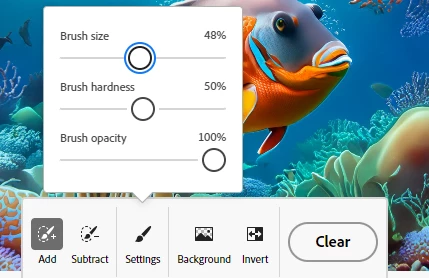
Click anywhere on the screen. The settings menu will appear where you can change brush settings. 
 

3 replies

Participant
August 12, 2023

I am having the exact same problem.

Participant
August 11, 2023

I've got same problem too...


CMass
Community Manager
Community Manager
August 14, 2023

@Sitab316242260a82 & @S.Sanjay316291686k8n Are you able to see the brush setting like in the image above? Can you also share a screenshot of the issues you're running into? 

Participant
September 28, 2023

Yes i can see the brush settings and even if i set the brush size to 100% the brush is still very small

Tracy.H
Community Manager
Tracy.HCommunity ManagerCorrect answer
Community Manager
June 9, 2023

Click anywhere on the screen. The settings menu will appear where you can change brush settings. 


Participant
September 14, 2023

It's still not working on my phone it's still drawing like pen poin please fix it