
Participant
December 1, 2024
Question

How to improve the background colour for a pdf

  • December 1, 2024
  • 1 reply
  • 299 views


Hello

Please is not there a program for improving pages background colour in the pdf file


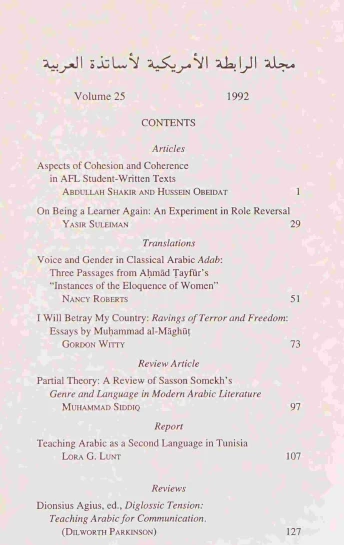
After I compressed one of my pdf files using a program named ( Systweak PDF Editor) installed in my computer desktop , the colour of all pages ( background ) changed as if it were freckles ( spotting)

By the way to get the minimum size for the pdf, I have chosen the highest compressing


So how can I change it to a usual colour ?

I hardly know something about the programs

Here is one page I upload    I use acrobat reader   ( Adobe Reader XI) 


1 reply

Monika Gause
Community Expert
Community Expert
December 1, 2024

That app made your PDF pixel based. Probably not what you want. Just don't do it.

Participant
December 1, 2024

Thank you @  Monika Gause  , but I did not find another program compressd file size better than this one.

The file size after I compressed in the site ( I love pdf ) I got it 202 megabytes , then after using : Systweak PDF Editor , I got it  66 megabytes , so the difference of size is huge. The file can be read without difficultly and nothing bad is with except in the freckles in background ( not normally colour or  having spots) 

By the way I tried some ways  : edit --- experience  ----accessibility --- check replace document colour --- costum colour  ( I changed the background for gray and the text to black ) the spots become lesser than the previous  But I still want it better . I also in the morning posted a message to the company of the program , yet no answer  comes to me. 

MMA
Participant
December 1, 2024

It is perhaps if I use another option  medium or low compression, the spots will not appear in the background, but the size will be larger  or too much larger. 

MMA