



Insights from the Masters: Unveiling Expert Opinions on Firefly

Adobe Firefly has been out of Beta for over a month, and we've asked Adobe Community Experts for their first impressions. You can read more about the Adobe Community Expert program and how to join here.
What are you most excited about with Firefly?

I think what we're seeing with the various features will only increase over time and give users even more options for easily converting conceived ideas into viable deliverables."
I am most excited about the Text-to-image feature of Firefly. I am amazed and wowed by how does my ideas became a reality in seconds. I can see every single thing from my imagination into a real one by just typing and clicking a button.

Most excited I'm with the Options that I have with only ONE simple prompt and then have a Photo, an Art-Piece, different Styles, different sizes, Flavors, etc. and that I have to think more in Text form to express Images in my mind to come to live with the help of Firefly.
How do you use Firefly in your workflow?

I use Firefly on a daily basis, exploring extraordinary capabilities we haven't seen before, often referred to as "magic." I utilize it within Adobe software to create creative designs for social media, presentations, and image editing, and even rely on it entirely for crafting large-scale advertising campaigns, now that it's available for commercial use.


I like to use Firefly to generate interesting background imagery for more complex compositions using Photoshop and other applications. I've even used a combination of Firefly and Photoshop generative expand to create a VR background texture for Adobe Animate!
What is one feature you would like to see in Firefly?


Being able to work off my original image and say, repose a person or animal in a scene.

What is the last thing you created in Firefly?
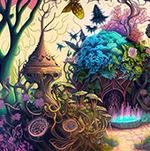
Check out some fantastic text to image generations by our Adobe Community Experts have created!

 .
.
 AdChoices