
Not following style and composition references
Below is a screenshot. I want to create a series of illustrations that will thematiclly be consistant, and have a main character represented in all of them. I created a prompt which generated the first line of images, used one of the images a reference for both style and compostion. I even tried FF 3. I have included the prompt below the image. What do I need to do to get images that look and feel like the reference image and use the same moose character.
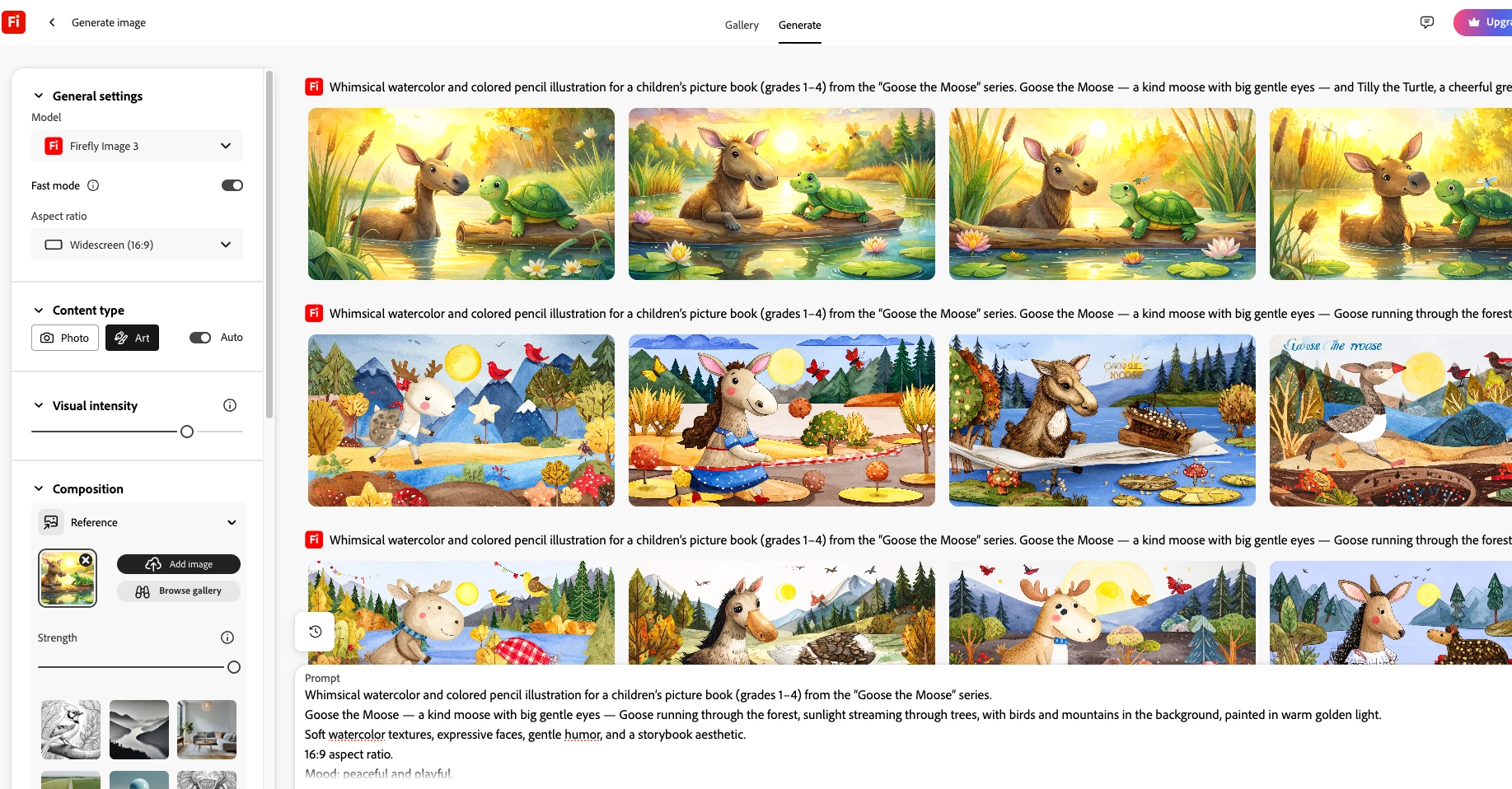
Whimsical watercolor and colored pencil illustration for a children’s picture book (grades 1–4) from the “Goose the Moose” series.
Goose the Moose — a kind moose with big gentle eyes — Goose running through the forest, sunlight streaming through trees, with birds and mountains in the background, painted in warm golden light.
Soft watercolor textures, expressive faces, gentle humor, and a storybook aesthetic.
16:9 aspect ratio.
Mood: peaceful and playful.
The image should feel full of warmth, wonder, and friendship.
 AdChoices