SonseraeLeese
Known Participant
August 5, 2024
Answered

Text prompt is missing.

  • August 5, 2024
  • 5 replies
  • 557 views

Text prompt is missing for me to describe what I need done.

This topic has been closed for replies.
Correct answer droopydog500

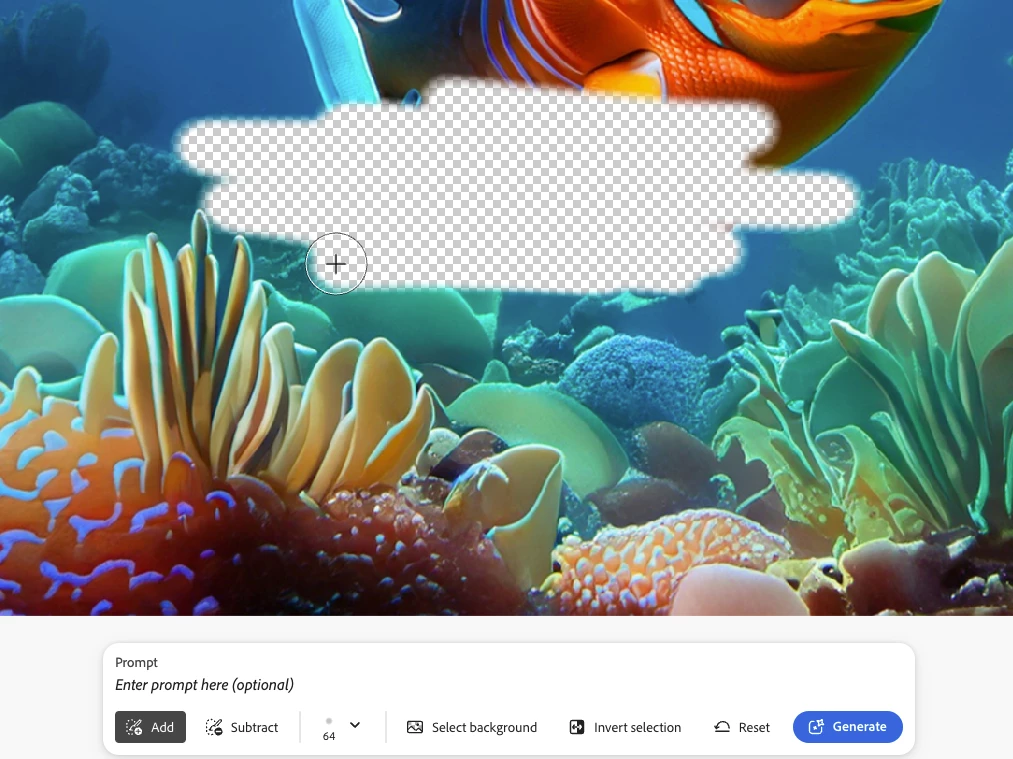
Ah, got it.  You now have to select an area first before it shows the prompt box above the bottom control panel:
 

My best,

    droopy

5 replies

SonseraeLeese
Known Participant
August 5, 2024

Oh! Doh! Thank you!!

droopydog500
Community Manager
droopydog500Community ManagerCorrect answer
Community Manager
August 5, 2024

Ah, got it.  You now have to select an area first before it shows the prompt box above the bottom control panel:


My best,

    droopy

Adobe Community Expert (not an Adobe employee)
SonseraeLeese
Known Participant
August 5, 2024

There used to be a text prompt to describe what you want changed. I don't see anything like that anymore. Just Add, Remove, Extend...but no place to put any text description option to change image.

SonseraeLeese
Known Participant
August 5, 2024

droopydog500
Community Manager
Community Manager
August 5, 2024

Hello @SonseraeLeese,

Thank you for your message. I am sorry you are having this problem. 

Can you please show us a screen shot of what you are seeing?

Thanks,
    droopy

Adobe Community Expert (not an Adobe employee)
SonseraeLeese
Known Participant
August 5, 2024

There is no text prompt to specify what to change on the image.

--

Sonserae Leese
Sonserae Designs
Disney Legacy Artist/Art Instructor
Photographer
Fine Artist/Painter
Digital Artist - Visual Effects for Film/TV
Graphic Design/Branding/Websites
Jewelry Designer


[website and email removed by moderator]