


New Participant
January 19, 2025
Answered

Myriad Pro in Indesign: Regular font style missing

  • January 19, 2025
  • 5 replies
  • 5093 views

I've downloaded Myriad Pro (full font family) from Adobe fonts and all font styles are showing in Illustrator, but when I go into indesign it does not show the regular font style for Myriad (only every other font style in the family). It says "Myriad Pro (OTF)" In indesign while other fonts I've downloaded haven't shown that before. Not sure what the issue is, there is an option for regular but when I click it, it activates the "light" font weight instead of regular.
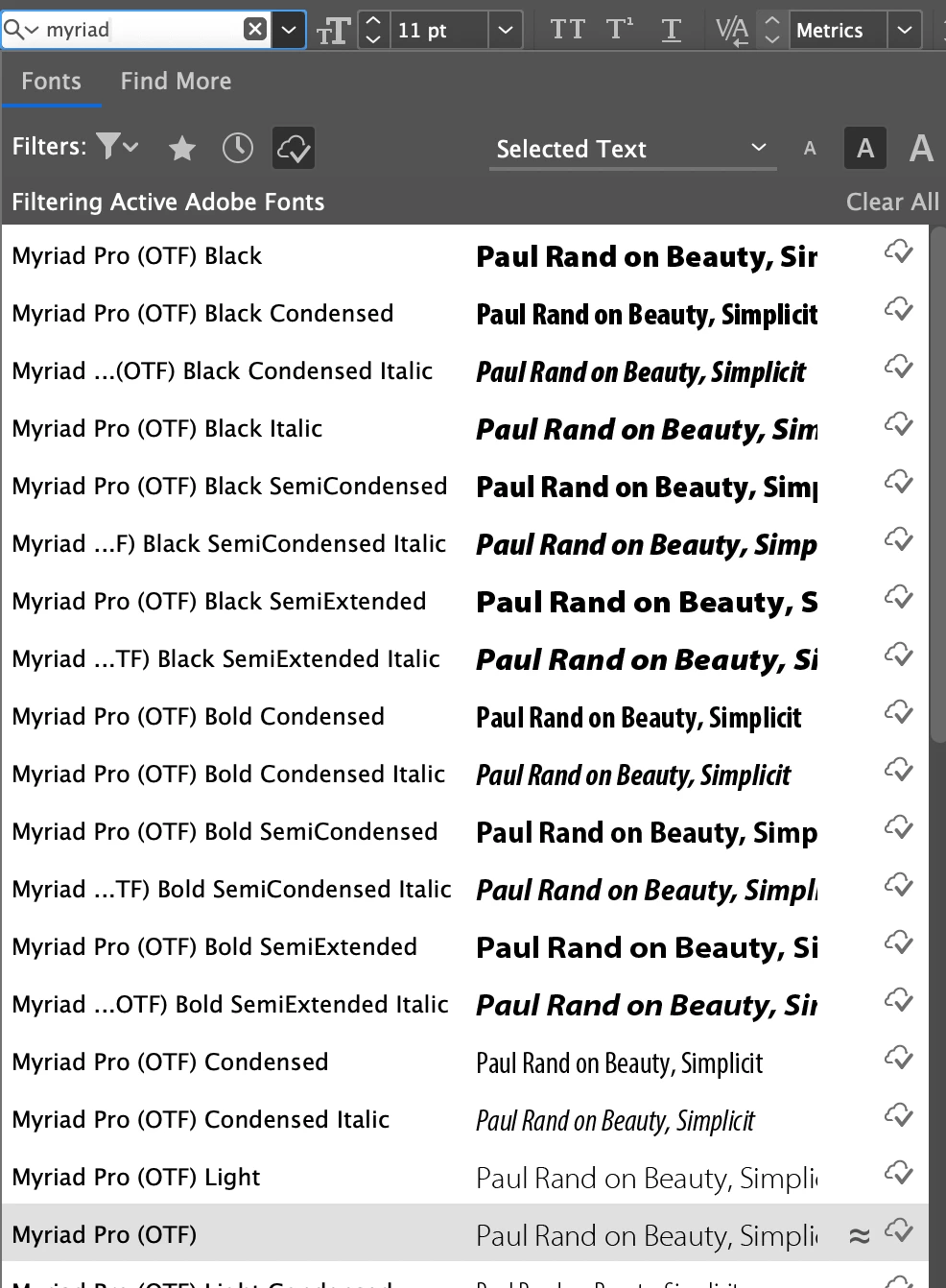
 please help!

Correct answer Bobby Henderson

One way I've worked around this is by adding Myriad VF at Adobe Fonts and installing it in the Creative Cloud Desktop App so all apps can use it. Myriad VF doesn't get confused for the built-in styles of Myriad Pro within Adobe Illustrator or InDesign. It doesn't get confused with the Myriad Variable Concept font in Illustrator either.

5 replies

New Participant
August 28, 2025

Turn the font off and back on in Adobe Fonts.


This "incomplete font" glitch was a quick fix for me. When packaging my InDesign file, I had a warning that Myriad Pro Italic was incomplete. I went to Adobe Fonts online, then to Myriad Pro, clicked the "remove" button under Myriad Pro Italic, then clicked the same button again, now that it says "add font." I returned to my still-open InDesign file, and all was well when I packaged it. 

Participating Frequently
March 10, 2025

Myriad Pro is producing a similar problem for me in INDD following recent pushed update to CC software. (Windows 10 Enterprise, Adobe INDD 2025 version 20.1)    


Existing files no longer recognize Myriad Pro semibold and italic. I uninstalled the font family and reinstalled from Adobe Fonts, and in Font manager see all 40 weights listed under "Myriad Pro (40)". However:

  • In INDD -- without a file open -- I now have 2 versions of Myriad: "Myriad Pro" (40 weights listed) and "Myriad Variable Concept" (16 weights listed, some not in the other family). Both have semibold and italic within the same family.
  • However, opening an existing INDD file that contains "Myriad Pro - Semibold", I now see 3 versions: "Myriad Variable Concept" with 16 weights, "Myriad Pro (OTF)" with 36 weights (no semibold), and "Myriad Pro" showing regular and semibold missing. 


If I go to cure the problem through the stylesheet, I'm offered Variable but also two "Myriad Pro (OTF)" options, one of which has just 5 weights including the missing semibold. Argh!


Is there a method to merging the two (OTF) versions that appear in my documents (it's affecting all files in the book) -- given that according to Fonts manager, there's only one family of Myriad Pro installed, with 40 weights in one folder?


Many thanks for any help you can offer.

Participating Frequently
March 10, 2025

To follow up a bit: These three screenshots show what I'm offered in Find/Replace font dialogue box -- in which the 36-weight Myriad Pro (OFT) list disappears and only the 5-weight list is offered, and which shows semibold as active in the file anyway. Sigh. I'd hate to start replacing one nonexistent semibold with a version from a family set that only has 5 weights in it.

Participating Frequently
March 11, 2025

Myriad Variable Concept is a separate version of Myriad. It is an OpenType Variable Font with variable axes for weight and width. The regular Myriad Pro family has 40 "static" OpenType font files.


Complicating matters, there have been numerous builds of Myriad Pro released over the years, first in Postscript Type 1 format and then OpenType. Myriad Pro font files that were bundled in a copy of InDesign may be seen as different fonts from the version of Myriad Pro hosted at Adobe Fonts.


There may be a glitch in font naming tables for Myriad Pro that are causing some styles to be listed in the font menu separately. You could try deleting the Font Data Cache file to make InDesign rebuild/refresh the fonts list. I'm not sure if that would work, but the step does tend to solve some other font sync issues.


Thanks for the advice, Bobby. We've uninstalled, trashed, and reinstalled the INDD 20.1, repeatedly deleted the font data cache files, and uninstalled Myriad from the CC desktop Font manager. Opened Font manager in the cloud, selected Myriad Pro (40 weights) carefully not the other variations, and chose Add (rather than install). Result on opening INDD: Myriad Variable and Myriad Pro, both 40 weights, present in the fonts list. Result on opening an existing AND a new file: two versions of Myriad Pro (OTF), one with 36 weights, one with 4-5. This will just drive me to distraction!

New Participant
March 5, 2025

Not sure if this is the answer. I have been having the same issue with Myriad Pro as well. It also came up as OTF in InDesign. So I read Bobby's reply and decided to remove the Myriad Pro I installed from Adobe Fonts, and now the OTF problem is gone and I can use Myriad Pro Bold now. I think Bobby said Myriad Pro was installed with InDesign so there is no need to download it again from Adobe Fonts since it might bring conflicts with double fonts and will cancel out certain forms of it. You can try what I did and just remove Myriad Pro that was installed from Adobe Fonts in the Cloud app. it might resolve your issue. It helped me to get Myriad Pro Bold to work for a crucial INDD file I needed to print and get ready for translators.

Bobby HendersonCorrect answer
Community Expert
March 5, 2025

One way I've worked around this is by adding Myriad VF at Adobe Fonts and installing it in the Creative Cloud Desktop App so all apps can use it. Myriad VF doesn't get confused for the built-in styles of Myriad Pro within Adobe Illustrator or InDesign. It doesn't get confused with the Myriad Variable Concept font in Illustrator either.

Beep Sparrow
Participating Frequently
February 24, 2025

I've been having this same issue, and I've not found a solution either. My company uses Myriad as it's main branding font, so this is getting really obnoxious. 

Community Expert
January 22, 2025

The basic styles of Myriad Pro are included with Adobe InDesign via fonts stored in program sub-folders. It's possible that synching the Myriad Pro family from Adobe Fonts is creating an odd conflict with the Myriad styles already present.