


Inspiring
September 21, 2012
Question

Abobe Media Encoder is Now Broke After Update!

  • September 21, 2012
  • 3 replies
  • 22591 views

Hi,

To my dismay, I discovered that Media Encoder no longer exports mp4 files. Each time I try it now, it exports a file with the extension m4v instead of mp4, and it will not play. This is CS6 on a MacBook Pro running mountain lion. It was working previously before the latest update from Adobe. Anyone else experiencing this?

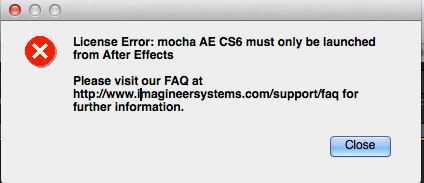
When I try and play back the m4v file, I am seeing this error.
thx

    This topic has been closed for replies.

    3 replies

    Participating Frequently
    September 27, 2013

    "AME should output m4v files only when the multiplexer is set to None, in which case you get separate audio and video files. Please check which preset was used and what the muxer is set to. Please let us know if it's set to anything other than None, in which case you may have found a bug".

    I've now experienced this issue and, while it appears that this is the intended behavior, there are two observations to be made.

    1) Import an AE project into ME. If export audio is unchecked, the muxer remains set to mp4 and the file extensions are shown as mp4 in Media Encoder; however, ME does indeed output a .m4v file.

    2) Rendering same project in AE without audio however produces .mp4 file.

    As a result...

    "Soundless" AE files are more readily "playable" since "soundless" .m4v files are, well, virtually impossible to play. Prime example: under Win 8 desktop, click the AE .mp4 file and the Win 8 "Metro" player handles it just fine whereas the ME .m4v shows as unplayable. Unfortunately, the SAME unplayability resuls occur using Media Player, Qucktime Player and the vaunted VLC Media Player. AE really appears to do it right and it's interesting that, as of CS6, there is this encoding difference and, of course, furthur interesting that ME changed it's ways with an update at some point.

    Three presets were used in Media Encoder yielding identical, i.e. .m4v files, results. H.264, Youtube HD 720p 23.976, HD 1080p 23.976 and NTSC DV 24p. P.S. renaming .m4v to .mp4 doesn't make it playable either.

    AE selections were selecting H.264 from the drop down menu and leaving audio unchecked. BTW, examining the Format Options, Multiplexer tab under these selections shows mp4 as the muxer.

    And, to be sure the value of AE's method is fully appreciated, please again note that AE renders generate a very friendly playable "soundless" .mp4 whereas ME's "soundless" .m4v is virtually unplayable.

    Participant
    December 18, 2014

    Wow two years later and still no fix for this? I'm wasting so much time with failed encodes. Not happy.

    Mark Mapes
    Community Manager
    Community Manager
    December 18, 2014

    Exactly which version of AME are you using, alviniss?

    Participant
    May 4, 2013

    I just wanted to chime in and say that I have the same issue -- Mac OS x 10.8.2 ... unchecking the audio button on the H.264 preset results in a .m4v file that is unplayable.  Please fix!  Thanks.

    Participating Frequently
    May 6, 2013

    Same problem here.

    Participant
    May 7, 2013

    Also same problem here. I work on Mac OS X 10.8.3 and tries to output mp4 file with sound and image. The file is useless, can't even be red by VLC. The setting is Youtube HD 1080p 29,97 fps VBR 1 pass.

    Mark Mapes
    Community Manager
    Community Manager
    September 21, 2012

    AME should output m4v files only when the multiplexer is set to None, in which case you get separate audio and video files. Please check which preset was used and what the muxer is set to. Please let us know if it's set to anything other than None, in which case you may have found a bug.

    leejkAuthor
    Inspiring
    September 21, 2012

    Hi,

    I am using a custom preset I tweak which is based off of one of the ipad 2 export presets for h:264. The multiplexer is set to mp4, not none. This preset previously worked fine. Now, the output files have a m4v extension instead of mp4, and do not play back. Looks like a nasty bug.

    This also happens when exporting directly from Premiere Pro. Is there a work around?

    Mark Mapes
    Community Manager
    Community Manager
    September 21, 2012

    I just encoded to all three of the iPad2 system presets, and all outputs are .mp4.

    If you send a copy of your custom preset to me [mapes (at) Adobe *dot* com], and I'll see if I can repro with it. [To do so, select it in the Preset Browser and click the Export Presets button.]