


AndreaFar
New Participant
December 27, 2016
Answered

Cannot find HEVC in Adobe Media Encoder CC2017

  • December 27, 2016
  • 5 replies
  • 21930 views

I have updated to CC 2017 and cannot find the HEVC preset. I have see similar discussion and the problem was related to license issues but I have HEVC in Adobe Premiere CC 2017 and I have already tried to remove license folder to reset license unfortunately when I open Media Encoder outside Adobe premier HEVC is still missing
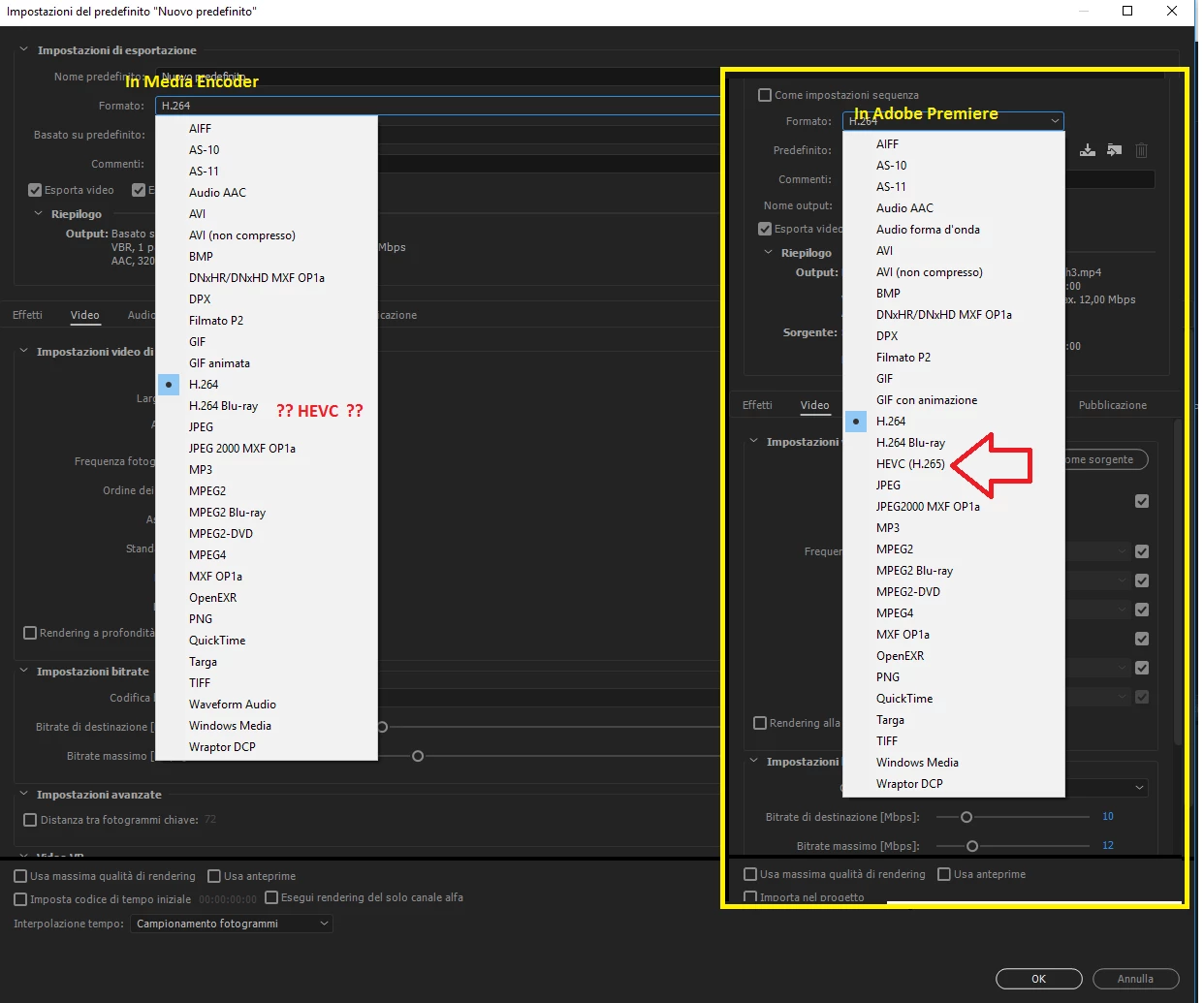
    This topic has been closed for replies.
    Correct answer Vidya Sagar

    Hi AndreaFar,

    As you mentioned, it is an issue with License. HEVC codecs are not available for trail versions. It seems like Media Encoder is not activated. Please try the following:

    1. Quit all Adobe apps.

    2. Close all running Adobe processes in Task Manager.

    3. Sign Out from Creative Cloud application, Quit the application(check in Task Manager for confirmation)

    4. Launch Creative Cloud app, Sign in.

    5. Launch Media Encoder & Check for HEVC codecs.

    If issue persists, Disable Antivirus, Firewall & perform the above steps.

    Please let us know the status.

    Thanks,

    Vidya Sagar.

    5 replies

    wittytree
    New Participant
    November 6, 2018

    i try all, hard job and fix, if you still no working, i try my best, text to me from wechat, id is linjiecn

    New Participant
    August 1, 2018

    Which plan I have to use to get hevc, because all of you written does not work.This is not free, I have to pay. Please help me

    Known Participant
    April 12, 2018

    Bought individual Adobe Premiere Pro licence (single app), was using team subscription before. STILL NO HEVC! ADOBE, get my money back or FIX THIS!!!

    Dmitri Graf
    Adobe Employee
    Adobe Employee
    April 12, 2018

    Sign out of creative cloud app, then launch ppro and sign back in. You should have HEVC in AME and Ppro.

    If that doesn't work, create a new user account, launch PPro, sign in, and check for HEVC.

    Known Participant
    April 12, 2018

    No luck - no HEVC after re-login.

    I tried multiple times with team sub before and individual now - it's not there. Disgusting!

    Known Participant
    March 12, 2018

    This doesn't help, I've Creative Cloud for teams, tried reinstall apps, sign out and in again and so on, antivirus is off but still no 265 in Media encoder. Any ideas?

    @Vidya Sagar

    Vidya Sagar
    Community Manager
    Vidya SagarCommunity ManagerCorrect answer
    Community Manager
    December 28, 2016

    Hi AndreaFar,

    As you mentioned, it is an issue with License. HEVC codecs are not available for trail versions. It seems like Media Encoder is not activated. Please try the following:

    1. Quit all Adobe apps.

    2. Close all running Adobe processes in Task Manager.

    3. Sign Out from Creative Cloud application, Quit the application(check in Task Manager for confirmation)

    4. Launch Creative Cloud app, Sign in.

    5. Launch Media Encoder & Check for HEVC codecs.

    If issue persists, Disable Antivirus, Firewall & perform the above steps.

    Please let us know the status.

    Thanks,

    Vidya Sagar.

    AndreaFar
    AndreaFarAuthor
    New Participant
    December 28, 2016

    Already done and HEVC seems unlocked only when I use it in Premiere Pro. I'm a bit confused. Premiere doesn't use the same Media Encoder? Are there 2 different redundant Media Encoder?

    Vidya Sagar
    Community Manager
    Community Manager
    December 29, 2016

    Hi AndreaFar,

    Premiere Pro uses the same Media Encoder when the export is queued.

    Have you tried uninstall & reinstall of Media Encoder?

    Thanks,

    Vidya Sagar.