


New Participant
March 9, 2017
Answered

Export from Media Encoder slightly desaturated and wrong color

  • March 9, 2017
  • 4 replies
  • 5186 views

Hello,

I've recently been going through a problem with the current Media Encoder. I have been trying to export my projects from it and the exports come out in an incorrect color. My color grades are warm and the exports they come out colder and more desaturated. I've tried exporting it multiple times, and in different formats. From mp4 to .mov and the exports still have problems. I even tried to uninstall and reinstall and it's of no use. I'm currently just exporting directly off of premiere and the exports seem fine there, but media encoder not working properly is troubling.
Correct answer kulpreet singh

Hi andres1024,

I understand that you are experiencing issues while exporting from AME, there is no such issue when exporting directly from PPro.

Which version of PPro & AME have you installed? (Please check from the help menu)

What are your system specs and please confirm the version of video driver?

Try these steps:

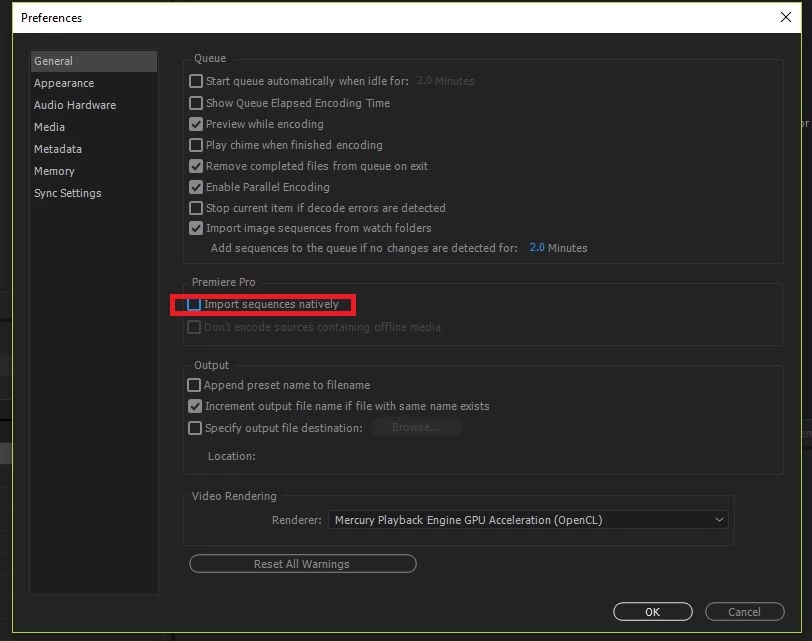
  • In the preferences of AME, keep this option disabled and check if that makes any difference.

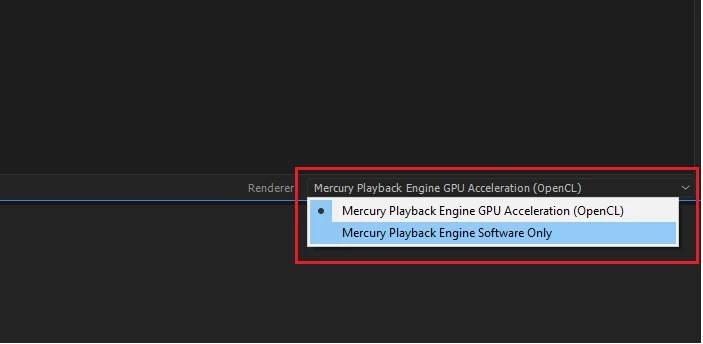
  • You can also try switching the video renderer. (In AME)

Thanks,

Kulpreet Singh

4 replies

New Participant
June 18, 2022

Hi

I am facing the same issue except I am not able to turn import sequences off natively off

New Participant
January 11, 2023

I have the same problem, that I am not able to turn import sequences off natively off. Switching the video renderer did not work, still incorrect color.

New Participant
December 22, 2021

Hello - I am having this exact same problem, however unchecking the "Natively" button in Media Encoder is not solving the issue. I've tried regrading the clips that get desatured, removing and replacing LUTs, clearing cache and render files, etc.


Any ideas?

New Participant
March 13, 2017

So far, that seems to have worked! Thank you so much.

kulpreet singh
Inspiring
March 13, 2017

You are welcome, andres1024!

Thanks for confirming.

kulpreet singh
kulpreet singhCorrect answer
Inspiring
March 10, 2017

Hi andres1024,

I understand that you are experiencing issues while exporting from AME, there is no such issue when exporting directly from PPro.

Which version of PPro & AME have you installed? (Please check from the help menu)

What are your system specs and please confirm the version of video driver?

Try these steps:

  • In the preferences of AME, keep this option disabled and check if that makes any difference.

  • You can also try switching the video renderer. (In AME)

Thanks,

Kulpreet Singh