New Participant
March 15, 2022
Answered

Extremely Slow Render/Export on Adobe Media Encoder 2022

  • March 15, 2022
  • 68 replies
  • 122275 views

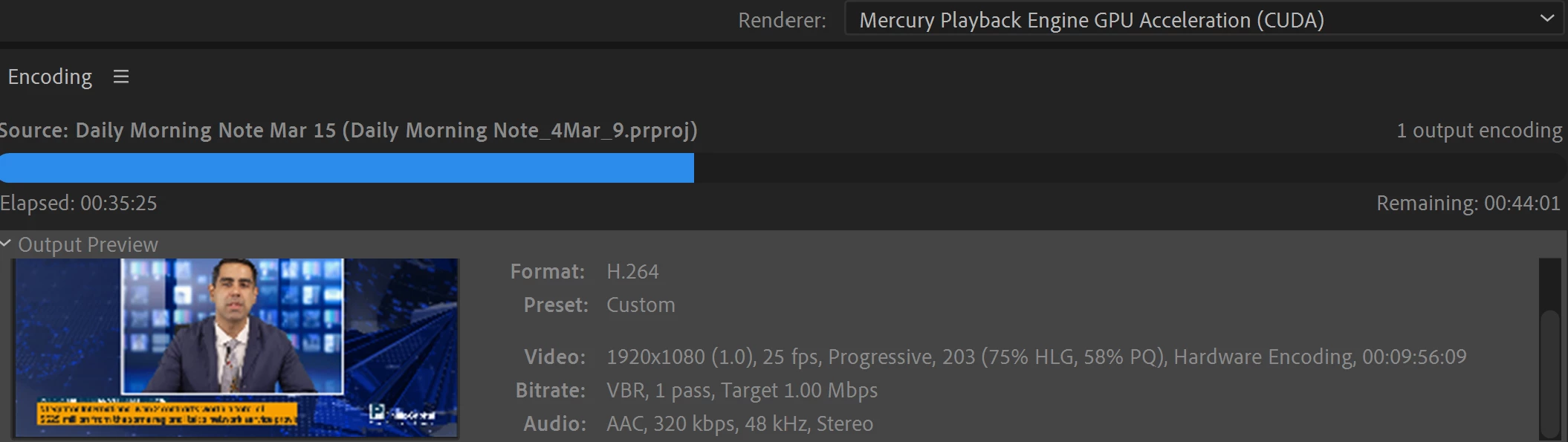
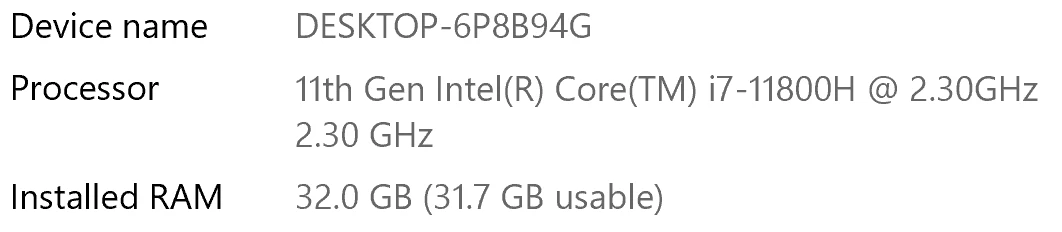
I have been waiting for more than 30 mins for the final video to be rendered. It's already 40 mins and it's barely 50% rendered. Never had this issue before. My laptop specs are as below and my GPU is RTX 3070.


Anyone knows how to solve this sudden issue?


Correct answer Fergus H

Hi all, 
Despite receiving test files from many of you (thank you!), we have not been able to reproduce this problem at Adobe. That's a bit unusual and certainly frustrating - to you and us - but we do think this issue has been fixed in the latest beta of After Effects and Media Encoder. We'd love to get your feedback on that. Creative Cloud betas are specifically designed to run alongside the release versions and are available in the "Beta apps" section of Creative Cloud Desktop. More information is here: https://helpx.adobe.com/x-productkb/global/creative-cloud-beta.html

The v23.x beta of After Effects also has the ability to directly export H.264 - without having to use Media Encoder - so your feedback on this would be useful too. More information is available here: https://community.adobe.com/t5/after-effects-beta-discussions/feature-focus-exporting-h-264-from-the-after-effects-render-queue/td-p/13117618


Regards,

Fergus

68 replies

New Participant
September 1, 2022

As everyone else, same issue here. Last week exporting the same videos took 2-3min, now they are taking 2+ hours for a 30sec video. Spec below (although it doesn't matter because this is a new problem that was working perfect on the same machine days ago)


Mac 12.5.1

AE 22.6

ME 22.6

Inspiring
August 31, 2022

Same here

Running AE 22.6.0 and ME 22.6 o a M1 Mac (64 GB, Monterey 12.4) and plenty 2,2 TB free on hard drive.


Rendered a quite simple movie in AE Render Que, default lossless in 1 min 46 sec.

Rendering the same project in ME (H.264 and Youtube preset) and it's now about 40 % done after 1 hour and 4 min – remaining: 1 hour 24 min.

Was thinking that the latest update would solve this catastrophe bug along with all problems regarding Dynamic Link – but no... same old disappointment...

Participating Frequently
August 30, 2022

Hello Everyone, Over the past few months I've been pulling my hair out in frustration watching Media Encoder take 4 hours to render a 10 second after effects clip.  That said, I stumbled onto something that allows the encoder to run at what seems to be a normal speed.  As a file was slowly rendering in ME, I opened a movie in the quicktime app.  As I was watching the movie I saw the the "Time Remaining" had sped up to finish what was gong to be another 2 hours and it finished in a few minutes.  Not sure why but having QT Open and playing and ME running in the background made it go faster.  If I quit QT and run ME in the forefront, it goes back to a crawl.

brunoseven
Known Participant
September 2, 2022

exactly the same is happening with me. Since july when I'm rendering in Media Encoder something from AE it get stucked in some moments, but when I open some video on youtube it kinda get back to normal. But I need to keep opening a new video every once in a while. it doesn't make any sense for me.

New Participant
September 7, 2022

Woah, just tried the "YouTube" trick - it is like putting a booster on the render, starts flying!!

Participating Frequently
August 26, 2022

I have just spent the entire day making a tutorial on how to speed up Render times in After Effects. It does cost $20. but you will never regret spending that $20. 

https://youtu.be/6O_lO8_izZg

New Participant
August 26, 2022

ME and AE are not well integrated, do not use the "Queue in ME" button.
Advice: Render from AE, and then drag finished Mov into ME. ie. The old way, that worked just fine.

New Participant
August 26, 2022

I'm working with a Macbook pro. 16GB ram--Final Cut exported a 15 minute video with effects/transitions/other video files in 8 min.  Yet I'm stuck working with Adobe for this project because the client sent me an After Effects template as a base for this file.  


Here we are....4 hours later....


Seriously cannot figure out what settings is cause it to take 4 hours to render a minute and a half worth of video...

Participating Frequently
August 26, 2022

simply buy Anubis (renderer)  from battleaxe. It cost $20 but this was the best money I ever spent.  Renders went from 2 hours on media encoder to 4 minutes. 

The alternative is to export with the render queue and then convert/compress the large videos with Media encoder

New Participant
August 26, 2022

Thanks, but I'm not interested in spending money on a third party app when the problem is in the adobe software itself.

Inspiring
August 21, 2022

Same here. AMD 2950x with 128GB of ram with two 2080supers in SLI and it's NEVER been this slow. For some reason it only renders on 1 gpu now also. I've been dealing with creative cloud issues for years and now this takes the cake. Has anyone heard from adobe why their latest products are such trash? 

New Participant
August 14, 2022

Hi everyone!
Same here, im using the latest version of After Effects and Media encore an its taking so long to export a 11 min video, even i restarted my PC 'cause i thinka that maybe solved the problem:


My Specs are: 
AMD Ryzen 7 5800X 8-Core Processor 3.80 GHz
32 GB RAM
NVIDIA RTX 3070 8gb

Community Manager
August 16, 2022

Please try the steps I posted above your post and see if any of those help.

Inspiring
August 12, 2022

This is happening to me now.  9 hours to render a comp with a shape with no effects or transformation, just a shape layer sitting there doing nothing!!  Im over paying good money for this rubbish

Kevin-Monahan
Community Manager
Community Manager
August 12, 2022

Hi Arrakis,

Sorry about that. Can you try a different codec? What happens?


Thanks,

Kevin

Kevin Monahan - Sr. Community & Engagement Strategist – Pro Video and Audio
Inspiring
August 13, 2022

But Im using H264!!  supposed to be the best one for smaller files right?  Its not my computer because I have a $5000 custom built machine and it was fine but suddenly your software decides to stop rendering.  Seriously sick of updates that just break everything.  

Community Manager
August 11, 2022

Thanks for all the details so far. If you are rendering an After Effects composition to H.264, we are wondering if you would try out the latest AE Beta (also available in the Creative Cloud Desktop app) as it now has native H.264 export from the Render Queue. We'd like to try to understand if the slowdown in rendering happens in AE itself, or with H.264, or with the connection to AME. 


Whatever projects you can share, stripped to the minimal number of layers/effects/plugins/etc, to reproduce the problem, would be really helpful. There likely isn't a single cause here, and could be one of many things (available memory to AE/AME, plugins that do and don't support Multi-Frame Rendering, types of footage being used, etc.) so as much as you can share with us, the better chance we have of helping. 


Thanks!