New Participant
March 15, 2022
Answered

Extremely Slow Render/Export on Adobe Media Encoder 2022

  • March 15, 2022
  • 68 replies
  • 122275 views

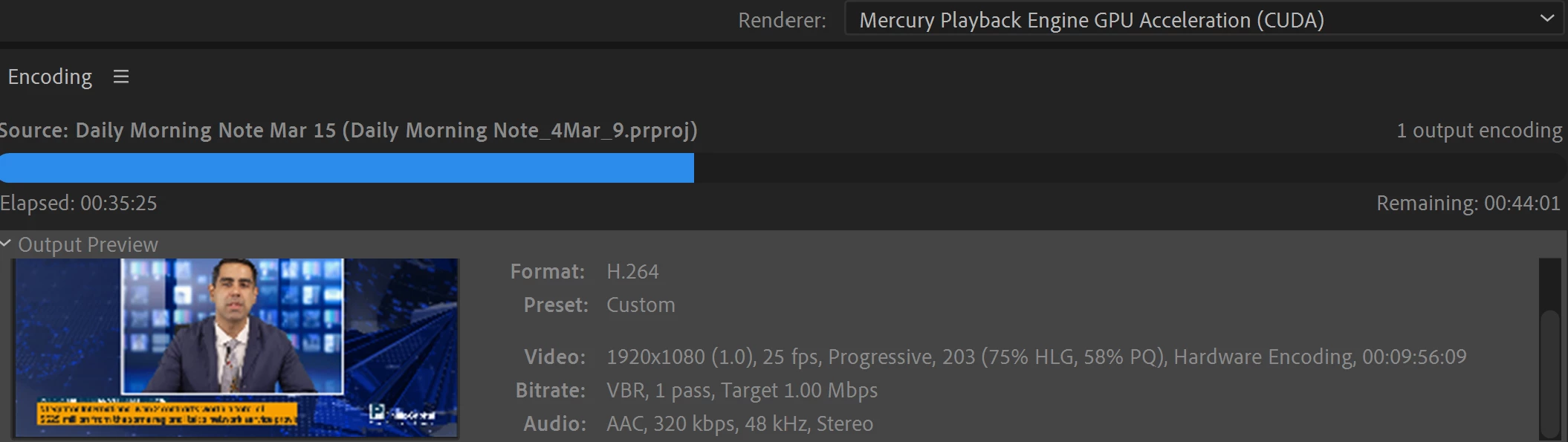
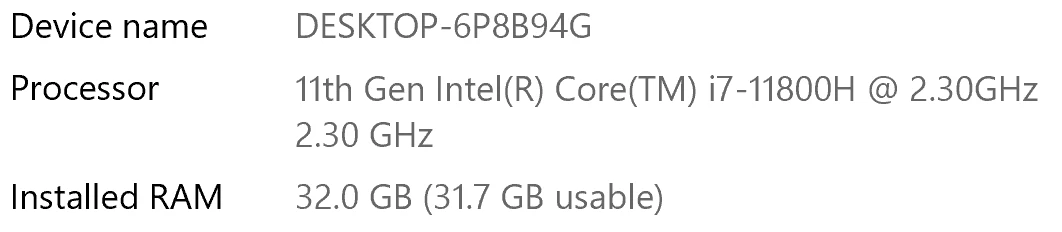
I have been waiting for more than 30 mins for the final video to be rendered. It's already 40 mins and it's barely 50% rendered. Never had this issue before. My laptop specs are as below and my GPU is RTX 3070.


Anyone knows how to solve this sudden issue?


Correct answer Fergus H

Hi all, 
Despite receiving test files from many of you (thank you!), we have not been able to reproduce this problem at Adobe. That's a bit unusual and certainly frustrating - to you and us - but we do think this issue has been fixed in the latest beta of After Effects and Media Encoder. We'd love to get your feedback on that. Creative Cloud betas are specifically designed to run alongside the release versions and are available in the "Beta apps" section of Creative Cloud Desktop. More information is here: https://helpx.adobe.com/x-productkb/global/creative-cloud-beta.html

The v23.x beta of After Effects also has the ability to directly export H.264 - without having to use Media Encoder - so your feedback on this would be useful too. More information is available here: https://community.adobe.com/t5/after-effects-beta-discussions/feature-focus-exporting-h-264-from-the-after-effects-render-queue/td-p/13117618


Regards,

Fergus

68 replies

Known Participant
August 11, 2022

It's taking me over two days to render off 4 minutes of video. Luckily, I was able to break the video up a bit so that way it's 14 files it's exporting to, each taking 2-4 hours at 10-20 seconds per comp, instead of 1 file. Once it's all done I'll just recompile it into Premiere. That way I can at least give my computer a break at the end of the day after 12 hours of rendering, and if anything does go wrong, I didn't lose all of my progress. 

Known Participant
August 11, 2022

I also tweaked the output preset so there's no audio, and it's the lowest file size possible while still being at 1080p. For context, a standard YouTube 1080p Full HD version would be 40-120 MB whereas this preset clocks in at 20-60 MB per video, and it's still taking 2 days to render off all the comps.


Personally speaking, the real frosting on the cake is that this time last year I was rendering off videos on my old computer, with only 12 GB of RAM, much faster. The exact video I'm rendering now is an updated version of a previous video, which only took about 8 hours to render off last year. Though now with 32 GB of RAM, a stellar graphics card, and great CPU - I'm clocking in at 20-30 hours to render.


I tried to see if I could transfer the file between computers, to eliminate and isolate potential variables for troubleshooting, but I am having no such luck in this situation. Render times shot up even more, which I expected and is good news for the new computer, but dang was I hopeful that I wouldn't have to waste two days on rendering.

Known Participant
August 11, 2022

The only thing that's saving me right now is exporting from After Effects to AME with the "MP4 1080p (No Audio)" preset I made, recompiling it in Premiere, and exporting directly from Premiere. The YouTube 1080p Full HD setting would've added whole days to my render time, tried it on one video and got a 6 hour render time for a 20 second clip, whereas now I am looking at 1-3 hours for a 20 second clip.

It's something, but dang does it still hurt. 


I guess, in the meantime while Adobe looks into this, is there any external hardware that could help boost my rendering speed? It's to the point I feel like I need to get a new-new computer just for rendering off videos, but even if I had double the specs, I feel like it would still take just as long. 

New Participant
August 10, 2022

I am having the same issue. Compositions from After Effects are taking way longer than usual to export via Adobe Media Encoder. This particular comp today is less than 30 seconds, uses minimal effects within AE (no plug ins), PNG image files, and 1 photoshop file (static image). It's taking 30+ minutes to export. This is a file I export weekly and it used to take 1 minute to export. I tried re-downloading a previous version of AE and AME, did not help. 

Fergus H
Community Manager
Community Manager
August 10, 2022

I will send you a DM, as I'd love to get a copy of that file. 

Regards,

Fergus

New Participant
August 11, 2022

Hi,

Is this going to be solved quickly? I film hours and hours of Elearning videos each week. I used to have a watch folder for automatic exports with another machine. Now I can't even meet my deadlines...this is really really bothering me and makinf me loose money. Just simple H264 10 bit footage. RTX 3080 ti i9 12900k. Everything is painfully slow an unusable. Where i used to export in 5min, I now need 30 or 50 min...per lesson! On course is composed of 25-35 lessons. I film between 1-3 courses a week.  I´ll let you do the math...Adobe please we need a fix. quickly!


Fergus H
Community Manager
Community Manager
August 10, 2022

[I'm marking this as "Correct" to keep it at the top of this thread. We have not yet been able to reproduce this problem at Adobe so we are very eager to get files that demonstrate the issue.]


Hi all, 

I'm the product manager for Media Encoder and I'm very eager to get this problem resolved. If you would be willing to share an AE comp and the related media, fonts, and plugins with us for testing, please send me a private message via the forum.

Fixing this issue is my team's number one priority. Candidly, we've not done enough, fast enough, to jump on this issue and I apologize for that.

Regards,

Fergus 

Participating Frequently
September 28, 2022

I updated to the latest version of AE and ME this week (22.6) and am still seeing hour+ render times on a project that's less than 30 second and used to render in 10ish minutes. I've tried turning off multi-frame rendering, but that only had a small effect on renders. I'm attaching the project I'm working on currently. It's the "Coming Up" composition within this project that I'm working on at the moment. Thanks for your help!

Community Manager
September 28, 2022

Thanks for posting the aep. Any chance you're able to supply the assets as well? 

Fergus H
Community Manager
Community Manager
August 3, 2022

To you (and everyone else who's seen this issue), can you tell us if the Premiere Pro projects you're trying to export from Media Encoder include content from After Effects? That would include Motion Graphics templates (.mogrt files). 


Thanks. 

Known Participant
August 3, 2022

I'm not using Premiere, only After Effects. I'm using plugins/templates in After Effects.

Fergus H
Community Manager
Community Manager
August 3, 2022

Thanks. Would it be possible for you to share the AE comp with me? 

Participating Frequently
August 2, 2022

Same here.  I'm rendering a file that, when rendered a month ago, took about 50 minutes.  Now, after updating Media Encoder, I'm at 3 hours and it's only 2/3 done.  Very upsetting when on a DEADLINE.


New Participant
August 3, 2022

Same problem here, in a 1 min 30 sec project , it took about 1 hour 30 min, extreme slow!!

Fergus H
Community Manager
Community Manager
August 3, 2022

Would it be possible for you to test this issue using the latest beta of Premiere Pro and Media Encoder? The beta is easy to install and it runs completely separately from the version you currently have installed. Here's more information about the beta:

https://helpx.adobe.com/x-productkb/global/creative-cloud-beta.html


Thanks. 

Known Participant
July 29, 2022

Same here. It's rendering extremely slow all of the sudden. It barely even works...

Known Participant
August 2, 2022

I noticed it started rendering a little faster once i uninstalled media encoder and reinstalled it back (same version). 

New Participant
July 26, 2022

Hi,

Same here, rendering 5min video (with After Effect dynamic links) 8hours and remaining is 40+h. 

Software Only - 8 hours and the remaining is 40+h (after 8 it probably gets stuck too, bcs it was not moving quite a while)

Hardware accelerated - after 20-30min it always gets stuck. The remaining was 6h. 


Macbook 16"

M1 Pro

16GB RAM 

1TB SSD

------------------------------

Premiere, AE,ME 2021 is running relatively fine. (for Adobe).

But 2022 project was handed to me, and I am disgusted. 


New Participant
July 27, 2022

Same Here!!!!!!

Participating Frequently
August 24, 2022

I had the same problem. Media encoder took estimated time remaining 2 hours on a small file.  But Battle Axe's Anubis saved me. Render in less than 4 min

https://www.battleaxe.co/ This plugin with AE is magic. The best $20 I have ever spent 

Media Encoder can go suck an egg. 


Community Manager
March 18, 2022

Hi there,


Sorry to hear about this. Please let us know the type of media files you have used (format/codec, frame rate & frame size) & the effects applied.


Thanks,

Sumeet

New Participant
March 21, 2022

Hello, I have a similar issue. 

I simply had to cut down a gif to conserve a bit of space, The final video lasts 13 seconds. It took over 2 minutes to render it using hardware encoding with an RTX 3070. I used the H.264 format, like I have with all previous projects. The output framerate is 15 fps, and the frame size is 1604x828. I applied no effects, since I only had to cut the gif a bit shorter. This is a problem i've only encountered this one time, as all previous projects I rendered with higher quality targets rendered much faster.

Kevin-Monahan
Community Manager
Community Manager
July 29, 2022

Sorry about that taylorbenniefaull.
If you have time, you may want to reinstall the previous version to see if your expected performance returns. Depending on your system, the previous version might be more performant. Let us know if the advice helped you or not.


Thanks,
Kevin

Kevin Monahan - Sr. Community & Engagement Strategist – Pro Video and Audio