New Participant
March 15, 2022
Answered

Extremely Slow Render/Export on Adobe Media Encoder 2022

  • March 15, 2022
  • 68 replies
  • 122275 views

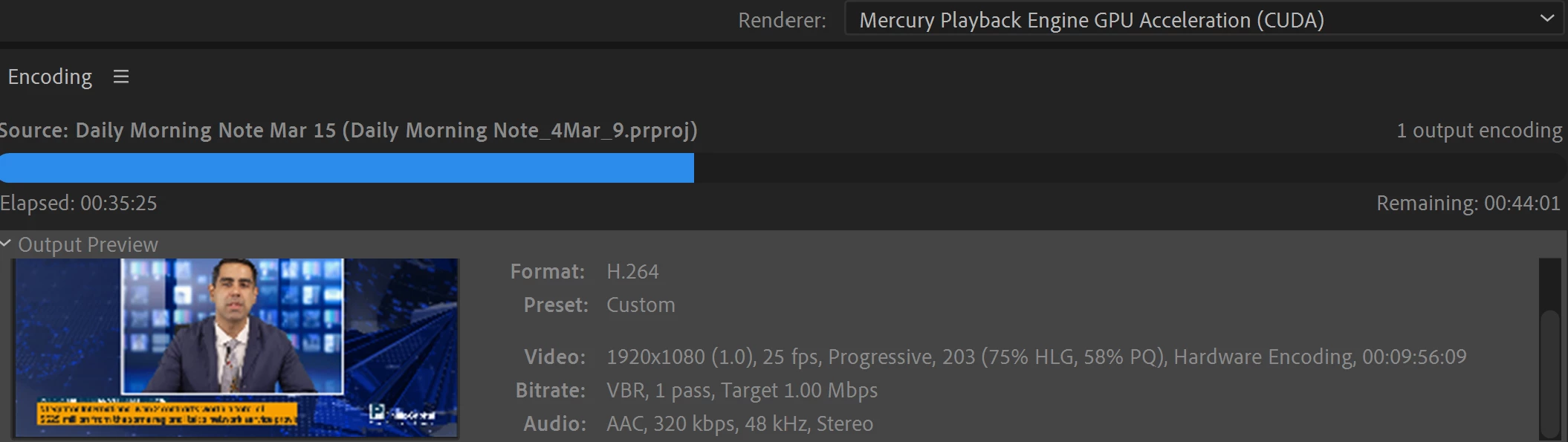
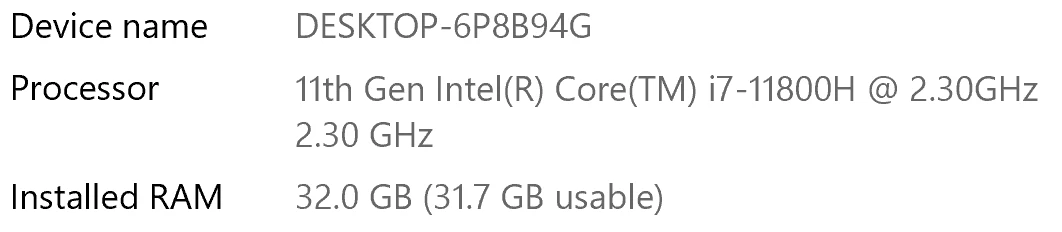
I have been waiting for more than 30 mins for the final video to be rendered. It's already 40 mins and it's barely 50% rendered. Never had this issue before. My laptop specs are as below and my GPU is RTX 3070.


Anyone knows how to solve this sudden issue?


Correct answer Fergus H

Hi all, 
Despite receiving test files from many of you (thank you!), we have not been able to reproduce this problem at Adobe. That's a bit unusual and certainly frustrating - to you and us - but we do think this issue has been fixed in the latest beta of After Effects and Media Encoder. We'd love to get your feedback on that. Creative Cloud betas are specifically designed to run alongside the release versions and are available in the "Beta apps" section of Creative Cloud Desktop. More information is here: https://helpx.adobe.com/x-productkb/global/creative-cloud-beta.html

The v23.x beta of After Effects also has the ability to directly export H.264 - without having to use Media Encoder - so your feedback on this would be useful too. More information is available here: https://community.adobe.com/t5/after-effects-beta-discussions/feature-focus-exporting-h-264-from-the-after-effects-render-queue/td-p/13117618


Regards,

Fergus

68 replies

Participating Frequently
June 2, 2023

I solved the problem by just installing After Effects 2019. Everything that came later than that version can go away forever for me.
Renderings now are 20 ways faster.

[Abuse and profanity removed by moderator]

Inspiring
June 2, 2023

I honestly think these software programs just get worse and worse.  They just make up things to change so that everyone has to upgrade and keep spending money.  It was all so much better before subscriptions when a hobbyist could purchase the master suite and not have to upgrade until they feel like it. Now theyve just forced everyone to pay every year for products that continue to get worse and don't take into account that many people who were paying were doing this for fun but now cannot continue. If it's not broken don't fix it. Thats my motto.

Participating Frequently
June 2, 2023

You are totally right.

New Participant
May 23, 2023

I had an simple example of how slow Media Encoder 2023 is, I had an 15 second TV commercial which was a PAL HD MXF file and dragged it into Media Encoder 2023 to export a 2 pass H264 5 MBPS VBR MP4 to email to my client and it took 1 minute 27 seconds. I then dragged the same MXF into Media Encoder 2020 and exported with the same settings and it took 15 seconds, so the later version is 6 times slower - that's progress!

Adobe Employee
May 23, 2023

That is definitely a performance bug then. Would you be able to share this media file for our team to investigate. I can send you instructions via private message in this forum.

New Participant
May 8, 2023

I have the same issue, an AE project rendering for hours that on another PC (Windows 10 with a weaker GPU) only took a few minutes. Restart and Update didn't solve anything.

Specs: Windows 11, Processor: AMD Ryzen 9 39000XT, GPU: NVIDIA RTX 2080 Ti, 32GB Ram

Riptopian_Animations
New Participant
May 6, 2023

I have the same issue, but probably 1000x times worse. I want to render a 30 second animation and apparently it's gonna take 149 hours?! That's ridiculous!!! 

Adobe Employee
May 6, 2023

I am very sorry for your bad experience. Could you please provide you specs (operating system, CPU, GPU)? Would you be able to share your project for vcerification? I couls send you a private message with instructions in this forum.

New Participant
March 14, 2023

Hi there, same issue here. I did a bunch of updates at once (huge mistake, I know), PR/AE/ME to the latest versions and also  Mac OS 13.2.1 on my 2018 Macbook. Before that, everything was going reasonably well. 

Now I can't use ME to render out my PR projects anymore. It would take over 2 hours for a simple 5 min edit, which takes only about 15 minutes using the "native" PR export. No magic in this project, just some footage with a little bit of Lumetri, some Dynamic Link AE imports (lower thirds).

Totally destroys my workflow. Looking forward for a quick fix here. 


Participating Frequently
March 22, 2023

i would just revert your update. if you want a newer version of the video suite than you were on before, i've been using 22.1 (the most recent version i was on before updating broke my rendering) with no issues. adobe cc desktop app should let you install and pin older versions.

New Participant
February 11, 2023

@jenkmeister17177426 I see this has been a bit of presistent issue, so I thought I'd share my experience to see if you're able to replicate this issue on your end. I'm running into this issue while rendering a video that I edited in Premiere Pro, which has three layers: 1. a small three-band audio spectrum, 2. a foreground image imported using a MOGRT, and 3. a wave form that moves with some music. Both 1. and 3. are After Effects compositions that I linked to my Premiere Pro file by creating an adjustment layer and then selecting "Replace with After Effects Composition." In total, the video is about 4.5 minutes, but is projecting over 1.5 hour to render. When I send the file to Media Encoder to be exported, the video starts rendering quickly but very quickly slows down before eventually grinding to a total hault and stops rendering altogether (about an 1/8 of the way through the render). I have a brand new Apple MacBook Pro "16 with an Apple M2 Pro Max chip, so I was pretty shocked when I saw the render time, as it's about as long as a similar video would take on my Apple iMac from 10+ years ago. Below are the full specs of my computer and attached are both the Premiere Pro and After Effects files I created.


Computer Specs:

Apple MacBook Pro "16

Apple M2 Pro Max

12-Core CPU
38-Core GPU
32GB Unified Memory
1TB SSD Storage

blancheeen
New Participant
February 10, 2023

I have the same problem right now. 2 minutes video is rendering now for almost 2 hours and still not the end. How is this even possible? How should I render longer videos and keep my work flow when this is happening? 

Community Manager
February 10, 2023

Any chance you can describe in more detail what you're rendering (AE comp, PPro sequence, plain video file conversion, etc.), which version of AME you're using, etc? We'd love to help figure out what's going on, so every detail you can give us would be really valuable. 

blancheeen
New Participant
February 10, 2023

Hi, I'm rendering simple animation (white bg and cca 30 2D squares with shadows just changing position + music. Size 1920x1080). I have MAc studio 2022, using AE 2022 + media encoder 2022. 

Lockie Mitchell
New Participant
January 30, 2023

I had a similar issue (a pretty basic 5 min video was gonna take 6 hours to render). As I started to pack up and give up, I turned off all my open applications. The very second I turned off AE, Media Encoder went nuts and tore through the render! It seems ME couldn't  handle other Adobe apps being open. Maybe because I'm running a beta OS?


Mac Studio

Apple M1 Max

32GB Ram

Ventura 13.2 beta

Adobe AE 23.0

Adobe ME 23.1

Community Manager
February 7, 2023

AE, AME, PPro, and other Adobe apps all work under a shared maximum amount of memory based on the Memory preferences set in any of the apps. My immediate thought on this is AE was using a good portion of the memory that it couldn't hand over to AME, but once AE was closed and the memory was released, AME had more memory to use. AE 23.1 (and 23.2 released today) have a number of memory fixes that should help with these situations. 

AndrewDacian
Participating Frequently
January 13, 2023

As expected, I am the 100000000th user to face this very same issue. But it's just a coincidence, I'm sure the very hardworking people at adobe have taken all necessary steps to ensure they don't release an effectively broken version of Media Encoder. I would like to ask you guys (not the adobe tech support that in January 2023 is still unable to fix a huge problem reported in March 2022), the actual users who actually care about adobe, whether the beta versions of After Effects and Media Encoder were able to solve it, to render faster. 

Following the advice of some people who posted here earlier, I have just installed the 2022.2 versions of AE, ME and PP and - surprise! it now crashes on export because of an accelerated rendering problem. And currently the 2023 versions take 41 hours to render a 40 seconds clip. Imagine that - more than an hour to render a second of footage. Thanks adobe.

brunoseven
Known Participant
January 13, 2023

in march we will complete 1 year here. 1 whole year without a solution because they say that can't reproduce this problem in there, and apparently it's very difficult to have the will to solve the problem and analyze other people's machine to solve a problem that theoretically would be easy to solve since it worked fine before, so it was just them reverting something.


On the anniversary of this forum, I think we could do an online virtual party where each participant uploads a 30-second video to render and the party can only end when all the videos have been rendered. It will be a party all year round.

AndrewDacian
Participating Frequently
January 13, 2023

the only "solution I've found is to use and old 2022 version for media encoder and after effects. So far is working for me.

another helpfull thing I was using when I was having this kind of trouble it was watching some youtube videos during the render. somehow it helped a looot, specially at moments when the render gets stucked


Yeah it's crazy. The 2022 version I use keeps sending back the "accelerated renderer error" message after a while. 

ryanr69301996
New Participant
January 6, 2023

I've had this problem for years. Basically have abandoned ae for premiere and was about to buy Blackmagic. However, after reading this thread this morning I I stalled the AE beta. Seems to have resolved a lot of the slowdown for me. Same file no changes - rendered predicted 80 hours in current version. Beta version predicts 4. It isn't great, but I will take it over not being able to work at all.


Please keep improving this, because I don't need your software to do my jobs. There are faster options.