New Participant
March 15, 2022
Answered

Extremely Slow Render/Export on Adobe Media Encoder 2022

  • March 15, 2022
  • 68 replies
  • 122275 views

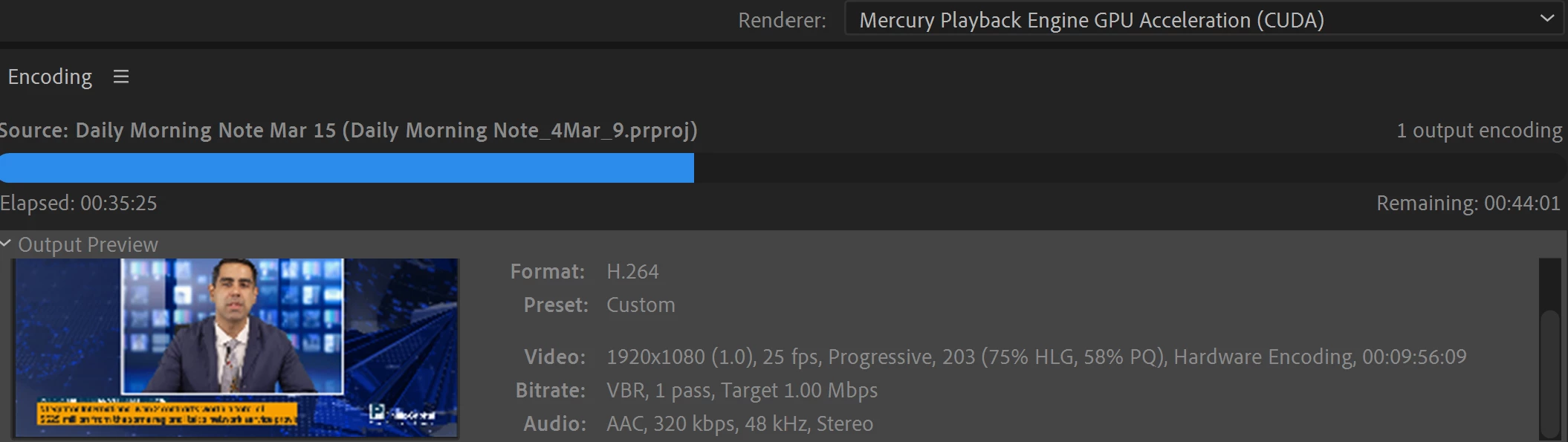
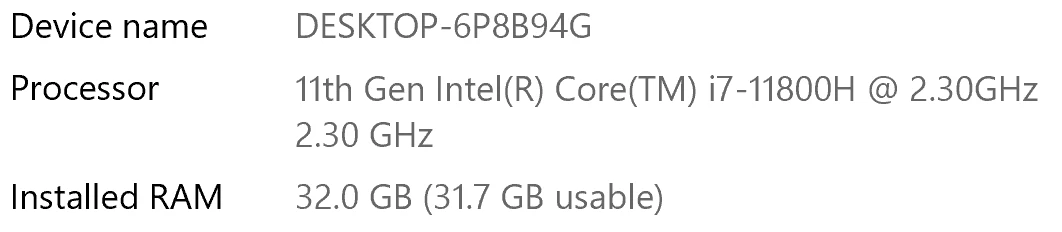
I have been waiting for more than 30 mins for the final video to be rendered. It's already 40 mins and it's barely 50% rendered. Never had this issue before. My laptop specs are as below and my GPU is RTX 3070.


Anyone knows how to solve this sudden issue?


Correct answer Fergus H

Hi all, 
Despite receiving test files from many of you (thank you!), we have not been able to reproduce this problem at Adobe. That's a bit unusual and certainly frustrating - to you and us - but we do think this issue has been fixed in the latest beta of After Effects and Media Encoder. We'd love to get your feedback on that. Creative Cloud betas are specifically designed to run alongside the release versions and are available in the "Beta apps" section of Creative Cloud Desktop. More information is here: https://helpx.adobe.com/x-productkb/global/creative-cloud-beta.html

The v23.x beta of After Effects also has the ability to directly export H.264 - without having to use Media Encoder - so your feedback on this would be useful too. More information is available here: https://community.adobe.com/t5/after-effects-beta-discussions/feature-focus-exporting-h-264-from-the-after-effects-render-queue/td-p/13117618


Regards,

Fergus

68 replies

New Participant
October 4, 2022

Hi Everyone,

Same here... 
12th Gen Intel(R) Core(TM) i9-12900K
Nvidia GeForce RTX 3060 12GB
All brand new.
Processor usage: 20%
GPU usage 20%
Extremly slow rendering on a very-very simple composition!


Cheers,
Peter

Community Manager
October 17, 2022

We might have found a repro overnight. If you're willing, can you do an export from AME where the issue happens, and then when that's complete, go to Help -> Reveal Log Files and find the Adobe Media Encoder Log.txt and Adobe Media Encoder Log-last.txt file and post those back. We are  looking for some log lines related to async timeouts. 

Chummystyle
New Participant
October 3, 2022

I haven't read this thread all the way through buy mu suggestions for slow Media Encoder would be.

  • Clear your cache.

  • Media Encoder the update selected "Mercury Playback Engine Software Only" so make sure you select under
    Preferences/General/ Video Rendering " Mercury Playback Engine GPU Acceleration (Metal) Recommended.
    Check in premiere as well. Same setting. Then restart and do work.

  • Media Encoder Preferences > General > Uncheck "Import sequences natively" and try export again.

  • Deactivate parallel encoding.

  • The source file needs on a fast drive - and I mean fast, 2GB/s minimum, better 3GB/s (M.2 NVMe with 4xPCIe for example.

  • Put source and target on different physical hard drives.


I'm not sure which of these works for me but Making sure all these changes are in place does the trick.

Martin

Participating Frequently
September 28, 2022

I'm having the same problem with the latest version of AE and AME. Similar videos that used to render 15-30 minutes have an estimated render time of 10+ hours. It was (and still is) driving me crazy.

My solution for the time being: install an older version of both software.
I installed After Effects 18.4.6 and Media Encoder 15.4.5 and just rendered a video in 20 minutes which took me hours with the latest versions.

Participating Frequently
September 29, 2022

If you want to stay at the 2022 version of both software, you can follow the solution of @Digiwheel 


Hi guys, had this issue for months and finally stumbled across a fix that works for me now perfectly.

Roll back to AE 22.2.1 and teh same on ME. It has to be this exact version. Works like a dream for me so it may be the solution for now.

(FYI I am running on Mac Monterey 12.6).


I tried it on Windows and it also works

Participating Frequently
September 29, 2022

Hmmm, thanks, that sounds like a reasonable solution! Where do I find the older version of AE and AME? They don't show up in my Creative Cloud panel.

New Participant
September 28, 2022

Hi guys, had this issue for months and finally stumbled across a fix that works for me now perfectly.

Roll back to AE 22.2.1 and teh same on ME. It has to be this exact version. Works like a dream for me so it may be the solution for now.

(FYI I am running on Mac Monterey 12.6).

New Participant
September 28, 2022

This worked for me. 


New Participant
September 26, 2022

I've had this same issue for a while and it's causing the quality of my work to worsen since I'm spending so much time managing and waiting on exports. I can't send my 170 GB project folder in for troubleshooting, but three different computers and several versions of AE and ME are exporting terribly slowly. And mutli-frame rendering drops down to 1 concurrent frame after a couple minutes. Same with the current beta version. 

brunoseven
Known Participant
September 26, 2022

man, I've been facing the same problem. a tip that MAYBE can help you a little:

OPEN SOME YOUTUBE VIDEOS IN YOUR COMPUTER DURING THE RENDER, AND ONCE IN A WHILE CHANGE THE VIDEO TO ANOTHER ONE. IT DOESN'T SOLVE THE PROBLEM, BUT KEEP REPEATING THIS DURING THE RENDER MADE THE PROCESS OF RENDER FASTER.

I have no idea why it works, but it does. Try it.

Cisco88
New Participant
September 27, 2022

I did try this and you are right it did help speed up the process a little bit.

Known Participant
September 21, 2022

Me too. For some reason, Creative cloud ignored my 'don't upgrade' request and upgraded everything.
AE slow. Photoshop slow. Media encoder is rendering a 'fairly' complex comp thats 17 seconds HD. 
Plays easily in AE on full rez. Half way through the render and it's taken 37 minutes. Says another 45 minutes to go.
The problem is, my computer is HUNG while this is going on, so I can't even work in the background.
Adobe.

New Participant
September 20, 2022

Hi everyone,
Had the same issue. Could not render with media encoder anymore. It was super slow and stopped during the render process! 
Now it works again! Halleluja!
Here is what I did:
Go in After Effects to Preferences, Media Cache, Media Caches Files and press delete! After that it worked smooth again!

New Participant
October 12, 2022

This worked for me too, thank you!!! ❤️

Participating Frequently
September 13, 2022

Hello All, In my humble opinion, any of us sending in AE projects for analysis is really not needed.  I work as a theatrical designer and my workflow and media change drastically from project to project.  The one thing that, unfortuately, remains consistent is that ME 2022 renders painfully slow on my M1 Max MacbookPro.  Whether it it be Prores, HAP or H264, it's problematic.  If I walk over to my 5 year old iMac that is running AE & ME 2021, files render in minutes while my M1 Mac take 4 hours.  I'm very, very frustrated by all this and I must say, it's seems like Adobe has stopped supporting ME.  Unfortunately these are the programs I use, so I soldier onward for the time being.

Community Manager
September 13, 2022

We are asking for projects because we aren't able to reproduce the problem here internally. I promise no one has stopped supporting Media Encoder, there is an entire team dedicated to it. We really do want to fix this problem, but we need a bit more help in identifying the cause. 

Felipe Osti
New Participant
September 13, 2022

Same happens to me. Funny that it began after I got a new computer. My old i7 3770 16gb gtx970 performs way better than my new i7 10700k rtx3070 64gb and nvme. It is taking 3 hours to render a 40 seconds After Effects video, it says remaining 5 hours, the same video rendered in less than 10 minutes on my old computer. Just makes abolute no sense at all.


Community Manager
September 13, 2022

Are you using the exact same version of After Effects and Media Encoder? Any effects being used in those projects? Any different versions of those effects? If you install the AE / AME beta from CCD, do you have the same problem? We'd love to help but we need specific details, projects, etc., to be able to debug. 

Felipe Osti
New Participant
September 13, 2022

Yes, I am using both the latest versions of AE and AME. Im trying to render a project with multiple effects 1080 of 35 seconds, and as the elpased time and the render increases, also the remaining time does, Its at 50% now with 4 hours and still remaning 4 hours to finish, this is just unaceptable. My work is getting really behind the schedule and Im statting to have trouble with my clients. Interesting, I tried it at my friend`s house and his version is older and not genuine, it worked just perfectly. 

Participating Frequently
September 9, 2022

sigh.....getting really tired of adobe taking 4 hours to render a 15 second video....its' beyond insane now 

Community Manager
September 13, 2022

Please give us more details, or a copy of the project. I know it's frustrating but we really need specifics and projects to be able to reproduce the issue. 

Cisco88
New Participant
September 23, 2022

Hi I'm also having same issue, how can I give you a copy of my project? Thanks