


Jayzinq
New Participant
August 2, 2021
Answered

Media Encoder 2021 Export Stuck/Stops at 100%

  • August 2, 2021
  • 3 replies
  • 12665 views

Hi,


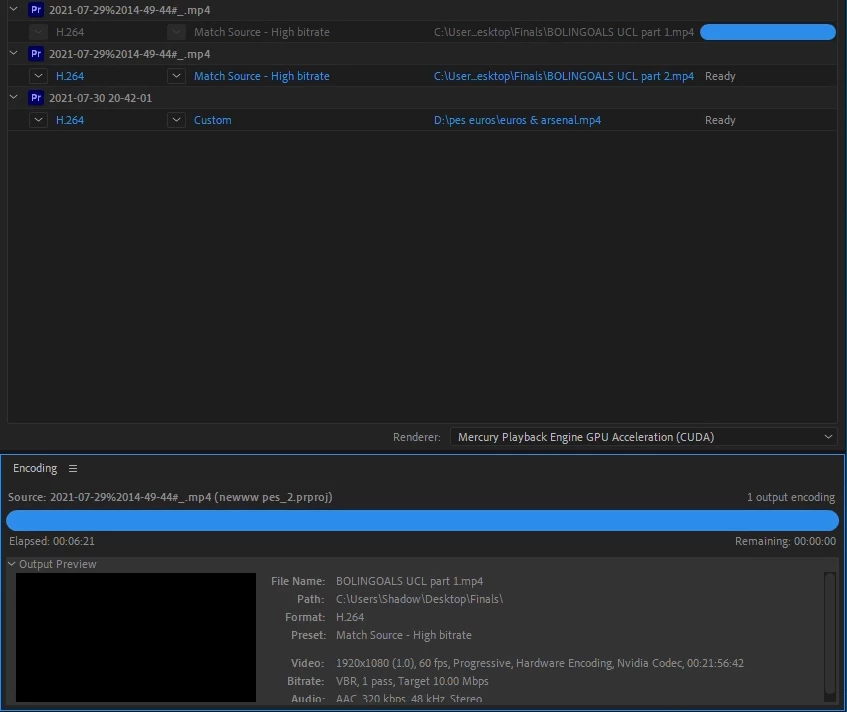
Media Encoder 2021 will just stop once it gets to 100% and need a fix for this ASAP.


I'm a youtube video editor so I use media encoder to export multiple videos at once.


No crazy settings just Match source - High Bit Rate 1080p 60 videos.


A 21 minute video takes 6 mins to get to 100% but then the bar just stays full and doesnt move?


I have adequte space on my hard drive and have tried software only and still get the same results.


This was never an issue in 2020 but really don't want to have to downgrade back to 2020 as that would be a lot of effort.


Hope someone can help


Correct answer CastIronDaddy

@Sumeet Kumar Choubey

Hi Sumeet, Have you got the fix for this issue? Please, I am expereincing the same now. Thanks


resolved.  I went to File, Stop current item.  Then restarted the next 2 and it worked like a charm


3 replies

Adobe Employee
April 17, 2023

Does this still happen for your on newer versions of AME?

New Participant
May 15, 2023

Hi, I've had this issue before but it seemed to be solved. I just updated Premiere and MediaEncoder TODAY and now the problem is back.

New Participant
August 29, 2023

Hi Elise, sorry to hear that you have those issues. I would really like to get a repro case for the encoding hang issue. Do you still experience this kind of freeze? Is it reproducable? If so, would it be possible to contact you directly? 


Hello,

In the meantime, my work has provided me with another computer to work on.
The problem does not occur on this one.
I'm sorry I can no longer be of help to solve this problem for others.

Kind regards,
Met vriendelijke groet,
Elise


[personal data removed by moderator]

Participating Frequently
August 19, 2021

I'm having the exact same issue. Encoding is fast but as soon as it's completed, it freezes at 100%. Freezes as in "beachball of death" appears. It unfreezes after a couple of minutes or hours, it depends on the will of AME, since i've not found any corelation between the files i've been exporting and freezing times. 

I'm using a 2,9 GHz Intel Core i7 with 32 GB 3000 MHz DDR4 and a Radeon RX 580 8 GB.

My files and project are in an external hard drive. Preview and autosave files are in a separate hard drive.


Come on, Adobe, fix thisssss! 

Participating Frequently
August 19, 2021

@Sumeet Kumar Choubey Help, please??

Community Manager
August 20, 2021

Hi there,


We're sorry to hear about this. We can get this checked. Could you please confirm if you are experiencing the same issue when exporting in any other format (like QuickTime > Apple ProRes)? Also, have you tried exporting the sequence directly through Premiere Pro & checked if it's doing the same thing?

Thanks,

Sumeet

Jayzinq
JayzinqAuthor
New Participant
August 2, 2021

Update:


Files DO finish rendering but I have to manually stop them once they get to 100%?


Surely that's not right and must be a fix so they can complete and move to the next file by themselves?


Both files have no issues and playback fine but there must be a fix for this?