


Participant
September 23, 2019
Answered

Media Encoder changes the dimensions of my video

  • September 23, 2019
  • 2 replies
  • 7549 views

Its' been a looooong time since I've used Flash (now Animate) and I'm having some trouble figuring out how to encode my videos properly without it changing the dimensions of my videos. I've burned about 4 hours trying to figure this out myself... so here I am.


Here's what I've done:

1. I created two set of short animations in Animate (5 second videos) that are two different sizes (1200x675 and 1440x1080) which I will need in two different formats (mov and mp4).

2. Export > Video (all are approx 475mb files before I encode them)

3. Then I dragged those .mov files into the Media Encoder queue

4. Change format to Quicktime or h.264 (I need some in each format)

5. Edit the preset

     • uncheck "Export Audio"

     • Basic video settings » select Match Source

6. Press play....


Here's the problem:

1. The videos that I encode as .mov are still 100mb — I believe these come out the correct dimensions.

2. And the videos I export as .mp4 come out around 7mb (this is great), but it vertically squishes them.


How do I get them both to export smallest file size and the same dimensions they are before I encode them?


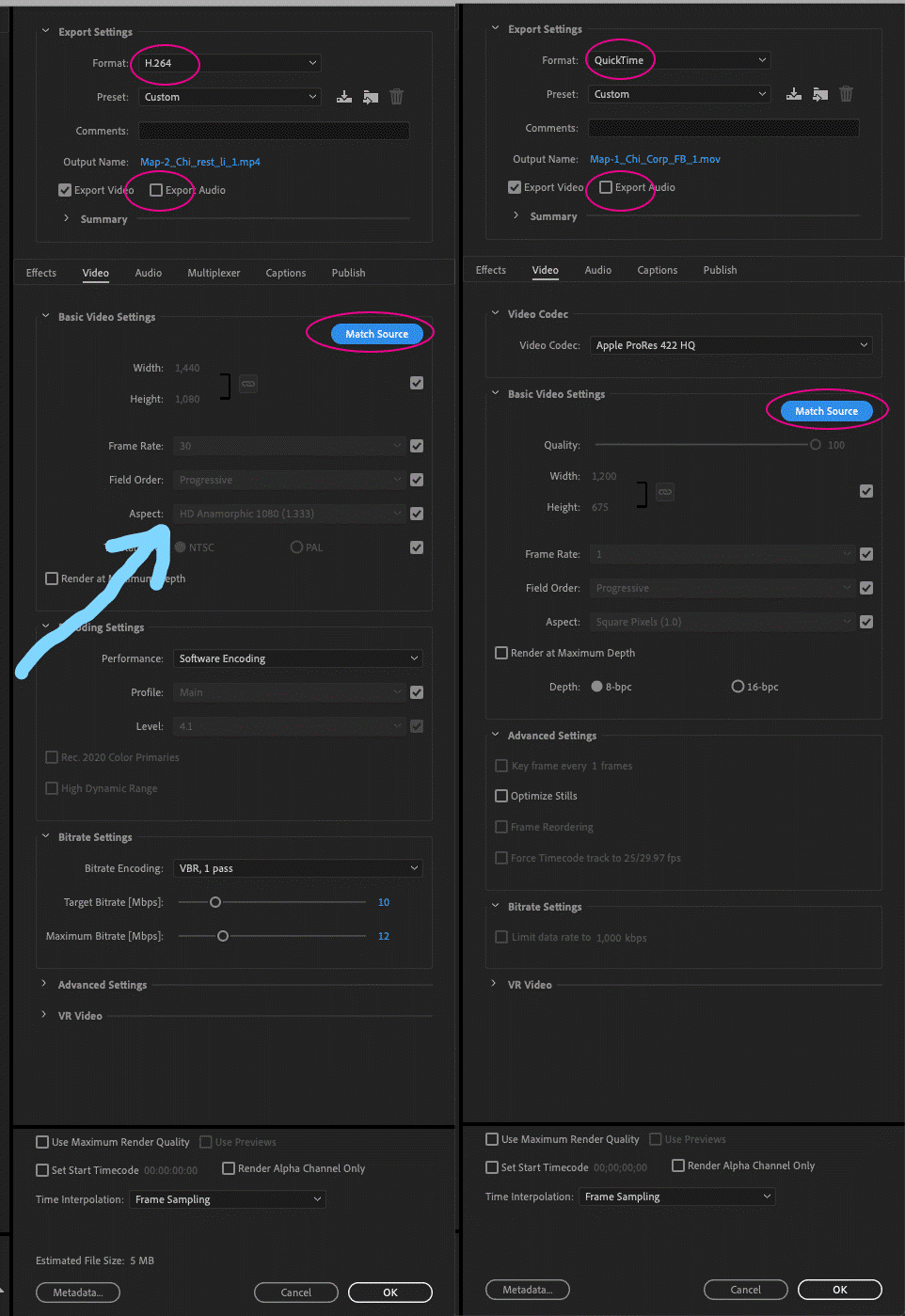
I attached screencaps of my setting for both...

Thanks in advance!
    This topic has been closed for replies.
    Correct answer imeilfx

    Your issue lays in here: 

    I guessin that you work with square pixels in Animate/Flash and export with square pixels. And when you cnoverting (as shown on your screenshot) to mov you also used square pixel but during exporting to h264 you are using non square pixel (PAR 1,33). I know that you use "match source" button but sometimes that does not work as it should and it can interprete some settins wrong - as it did in your case. 
    So to fix that - just change 1,33 HD Anamorphic pixel to 1,0 square pixel in h264 export settings. 

    2 replies

    Brandon Loshe
    Legend
    September 27, 2019

    Exactly what imeilfx said. In case you don't know, you have to uncheck the grey checkbox to change the aspect ratio.


    By the way (a little off topic), I see that your frame rate is 30fps for your .mp4 and 1fps for your .mov. Is your video ok at 1fps?

    imeilfx
    imeilfxCorrect answer
    Inspiring
    September 23, 2019

    Your issue lays in here: 

    I guessin that you work with square pixels in Animate/Flash and export with square pixels. And when you cnoverting (as shown on your screenshot) to mov you also used square pixel but during exporting to h264 you are using non square pixel (PAR 1,33). I know that you use "match source" button but sometimes that does not work as it should and it can interprete some settins wrong - as it did in your case. 
    So to fix that - just change 1,33 HD Anamorphic pixel to 1,0 square pixel in h264 export settings. 

    WesRaven
    Participant
    September 22, 2021

    Makes no difference. The width can be adjusted to any amount yet the height is stuck on one size. And it can be toggled to any size except the one I need... Is this a bug???? Any idea?

    Community Manager
    September 24, 2021

    Hi there,

    We're sorry for the trouble. Could you specify the version of the Adobe applications you are facing issues with?


    We're here to help.


    Regards,

    Shivangi