


New Participant
November 8, 2016
Answered

Media Encoder is not linking video size correctly

  • November 8, 2016
  • 3 replies
  • 18865 views

Hi,

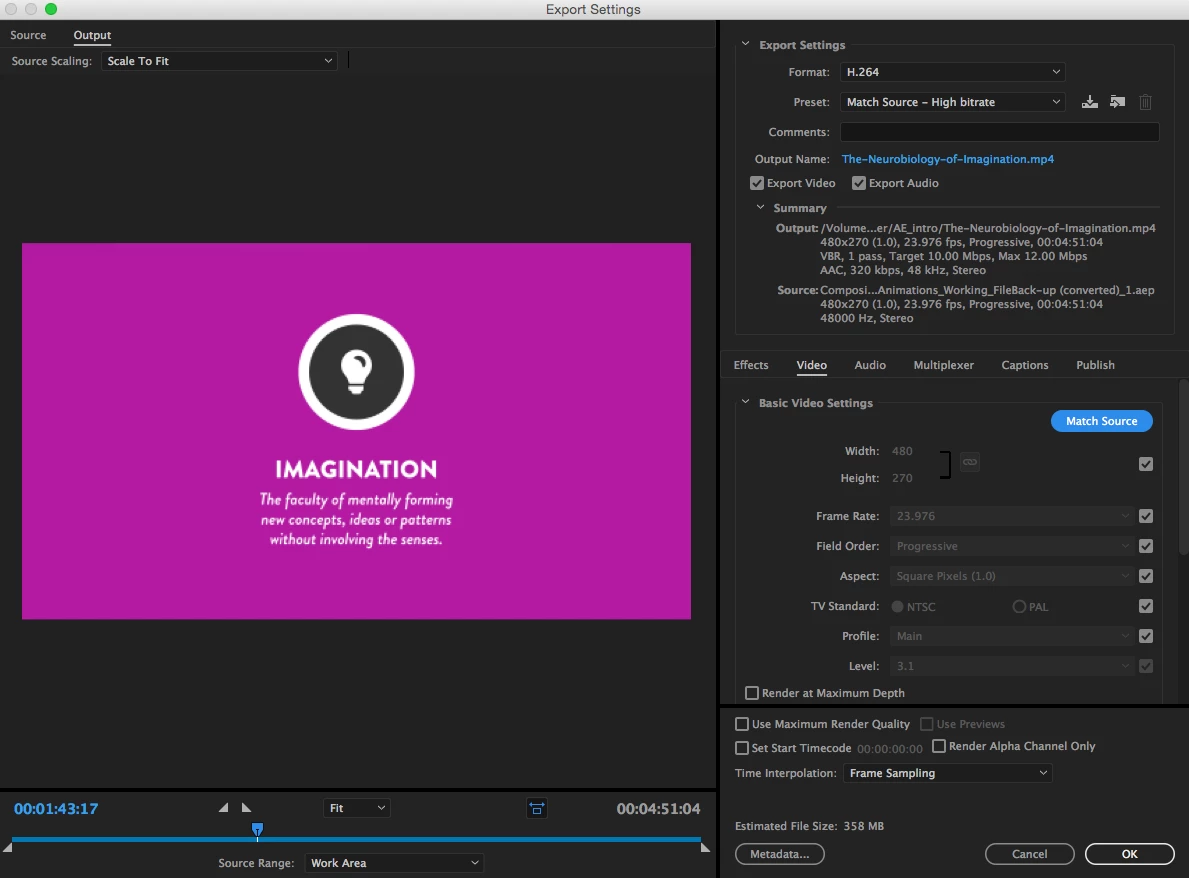
I need some help, I have just download the new Adobe CC and now I wish I had not! I am having a problem with rendering out After Effects (AE) files in Adobe media encoder (AME). AME is not linking to the file correctly and when I render out a 1080p video in AME it is rendering it out as 480x270 even if I select match source nothing changes. If I set the size in AME physically then the video is the correct size but the quality is terrible.
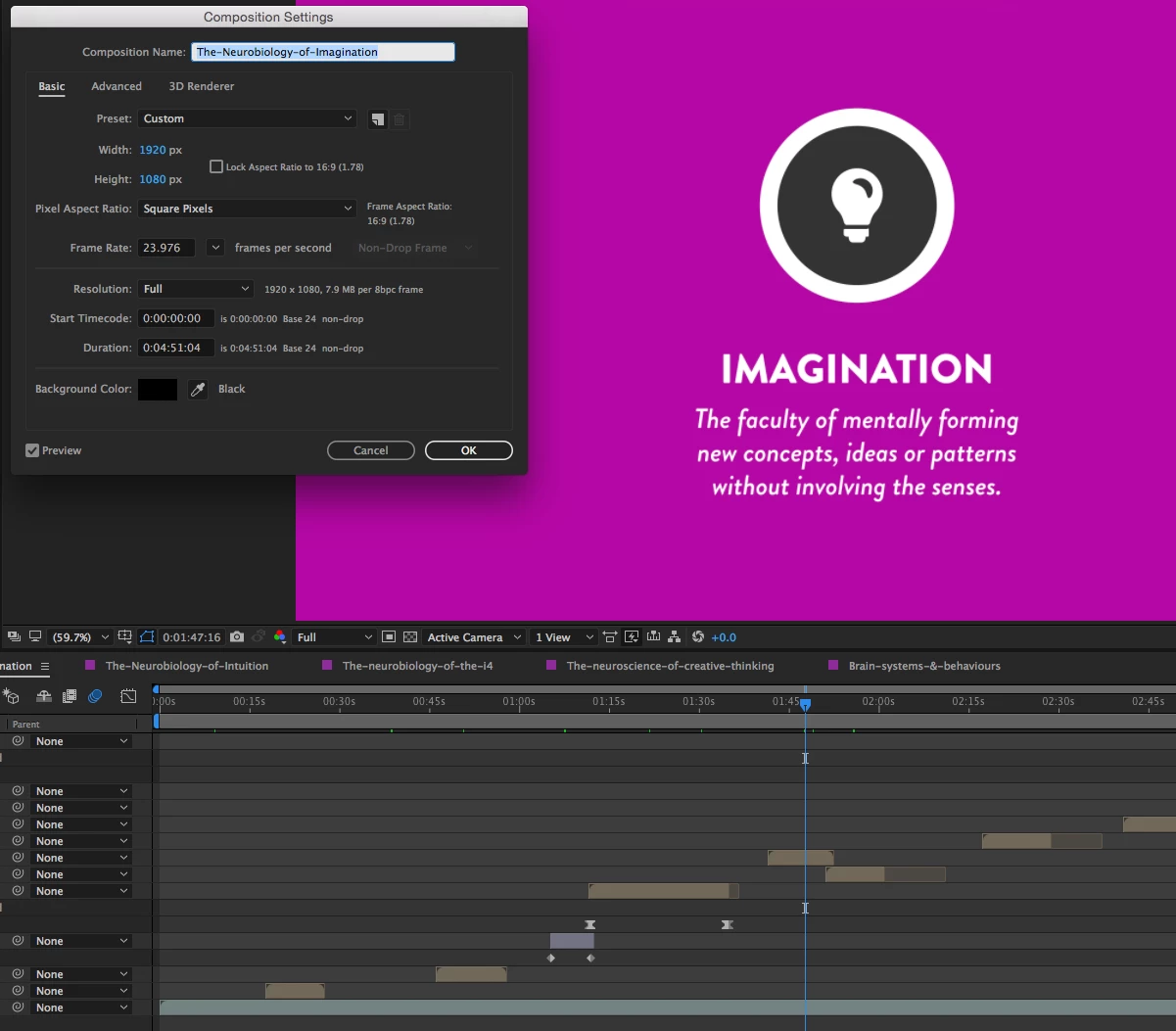
The composition settings in AE are set to 1080p and I have been rendering things out like this until this recent download with not problems. I am currently going back to Adobe CC (15.3) to see if that will fix my issue. This is a screen shot of the AE composition setting
Please help this is really F@#king me over and super annoying.

Thanks

This topic has been closed for replies.
Correct answer pshankar

I was like that wasn't very nice mate lol. All my resolutions are set to full in AE so I don't understand what you mean when you say

"You have to set your resolution in AE to full before saving" unless I'm missing something.

I have already done the normal cache and preference settings and both programs are the same versions not sure why it is still happening. I have gone back to the previous versions of AE and AME and it works fine I'll get what I need to get done then try and find a solution.


Here is more info on this issue.

Known issues in After Effects CC 2017

Composition sent from/to Premiere Pro via Dynamic Link appears in a lower resolution

Issue

  • When you send an After Effects composition to Premiere Pro or from Premiere Pro to After Effects via Dynamic Link, the composition appears in lower resolution. For example, if you send a 1920 x 1080 composition to Premiere Pro, Premiere Pro displays it in 960 x 540 resolution.
  • When you render an After Effects composition using Adobe Media Encoder via Dynamic Link, the output is rendered in a lower resolution. For example, a 1280 x 720 composition is rendered as a 640 x 360 output.

Workaround

Change the resolution at the bottom of the Composition panel in After Effects to Auto or Full, and then send it to Premiere Pro via Dynamic Link.

3 replies

kitchhock
Participating Frequently
December 5, 2016

Adobe Media Encoder (AME)​ whys is this bug still not fixed?

I urgently have to batch render a whole lot of ae comps and they all turn out miserable after render.

full HD size, but only third of the resolution...!

if I have to do the work around, I have to manually adjust all my after effects project files... (32)

we pay a lot of money every month so we expect updates to improve the program, not getting a program that is worse and gives troubles and thus extra work. we need to beat deadlines and because of these bugs we could loose clients...

Philippe191
Participating Frequently
January 4, 2017

Terrible bug!  We need a real fix ASAP. 

My workflow is now broken. "Thanks" for the update Adobe!

Already made me miss a couple of tight deadlines because of bad renders.

Inspiring
November 9, 2016

Here is the correct solution

AME keeps encoding at quarter resolution of the original when added from AE

You have to set your resolution in AE to full before saving.. stupid!!!!

Inspiring
November 9, 2016

Oops - I just realised how that read !! I didn't mean you were stupid - I meant that it is extremely stupid that AME is doing that! LOL

Adobe should fix it because I can't think of a single instance where a preview resolution would be used as a way to set output dimensions in a render program..

kitchhock
Participating Frequently
November 10, 2016

Here is more info on this issue.

Known issues in After Effects CC 2017

Composition sent from/to Premiere Pro via Dynamic Link appears in a lower resolution

Issue

  • When you send an After Effects composition to Premiere Pro or from Premiere Pro to After Effects via Dynamic Link, the composition appears in lower resolution. For example, if you send a 1920 x 1080 composition to Premiere Pro, Premiere Pro displays it in 960 x 540 resolution.
  • When you render an After Effects composition using Adobe Media Encoder via Dynamic Link, the output is rendered in a lower resolution. For example, a 1280 x 720 composition is rendered as a 640 x 360 output.

Workaround

Change the resolution at the bottom of the Composition panel in After Effects to Auto or Full, and then send it to Premiere Pro via Dynamic Link.


Had the same problem...

thanks for the workaround pshankar.

adobe you should fix this. thanks.

Inspiring
November 9, 2016

It sound like the Dynamic link server is not working correctly. I would try clearing preferences and cache as a first step. Also check that you are running the same version of AE..

If all else fails you could still render directly out of AE using the RQ using an intermediate codec to an AME watchfolder. More work, more space but should get around the problem short-term.