

New Participant
April 29, 2021
Answered

Media Encoder is telling me there is a warning?

  • April 29, 2021
  • 3 replies
  • 14661 views

Hi all,

I'm trying to export a short video on media encoder, under the word status it says warning. The warning says ꜜ.  What does this mean? What do I have to do?
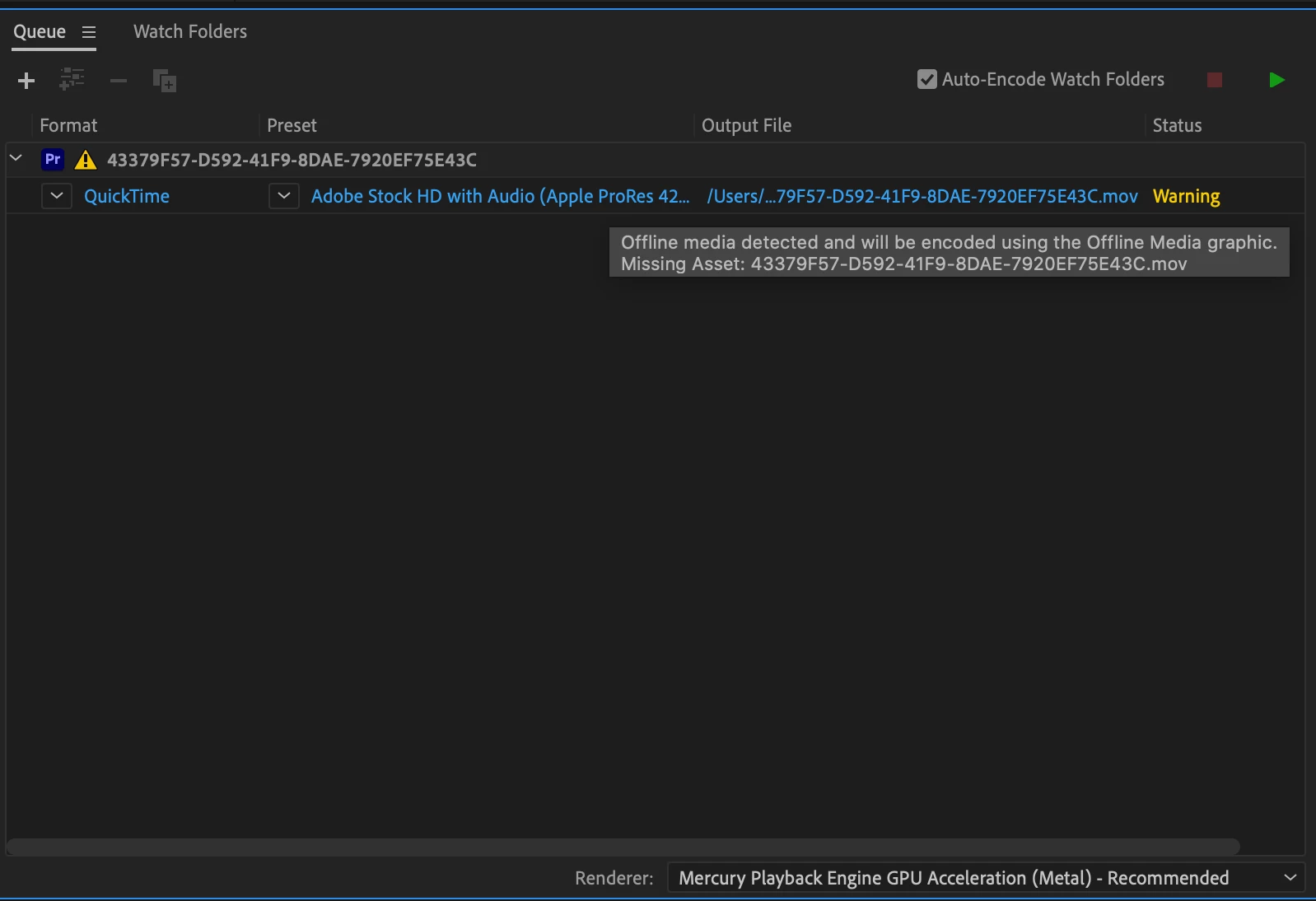

Correct answer wyattl12541698

Since its having to do with dynamic link try clearing your media cache and relink your media. This solved my issue. 

3 replies

New Participant
November 19, 2025

Hi everyone,


I am having this problem and could use some help.  So far I've re-installed Premiere, cleared the media cache, and re-linked the 2 pieces of media in sequence 1 via this method. Right Click clip > Make Offline > Link Media.  I've also restarted my MacBook several times.


First question.  Do I need to consider re-linking all media in the project?  In this particualar sequence, sequence 1, I only have the 2 aforementioned clips.


Second question.  Does Media Encoder prompt the warning if the faulty media exists in a sequence you are not rendereing?  For example if the faulty media is somewhere else in the project, can that cause this issue?


Other things to note

I tried rendering a clip from another sequence (seq 2) that does not include the 2 pieces of media in swquence 1 and I also got the warning/fail to render.  This is where my question about re-linking alll media comes from because I re-linked the media in the sequence I want to output and still get the warning.  Leads me to believe the problem is somewhere else?


I've tried to switch Render quality from custom to VBR 2 Pass, High QUality 1080 and others.


Thanks in advance to this aweome community that has helped me so much already!


-Mike


Carissa Ferro
New Participant
May 1, 2022

Hi. I Was having the same issue and couldn't find a fix anywhere. Finally, I realized there were 2 copies of the media in different places. To be safe I put an extra copy of the media file on my desktop and then deleted (trashed) the copy my sequence was linked to.  PR auto-linked to the second copy. Media Encoder then showed "ready" but my sequence in PR was not playing sound. I restarted PR and the sequence played fine.  I hope this helped. It was bugging me for weeks. 

SonyaS
Participating Frequently
November 24, 2022

I am also having the same issue.  I have only one copy of the footage and restarted the project with one clip and still the warning.  Any help would be great!

wyattl12541698Correct answer
Inspiring
June 24, 2023

Since its having to do with dynamic link try clearing your media cache and relink your media. This solved my issue. 

Community Manager
May 5, 2021

Hi there,

We appreciating you writing in. The error suggests that there are some media files used in the project are not linked properly. Could you check if you are getting correct playback while playing the video in Premiere Pro?

Looking forward to your response.

Regards,

Shivangi

rick rodgers
New Participant
September 1, 2021

i have a similar issue with media encoder 2021... tried everything... saying all media linked in premiere... although my external HD is not showing up in media encoder