


KaupoKuusemae
New Participant
January 9, 2019
Question

Media Encoder keeps on opening "Encoding is in progress. Do you really want to quit?"

  • January 9, 2019
  • 15 replies
  • 11283 views

Hey!

I have a problem. I'm using the latest Adobe Media Encoder 13.0.2 (Build 39) on MacOS 10.14.2. I have i7-7700k with Vega64 and 32GB of RAM..

Problem is that after adding 2 or more items to queue and starting the render process. And after starting queue, the exit promt window pops up.
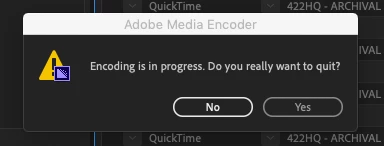
When I press No, it comes back in like half a second. So far have tried to reinstall everything, cleared cache. Problem is still there. Thanks to that it is impossible to leave something rendering over night without some stupid macro workaround method.

Am I the only one who is getting that error?

This topic has been closed for replies.

15 replies

New Participant
March 12, 2023

I have this issue popped up today. Used Media Encoder for long time, never had this issue. Version 14.8 (build 31) 

Strange that it had for such long time as i read here and never had fixed. 😞 

Rob Art Illustration
Inspiring
April 23, 2021

This issue is back for me in the latest version.

Worked OK yesterday, this morning, constant message. Press 'No' it pops up again. Only doing one render file.

Any help?

practice safe design | use a concept ~ Petrula Vrontikis
Rob Art Illustration
Inspiring
April 24, 2021

I tried again the second day and it worked fine.

practice safe design | use a concept ~ Petrula Vrontikis
New Participant
January 26, 2021

I'm having the same problem too. Been trying to export a 1.2GB file since yesterday. It kept crashing and now this. Thought I'm paying too much for my new hobby of making videos but obviously it doesnt even worth the money.

New Participant
January 18, 2021

Why is this still an issue 2 years later???  $50/month is a lot to pay for a 2 year old bug.  I'm not even gonna bother putting specs because this is occuring over multiple OS's.  Wtf adobe.

New Participant
June 24, 2021

I feel the same way. I can't pause my renders while this happens, major pain, adobe!!

New Participant
November 10, 2020

Same problem detected, November 10, 2020.

Luuk Bod
New Participant
August 10, 2020

I had the same problem recently, and managed to fix it.

It was pretty dumb honestly, and it might not even apply to your situation.


What happened is that, most of the times, Adobe software have a pop-up homepage with recently opened documents.

Most of the times I just click it away as soon as it appears out of habit.


It turns out that after a while my account logged out. Could be that I exceeded the limit of devices using my account, or that it might happen once every half year.

The pop-up window on media encoder was to log back in to Creative Cloud, and I clicked it away.

So naturally, Media Encoder tries to close after not being able to detect an account, but I already started encoding.

And that's why it keeps trying to close down, Media Encoder HAS to shut down, but is programmed to warn about ongoing processes before closing down.


Next time, try to make sure you're logged in when starting your encoding list. It just might do the trick. 🙂

New Participant
September 14, 2020

thank you : Just had this happening a few time for the last few days, when the internet provider had issues and the connection was suddenly lost.

rasel692
New Participant
July 28, 2020

After I faced the similar situation, I just restarted my computer and turned off and turned on wifi while the app is opened and then restrarted the media encoder app. It solved my problem.

theTallest77
Inspiring
March 19, 2020

By any chance, had you signed out of adobe creative cloud on that machine during the render process?

gman2014
Participating Frequently
July 22, 2019

This is happening to me as well. Seemingly after I opened another adobe app and it asked me to login- encoder decided to start trying to quit ... asking over and over like you said because I was 2/3 through with a 10hr render.... which upsets me to no end I assure you.

and I can’t figure out to to make it just continue!

looking at the preview, it appears to still be rendering inspite of the question that won’t accept my answer.

UPDATE: I spoke with support. It looks like as long as we don’t click yes, we can ignore it and it will continue encoding/rendering.

New Participant
November 20, 2019

This is the exact situation I'm going through right now. Its beyond frustrating. I'm glad to know that it will keep rendering. Thanks for that helpful information. I thought a full work day was lost for sure.

Inspiring
June 1, 2019

Okay, so I'm on here after running into these issues again.  Thought I had resolved them, but here they are all over again.

Originally, I ran through a whole series of steps to enable this program to function normally.  It went something like this:

Update intel graphics, update NVIDIA\other discreet Graphics, install adobe software by installing each update in succession, and finally, go to antivirus and unblock all adobe related apps.  This also involved a refresh of Creative Cloud app, and a force quit of all adobe processes in active memory before starting the creative cloud app.  The steps above enabled all apps to function normally.  I had issues with everything, and found that what adobe has now done is to modularize their apps, making small apps run inside a windowed process so that each small process can be tackled in a modular fashion.  This has both benefits and retractions.  In SAAS, software as a service, the modular model allows for troubleshooting targeted areas, and enables faster turnaround; it also allows for updating, enhancing and otherwise moving forward.  The downside is that you'll have more apps to worry about when you have an antivirus, or other security running on your machine that requires foreknowledge or proper setup so your software is "Trusted", and you'll have problems until that is handled.  Since many users are only at the level of user not administrator, this has to be handled by somebody not using the software everyday, and it makes it difficult for businesses to work with unless you send out a massive warning about just this kind of problem.  That also makes you look less competent to some who don't know the specifics and degrades consumer confidence, which is what they hope to avoid by not putting out a grand notice of this issue.

I have at least temporarily fixed this problem again.  I noticed that the creative cloud app had an issue as well, so I thought it might be related.  Check if your CC App continually logs you out.  If so, this will help you.  Here's what I did: Log out of Creative Cloud from the app.   Close all apps from adobe and creative cloud using the process monitor, open creative cloud app again and log in.  This will update the caches with new data.  Try media encoder again.

InTheFlicker
New Participant
June 22, 2019

Thank you so much, the log out/log in of Creative Cloud desktop app worked on my iMac for this issue. Really appreciate users like you who want to help solve the problem, THANK YOU!

On a possibly related note, I had a strange suspicion that Encoder might be asking me if I really wanted to quit premiere... even though the prompt was coming from Encoder. So after doing your log out/log in method, I re-opened media encoder and restarted the process of creating proxies for 27 interviews, and it was doing okay, but ALSO, I had premiere open, and did not quit premiere. I was actually not getting the media encoder prompt previously, until I quit premiere. I didn't think premiere had to be open for media encoder to work, but maybe it does in some strange buggy world?

In any case, I left premiere open (had to fix something on one of the exports anyway), and still no quit prompt... crossing fingers and leaving it overnight to continue working!!!