jenniferg94289929
Participant
July 20, 2018
Answered

How can I add photos in Adobe Sign?

  • July 20, 2018
  • 1 reply
  • 2877 views

Hi,

I am setting up photo release documents in Adobe Sign. The ideal scenario would be to have the subject sign the release and allow us to take a photo of them to include in the document. This is a standard workflow for photographers and I have done this in the past with other apps. Is this possible in Adobe Sign?

Please advise.

Jen
This topic has been closed for replies.
Correct answer MarjanA

Hi Jen,

Good question.

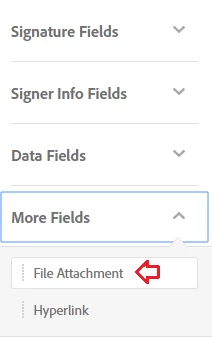
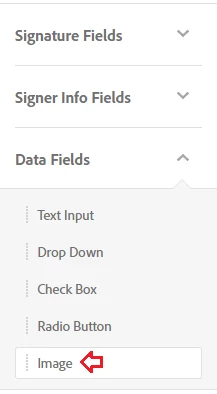
With the Adobe Sign Business and Enterprise license you can include an attachment box in Adobe Sign. You also have access to the

'in-line image' field. With both you can include an image to the document. The main difference is that the image is visible within the document with the in-line image, whereas the attachment box would create a new page with the image once the document has been signed.

I've highlighted both options below to look out for in your Account.

Hope this helps!

1 reply

MarjanACorrect answer
Participating Frequently
July 20, 2018

Hi Jen,

Good question.

With the Adobe Sign Business and Enterprise license you can include an attachment box in Adobe Sign. You also have access to the

'in-line image' field. With both you can include an image to the document. The main difference is that the image is visible within the document with the in-line image, whereas the attachment box would create a new page with the image once the document has been signed.

I've highlighted both options below to look out for in your Account.

Hope this helps!

jenniferg94289929
Participant
July 20, 2018

Thanks for the information! I appreciate it. Question: if I were to have the subject sign the form do I take the photo with my iPad camera and then attach it to the form?

Participating Frequently
July 20, 2018

Hi Jennifer,

Happy to help!

Yes, if you're using the Adobe Sign iOS app to sign a document in-person you can take a photo with an iPad camera to attach to the form

Kind regards,