This topic has been closed for replies.
Correct answer Rishabh_Tiwari

Hi there,


Sorry to hear about the trouble. Could you please try the steps below:


  1. Sign out of XD and CC Desktop app.
  2. Close CoreSync and all Adobe related processes from the Task Manager/ Activity monitor.
  3. Sign in on Adobe CC Desktop app and launch XD from there and check again.


If you are still finding difficulties while publishing, please share the details asked above.


Regards

Rishabh

10 replies

New Participant
May 10, 2021

One of my files is not letting me update links and I am getting the Error - 1


I've already tried to sign out and close my apps, closing sync, restarting my computer, and signing back in and the issue is still happening.

This is only happening to one file.


I tried to make a new file using save as, it worked once and is now giving me the error again. I also tried to make a new link on the same file. Again, it worked once and is now giving me the error. 


I do not want to make another file because all the links will change, this is really making me lose a bunch of time with my stylings and componetns already set up, the file is already deep into approval phase. Please help me fix this issue.


Thanks

HARSHIKA_VERMA
Community Manager
Community Manager
May 10, 2021

Hi there,


We are sorry to hear you are having trouble updating the link and getting error-1. We would like to know if it's a cloud file or a local file. We would also suggest copying everything from prototype mode into a new file and then try to create a link again and let us know if that helps.


If it's a cloud file, open the file from here: https://assets.adobe.com/cloud-documents, and then try to update the link. If nothing helps, please share the version of XD and the OS of your machine.


We will try our best to help.


Thanks,

Harshika

New Participant
May 11, 2021
Hi, it is a cloud file. I already mentioned I tried that, it synced once and then gave me the error. Also I do not want to copy everything over as it ruins my components and styles. What is a way to actually fix this issue without having to simply just create a new file? If this happens a lot and I keep having to recreate files and reshare, update links, that seems like a horrible solution.
New Participant
May 7, 2021

Recently, I started having a lot of trouble with review links. I've had issues in the past, and I would go and delete the existing link, and recreate it again and everything is happy and great. 


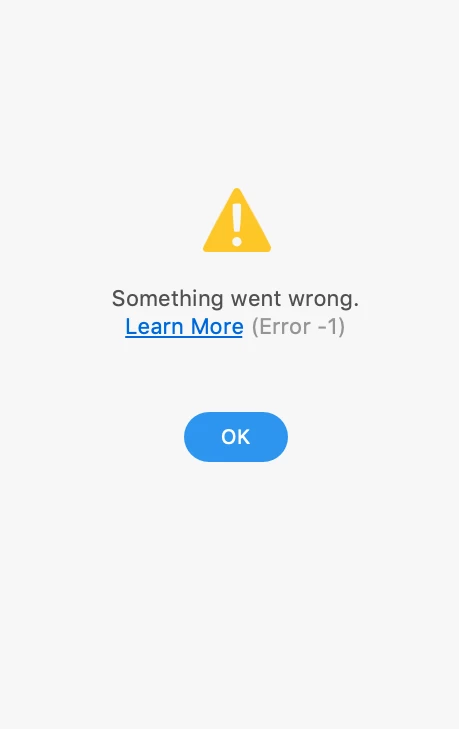
At this moment, after the initial creation, if I try to update the link I am getting an error consistently. "Something went wrong. Learn More (Error -1)" of course, clicking learn more doesn't actually help as it is for a typical error, which -1 is not. 


Any help or guidance in resolving this issue would be very appreciated. 

Thank you! 

Rishabh_Tiwari
Community Manager
Community Manager
May 10, 2021

Hi there,


Sorry to hear about the trouble. Could you please try the suggestions shared here: https://community.adobe.com/t5/adobe-xd/adobe-xd-error-1-when-updating-a-shared-link/m-p/11182454#M30835


Let us know if this helps or if you need any further assistance.


Regards

Rishabh

New Participant
November 10, 2020

I did all the above steps still the problem continues. I wasted my 3 Hours on making a link. Very unhappy with the application. Hope that I would be assisted soon.

New Participant
November 10, 2020

Have the same problem with 3 different computers and accounts

claudiam-noesis
Participating Frequently
October 7, 2020

Hi,


I'm getting the following error across all my XD files, both local and cloud.


I've tried signing out/in of CC, CC and XD are both up to date.

The only way I managed to solve the issue was to copy all the artboards to a new file. I have files and links that I want to keep, since they are shared with different people, so it's not an option to create new files and new links every time Adobe makes an update that breaks something.


Can you help out?

Rishabh_Tiwari
Community Manager
Community Manager
October 7, 2020

Hi there,


Sorry to hear about the trouble. Could you please try the suggestion shared here: https://community.adobe.com/t5/adobe-xd/adobe-xd-error-1-when-updating-a-shared-link/m-p/11182454?page=1#M30835


In case if this doesn't help, could you please confirm if you are connected to a private network or managed network?


Regards

Rishabh

claudiam-noesis
Participating Frequently
October 7, 2020

Hi, thanks for the reply.


Yes, I have tried the steps outlined above, but the issue persisted (sorry, I didn't know it was OK to revive an older topic, so thanks for the merge). I tried updating the links with various XD files, all displaying the same error. I tried pasting the artboards onto a new file and it worked. I had experienced this error previously, and updating XD seemed to solve the issue, at the time.


However, I just tried again with one of the files from earlier, and it updated the link properly.

Is it safe to assume that when this error occurs, something's going on with Adobe's servers? It's a little unnerving when you have tight deadlines and you can't update your work to share with other stakeholders.

usfbosco
New Participant
October 1, 2020

Trying to publish prototypes and getting a Error -1. I have tried creating a new link. I have signed out of Cloud. I have tried different files. I tried creating a new file. I've changed the file name. I have deleted the published doc to make anew link. I just can't seem to find any information on an (Error -1).

Rishabh_Tiwari
Community Manager
Community Manager
October 1, 2020

Hi there,


Sorry to hear about the trouble. Could you please try turning off the anti-virus on your computer and then follow the steps shared below:


  1. Sign out of XD and Adobe CC desktop app.
  2. Close CoreSync and all Adobe related processes from the Task Manager/Activity Monitor.
  3. Sign Back in on Adobe CC Desktop app and launch XD from there and check again if you are able to publish the link.


Regards

Rishabh

usfbosco
New Participant
October 1, 2020

This did not work for me. Same error. Thank you.

Koncept Kit
Participating Frequently
September 19, 2020

I was able to resolve this issue by copying into a new board then saving it in a different name. After that, I test out the new file by re-doing the create link steps and it worked. 


Nothing worked from what the instructions above. 

New Participant
August 21, 2020

I also have the same issue in a specific xd file. 
I already tried, signing out in adobe cloud, closing all adobe programs in task manager. Clearing temp folder, etc.


Playful_dancer5E27
Inspiring
June 9, 2020

Hi friend, have you found a solution to this problem?
By the way, I have also faced this issue.

Rishabh_Tiwari
Community Manager
Rishabh_TiwariCommunity ManagerCorrect answer
Community Manager
June 11, 2020

Hi there,


Sorry to hear about the trouble. Could you please try the steps below:


  1. Sign out of XD and CC Desktop app.
  2. Close CoreSync and all Adobe related processes from the Task Manager/ Activity monitor.
  3. Sign in on Adobe CC Desktop app and launch XD from there and check again.


If you are still finding difficulties while publishing, please share the details asked above.


Regards

Rishabh

Playful_dancer5E27
Inspiring
June 12, 2020

Ok i will try n get back to you again 🙂

Rishabh_Tiwari
Community Manager
Community Manager
June 4, 2020

Hi Trina,


Sorry to hear about the trouble. Could you please share a few more details like:


  1. Are you getting this error while updating a specific file or multiple files?
  2. Is it a cloud or a local file?
  3. Are you connected to a private network or managed network like a work network? Have you tried switching to a different network?


Regards

Rishabh

New Participant
June 1, 2020

After updating the program I am getting this error : 

Something went wrong. Learn More (Error -1)
A school account and a regular account were used. I was working with teammates and we used the share collaboration. I tried closing and opening a few times. 

Rishabh_Tiwari
Community Manager
Community Manager
June 1, 2020

Hi Shiffy,


Sorry to hear about the trouble. We'll try our best to help you with this. Could you please share a few more details like:


  1. A screenshot of the About XD info page.
  2. Are you getting this error on a specific file or all the files?
  3. Are you connected to a private network or a managed network like a school or work network? Please try switching to a different network and check if you are able to publish the file.


Regards

Rishabh

New Participant
June 1, 2020

Hi,


Thank you for trying to help me out. 


1. Screenshot


2.  Only this specific file. 


3. I am connected to a private home network. Not affected by the network.