Participant
May 20, 2020
Answered

Adobe XD saving options are changed after XD 29.

  • May 20, 2020
  • 25 replies
  • 26747 views

I did the last update of Adobe XD, version: 29.0.32.13

So these last update it changed the way you save your file, for some reason it saved it in the cloud, which I don't want to, since I want to save the file in a specific folder, because is for work, so first I had to try to find where the file was saved, when I found out a lot of unused files where there, and when I finally manage to save it where I wanted, the file was corrupted, so when opening gave me an error, so manage to retrive the last open file and finally to save it where I wanted it. The thing is I am working and I don't have time for this unacessary changes, you are supposed to be an UX tool which should be user friendly, making this changes are a bit reduntant and cause disruption while working. I never commented in any Adobe software, but this is my second feedback. Please think before making big changes on the way that the software is used. Appreciated. 


<The Title was renamed by moderator>
Correct answer HARSHIKA_VERMA

Hi Claudia,


I understand your concern and thanks for sharing your feedback. The team is working on it and you will definitely see the improvements in the UI in future releases of XD. I will make sure to share your feedback with the team.


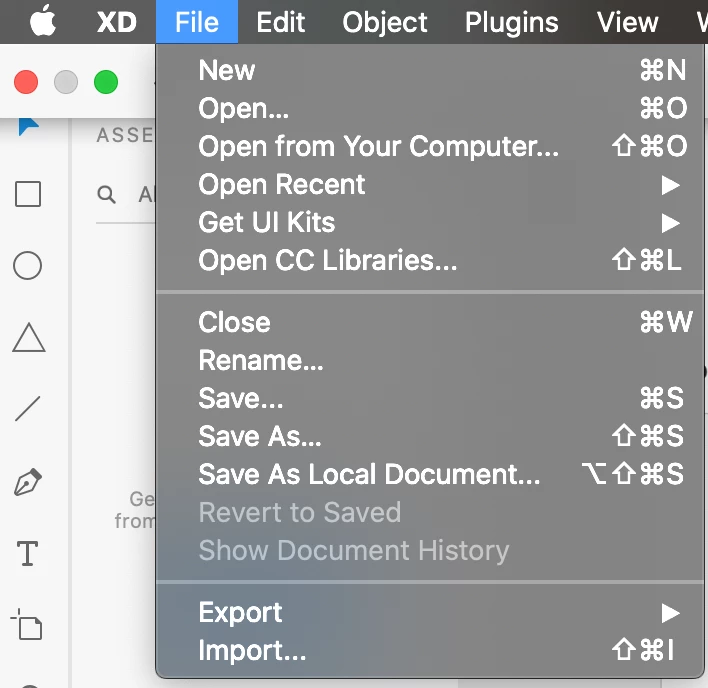
For now, in order to save the file as a local document, the options are available here for windows and mac operating system.


  • When you Save as a local document it will open the diaglog box where you can select the folder in which you want to save the file.
  • Save As will simply works as saving to the cloud document.


You may also submit your feedback here: https://adobexd.uservoice.com/forums/353007-adobe-xd-feature-requests/suggestions/40600444-open-local-documents-from-welcome-screen and upvote the request to add your voice.


Let me know if that helps.


Thanks,

Harshika

25 replies

Participant
September 10, 2020

Earlier, there was an option to save files either to Cloud or the local system. But now, I cannot find that option. Using version 32.2.22 


I want to save my files to local system as I'm frequently traveling and accessibility to the internet is sometimes an issue.

HARSHIKA_VERMA
Community Manager
Community Manager
September 10, 2020

Hi there,


Thank you for reaching out and sorry for the confusion. We had a similar discussion happened in past here: https://community.adobe.com/t5/adobe-xd/adobe-xd-saving-options-are-changed-after-xd-29/td-p/11146287?page=1. Please check the correct answer to this post and see if that helps.


Thanks,

Harshika

Participating Frequently
August 7, 2020

This is driving me insane. It's only giving me the option to save it in the cloud. There must be something I'm not seeing. Would appreciate it if someone could help me out. Thanks

Community Manager
August 8, 2020

Hi There,

Sorry for your trouble.

Instead of trying save or save as option under file menu, please try save as local document option. It will save your file at your Desktop or SSD.

Hope it will help.


Thanks,

Vertika Gupta

Adobe XD

Participating Frequently
July 28, 2020

I totaly agree with Claudia and on top of it I don't have "Save localy" option. Stop pushing the cloud down our throuats or we'll push you away.

Participant
June 25, 2020

maybe i'm missing something, but after the update, every time i save locally i must generate a new link???

superpain if you are updating live with yr client, and i dont see the point why i should save my works on the cloud if i dont need to.

i dont think this is the way to force clients to use new services you dont need.

Rishabh_Tiwari
Community Manager
Community Manager
June 25, 2020

Hi there,


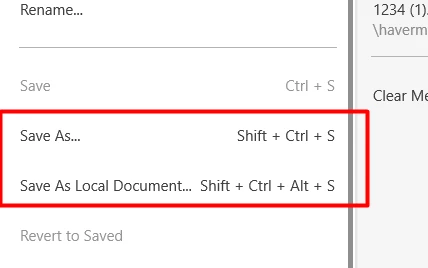
Thanks for reaching out. In XD 29 update, a new shortcut has been mapped for saving the file locally for the first time and that is   ⌥⇧⌘S for macOS and   Shift + Ctrl + Alt + S for Windows Operating System. So if you are saving the file for the first time, you can save using the shortcut mentioned above. In order to save the changes you can for sure use CTRL+ S and CMND +S and it will not change the location of the saved file and thus it will not ask you to create a new link instead you will be able to update the link.


Let us know if this helps or if you need any further assistance.


Regards

Rishabh

ryecooder
Participating Frequently
June 24, 2020

The new feature of saving to Creative Cloud by default is bad UI and terribly annoying!
I don't want to save my XD documents to Creative cloud as a default!
I can't stress this enough. It is slow and buggy.
To have the standard save shortcut routed to saving to Creative Cloud(online) is wrong. The default Save feature should only ever save to your local machine (unless specifically set to do otherwise by the user).

I've been using XD from the beginning and regard it as one of Adobe's best applications for simplicity of purpose and stability. BUT. When I first found that the new version was doing this I was like WHAAAAT! This is quite a blunder...PLEASE PLEASE correct it. My suggestion would be to put it as the secondary option NOT THE DEFAULT. See image attached.


Kind regards
Hamish

Designer/UI specialist.

HARSHIKA_VERMA
Community Manager
Community Manager
June 24, 2020

Hi Hamish,


I understand your frustration. I have seen customers giving feedback on the new UI of the saving dialog box in XD. The team is definitely working on it. We have shared all the feedbacks with the team and I will definitely pass on your feedback to the team to make improvements in future.


We really appreciate your patience.


I am also merging this post with the main post which has all the feedbacks for tracking purpose.


Thanks,

Harshika

Participant
June 20, 2020

I was directed to this thread by having a similar reaction on Twitter. This was after randomly not being able to find new files I created, only to realize my clients work (which they don't want in the "cloud") were indeed "in the cloud."


It's very clear from the XD folks who responded on social that this isn't an "issue" that's up for debate. It's more of a "your user experience is 100% OUR opinion, working as intended, fix your muscle memory" attitude which seems to be a running theme with XD.


The problem is, my basis of argument for many of the general features XD arbitrarily omits or decides to reinvent, come from already WELL DONE things that are standard for Adobe applications. I don't have an issue with XD being built from the ground up. I also greatly respect the innovation. What bothers me is the notion that basic existing conventions don't exist.


How could an Adobe application opinionate to an end user where a NEW file gets saved upon CTRL/CMD+S? Why would a CHOICE not be an out of the box feature? Why does the XD team make pretend their VERY successful and popular siblings Photoshop, Illustrator, and Indesign aren't sitting RIGHT there? Is it rebellion against dad and the family business? 🤣


Whatever the reason, stuff like this is why I get hyper frustrated with XD. Pardon the ranting.

Chris W. Griffith
Community Expert
Community Expert
June 18, 2020

Am not a fan of the change to the save options. Save As Cloud Document should be the four key choice. I understand Adobe's vision, but company policy says no third party clouds. So this just mean more work for my fingers. 

holliet
Participant
June 18, 2020
It was bad enough that the Save-As feature completely ignored my last used directory and forced me to jump through hoops, but now the short-cut ive been useing for TWO DECADES has been re-assigned to your next marketing pitch. No, i do NOT want to use your cloud features. This does not fit our model. We are not, will not, be interested. But now i have to hit FOUR KEYS in order to save. really?! You are flat-out harrassing your long time users for the possibility of a few dollars in the future when you jack up cloud prices. Now i have a double obstacle for saving my documents. First - if i'm working quickly they no longer open in the appropriate folders so i'm likely to save them accidentally in the wrong place and have to spend two hours hunting them down. And now it might not even be on my machine! YAY! Is there any team at all at Adobe assigned to actual user experience, or do you just make the products but not eat the dog food. Add to that making every new icon in the same typical workflow the same color. The exact opposite of what is useful to a user, but makes sense again.. from marketing. As a long time user, I feel that existing customers are being pushed out of adobe to make room for fresh meat willing to adopt any bad-practice cash cow adobe throws at them because they don't know any better.
HARSHIKA_VERMA
Community Manager
Community Manager
June 18, 2020

Hi there,


We understand that it could be frustrating for you. We have a similar discussion happening here: https://community.adobe.com/t5/adobe-xd/adobe-xd-saving-options-are-changed-after-xd-29/td-p/11146287


We would like you join the discussion.


Thanks,

Harshika

Participant
June 5, 2020

Hi, I just updated adobe xd and I can't recall if users could open local files directly once you open adobe xd ''launcher'' ( not sure what's it called) 


but I feel like there used to be open from your computer option or is that just my imagination? haha... can anyone verify for me? 


Community Manager
June 5, 2020

Hi JulsQ,

Thank you for writing to us, Yes there are few changes got done on welcome screen and more to come, Like my computer and few more.

My computer was in old build only.

Stay tune for more upcoming features.


Thank you,

Vertika Gupta

Adobe XD

Participating Frequently
June 4, 2020

Hi, could I please request that the "Save As" feature in XD map back to local file saving, as it does in all other programs? It seems counterintuitive coming from other programs that save to disk when doing "Save As". I work in a team that doesn't have CC access, and they need the files saved to hard drive, and Cmd-Shift-S is second nature to do this.

Thanks for your consideration.

Sjaani
Community Expert
Community Expert
June 4, 2020

I would suspect the additional Save As Local Document (Shift + Ctrl + Alt + S (Windows)) is the solution Adobe has offered for the saving to local drive to be possible. I'm assuming you have the same in your menu list on the Mac using Cmd + Option.

Participating Frequently
June 4, 2020

I do, thanks for suggesting that, however I am proposing that "Save As..." should default to saving to disk (or at least presenting an option to do so), to avoid confusion. Traditionally, "Save As..." saves to disk in other Adobe programs.