


Participating Frequently
May 3, 2020
Question

AI-file color change in XD

  • May 3, 2020
  • 2 replies
  • 4878 views

Hi, 

I have hired a freelancer to make illustrations for me which he is making in illustrator, I want to check the AI so they are correct and I do that using XD (because that is what I use). For some weird reason the colors change a lot. The cartoon who is supposed to have brown skin color gets a red skin color. If anyone has a clue what the problem is please let me know.


The picture shows the difference. Please note that the one to the left is the same AI-file as the one I have opened in XD to the right.


Thanks for all the help!

//Carl
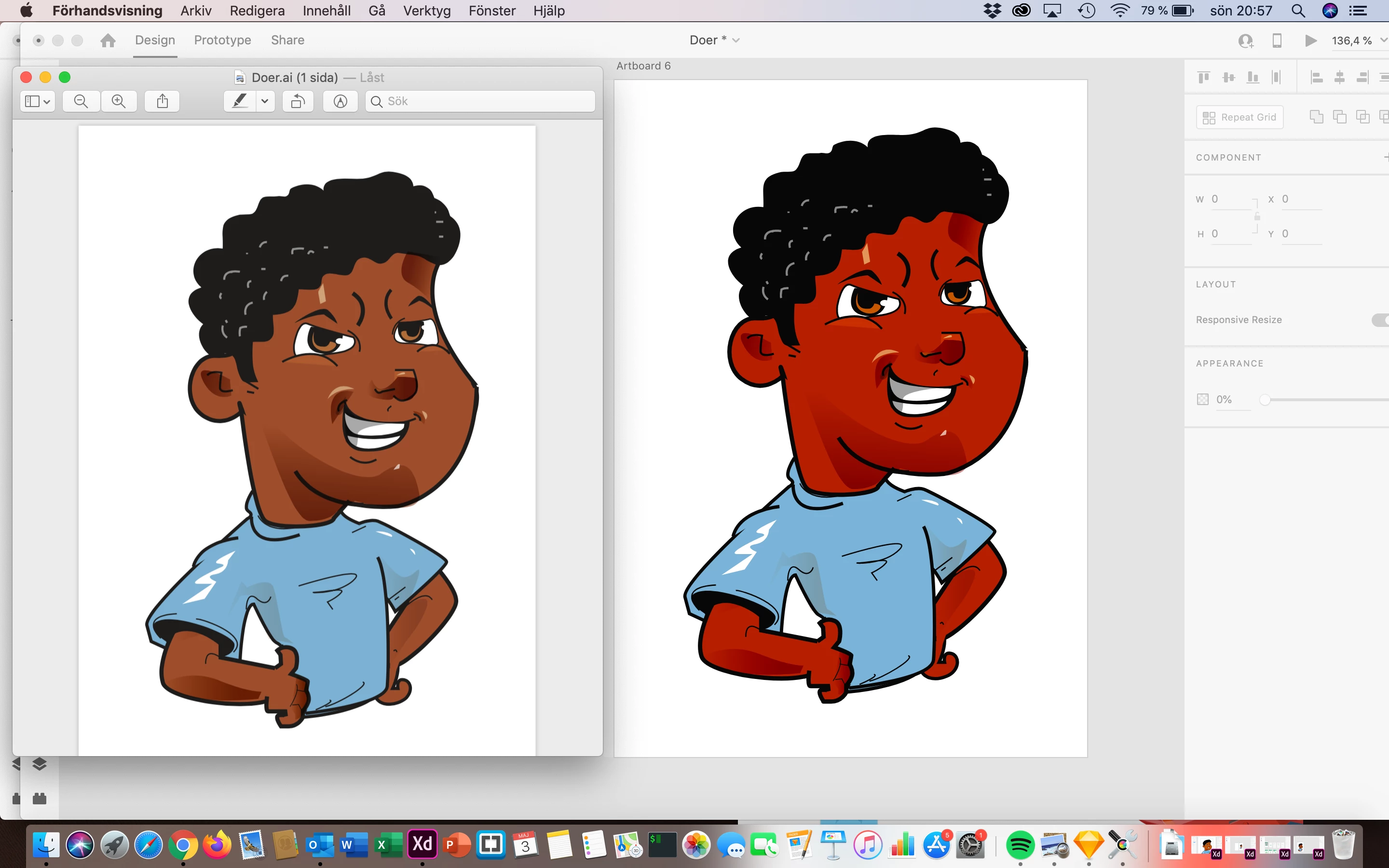


This topic has been closed for replies.

2 replies

Participant
June 2, 2021

Hey Carl,

Not sure if this has been resolved for you since the question is almost a year old. But I faced the same problem today and found this query and also found kind of a solution.


What you can do is finalize your illustration in Illustrator, the colour mode should be RGB, then group the whole illustration > Object > Flatten Transparency and then paste it in XD.


This should hopefully solve your problem.

Best,

Abhishta

Rishabh_Tiwari
Community Manager
Community Manager
June 2, 2021

Hi Abhishta,


Thanks for reaching out and sharing your findings, I am sure it will help other community members. This generally happens as Adobe XD is not color-managed and for the best viewing experience, we recommend using the SRGB profile for colors on the monitor. Please upvote this request https://adobexd.uservoice.com/forums/353007-adobe-xd-feature-requests/suggestions/17480899-color-management-set-color-profiles to add voice to the feature.


Regards

Rishabh

Eugenio.NYC
Participating Frequently
May 4, 2020

Ok,

Did you copy paste? saved as a PNG? JPG? SVG?

What is the color mode of the Illustration?

Those colors are HEX colors, pantone, RGB?

What is the color profile?

LMK

e

Participating Frequently
May 16, 2020

Hi,

Sorry for late reply, I've had a lot going on but I very much appreciate your response.


I must say that I am completely a beginner at illustrator. As I sade I hired a freelanser to do this design but I got adobe illustrator today to see what the issues are with the colors and this is what it says on the color settings. 


As you can see the color is not so bad in illustrator but ones I take it from illustrator and opening it in any other program ex: XD or after effects it gets that red color.


Any ideas?


Thanks again,

Carl


Monika Gause
Community Expert
Community Expert
May 16, 2020

Try and File > Document color mode > RGB.

Then save as a new file and then try and import it into Xd or After Effects.