


Participant
January 15, 2021
Answered

Can't add names to colors

  • January 15, 2021
  • 1 reply
  • 596 views

Hello All,


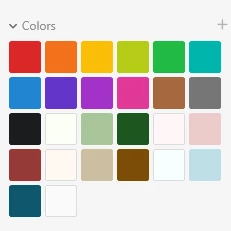
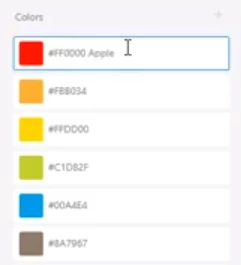
I apologize if this is silly, but I have looked over tutorials to understand how to add a name to a color to make it a design token. However, I'm unable to do so because my panel looks different. It does not include any name only a swatches palette. Could someone tell me what I'm doing wrong?

My display:
Tutorial displays:
 

Thank you,

Eric 
This topic has been closed for replies.
Correct answer HARSHIKA_VERMA

Hi Eric,


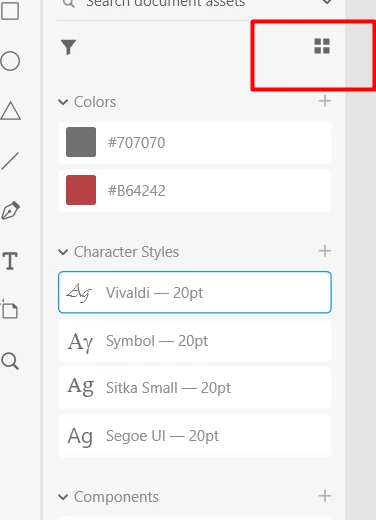
Thank you for reaching out and using Adobe XD. You need to switch from "List view" to "Grid view" and then you should be able to rename assets in the panel. Please see the attached screenshot below-


Hope it helps.


Thanks,

Harshika

1 reply

HARSHIKA_VERMA
Community Manager
HARSHIKA_VERMACommunity ManagerCorrect answer
Community Manager
January 15, 2021

Hi Eric,


Thank you for reaching out and using Adobe XD. You need to switch from "List view" to "Grid view" and then you should be able to rename assets in the panel. Please see the attached screenshot below-


Hope it helps.


Thanks,

Harshika

Participant
January 15, 2021

That's it! Thank you so much.


I feel silly missing that. I think I clicked everything but.


Stay safe and be well,

Eric

HARSHIKA_VERMA
Community Manager
Community Manager
January 20, 2021

You're welcome. Please feel free to reach out to us in the future for any query related to XD. We'd be happy to help.


Thanks,

Harshika