

Inspiring
April 5, 2022
Answered

Component activate state of another component

  • April 5, 2022
  • 1 reply
  • 1027 views

Hi,

I have a checkbox that when clicked should enable a dropdown.  Is this possible in XD?  (I would rather not use another artboard to accomplish this.)
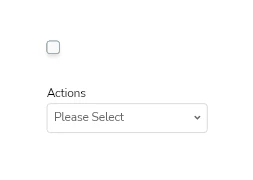
Thank you.

    This topic has been closed for replies.
    Correct answer Spas K.

    Hi Doug. Unfortunately, what you're trying to do isn't supported in Xd. There's a feature request for it.


    If your checkbox and dropdown are close to one another, you can put them both in one main component. So if both elements are components, they will be nested inside the parent component. This parent component will have 2 states - one with the checkbox unchecked and the dropdown invisible, and another with checkbox checked and dropdown visible. You can make it so when the checkbox is clicked, the parent component switches to the state where the checkbox is checked and the dropdown is visible.


    One note: When adding triggers to a nested component, you will still not be able to see the parent component's states. To get around that, put the nested component (the checkbox) in a group on it's own. Then add the trigger to the group, and you will be able to see the parent's states.


    Of course, this is all considering your both components are relatively close and putting them in another component is a viable option. If they are far away and there's a lot of elements inbetweeen, it might not be practical to do at all.


    In case you still can't get it to work, feel free to upload the .xd file somewhere and share the link here, or via PM if it's sensitive, and me or someone else will take a look and help you out with setting it up.

    1 reply

    Community Manager
    April 6, 2022

    Hi Doug21784293dvss,

    Thank you for contacting us, Yes, you can try out with the component state interactions, 
    1.Create a Component 
    2.Add ststaes to it
    3. Go to the prototype mode

    3.In prototype mode , you will able to see options: Trigger, Action under Action  Type> Destination ,under destination you can select the state.


    Hope it helps.


    Regards,

    Ashwini

    Inspiring
    April 6, 2022

    Thank you Ashwini, but the problem I am having is that the checkbox component cannot "see" the dropdown component states or the dropdown component at all for that matter.


    I did try putting both components in a group, but this did not help.


    Inspiring
    April 6, 2022

    Hi Doug. Unfortunately, what you're trying to do isn't supported in Xd. There's a feature request for it.


    If your checkbox and dropdown are close to one another, you can put them both in one main component. So if both elements are components, they will be nested inside the parent component. This parent component will have 2 states - one with the checkbox unchecked and the dropdown invisible, and another with checkbox checked and dropdown visible. You can make it so when the checkbox is clicked, the parent component switches to the state where the checkbox is checked and the dropdown is visible.


    One note: When adding triggers to a nested component, you will still not be able to see the parent component's states. To get around that, put the nested component (the checkbox) in a group on it's own. Then add the trigger to the group, and you will be able to see the parent's states.


    Of course, this is all considering your both components are relatively close and putting them in another component is a viable option. If they are far away and there's a lot of elements inbetweeen, it might not be practical to do at all.


    In case you still can't get it to work, feel free to upload the .xd file somewhere and share the link here, or via PM if it's sensitive, and me or someone else will take a look and help you out with setting it up.


    Thank you K.


    This will be awesome feature - do you have any idea when it will be developed?


    Being able to keep these components de-coupled would go a long way to reducing the time it takes to put together working prototypes.  This has been one of the most significant challenges I have faced on the project I am currently on.


    For now, I'm going to swallow my pride and use another artboard, but if I have some time to play I'll give your solution a try.


    Thanks again - appreciate your help.