


[Crash/Load]-Unable to open Adobe XD files from Google Drive File Stream.
I have an ongoing issue opening Adobe XD files from the Google Drive File Stream.
The company I work for keeps their files on Google Drive and we work through the Google drive file stream to access our files, so it's important for me to keep working this way. When I open Adobe XD, the program freezes then freezes my entire computer for roughly 10 minutes. When my computer finally works this is the error I see:
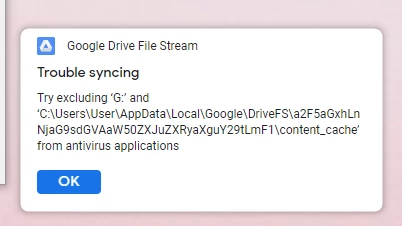
Once Adobe XD has opened, files open normally. But if I close the application the problem occurs again.
I've tried troubleshooting the problem with my IT department and they suggested this fix:
    Uninstall XD.
    Quit Creative Cloud Desktop app and kill all related processes from Task manager.
    Delete temp files by going to run(Win+r) then %temp%
    Delete Adobe XD CC folder from  C:\Program Files\Common Files\Adobe
    Restart  computer and install XD
This fix works for a while but gradually the problem starts to appear again. I don't think this is a google drive problem as this issue only occurs with Adobe XD.
Here are my computer details: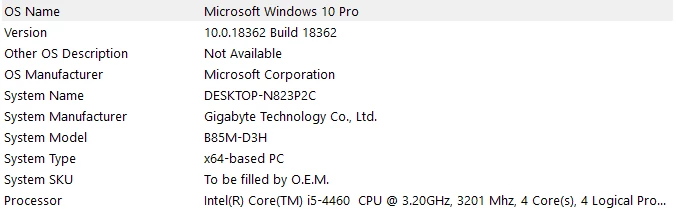
I attempted to run an error log:
AdobeLogs_20200129_114245_498-win.zip
Thank you
<The Title was renamed by moderator>
 AdChoices