Participating Frequently
January 26, 2020
Answered

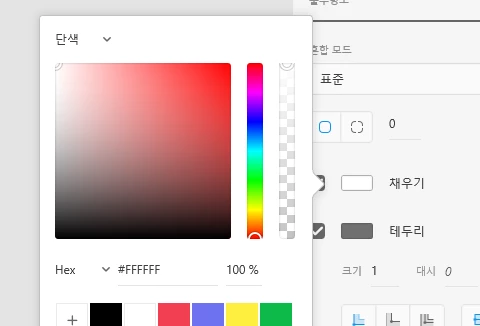
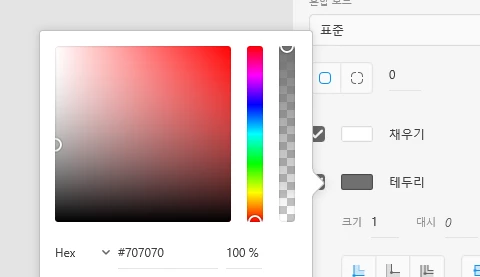
[Design]-How can I give gradient color to a border (stroke) in XD?

  • January 26, 2020
  • 4 replies
  • 25707 views

does XD have gradient function on border too?

i see no any other color-options when creating a border on a shape. .
 

<The Title was renamed by moderator>

This topic has been closed for replies.
Correct answer Peter Villevoye

You can mimic the effect by creating an object with a gradient fill, and overlapping it with a slightly smaller element with a normal solid fill. And if you need just a gradient line, then let the Pathfinder cut the smaller object away from the larger lower one. It's a make-shift method, but delivers the effect.


Please take note that when developers are going to recreate your design with HTML, it's much more difficult to achieve this gradient line effect in CSS. It's available as an SVG property, though (a web-ready drawing). But XD won't support it, even when you create a gradient line in Illustrator, save it as an SVG and then import that into XD. It just won't appear... 

4 replies

Participant
January 20, 2022

You can convert your shape to a stroke (ctrl + alt + O) and after that you can give it a background to that stroke/outline. Credits to: https://www.youtube.com/watch?v=fB7VwdOzigQ

(Please don't remove this comment and the tutorial link)

Peter Villevoye
Community Expert
Peter VillevoyeCommunity ExpertCorrect answer
Community Expert
May 16, 2020

You can mimic the effect by creating an object with a gradient fill, and overlapping it with a slightly smaller element with a normal solid fill. And if you need just a gradient line, then let the Pathfinder cut the smaller object away from the larger lower one. It's a make-shift method, but delivers the effect.


Please take note that when developers are going to recreate your design with HTML, it's much more difficult to achieve this gradient line effect in CSS. It's available as an SVG property, though (a web-ready drawing). But XD won't support it, even when you create a gradient line in Illustrator, save it as an SVG and then import that into XD. It just won't appear... 

HARSHIKA_VERMA
Community Manager
Community Manager
January 28, 2020

Hi there,


Thank you for reaching and sharing your feedback. In addition to what Anita has suggested, there is a direct link of the similar request that you can upvote here: https://adobexd.uservoice.com/forums/353007-adobe-xd-feature-requests/suggestions/17796841-apply-gradient-to-border-stroke 


We would request you to please submit your feedbacka and upvote the request to add your voice.


Hope it helps.


Thanks,

Harshika

yoitsmarco
Participant
May 16, 2020

I was wondering about that too.  I hope that will be a new feature in the upgrades because I've been enjoying XD thus far.

Community Manager
January 27, 2020

Hello,

Sorry for inconvenience. For now,there is no abilities to put gradients on border/stroke. But you may see in future release, Feature has been already raised by other customers Adobe XD Feedback : Feature Requests & Bugs ,please go and vote .

Thank you,

Anita Subedi