


New Participant
January 28, 2020
Answered

[Design]-Responsive Button Resizing with text in XD.

  • January 28, 2020
  • 2 replies
  • 11444 views

Is there a way to get the button background to resize automatically when you change the text? I'm working on building out our design system library and need these buttons to automatically resize to the full-width for longer copy and every responsive resize that I've tried hasn't worked. The text will go longer but the background won't resize with it. If someone can send a screenshot of how they set it up in the responsive resize that would be great!
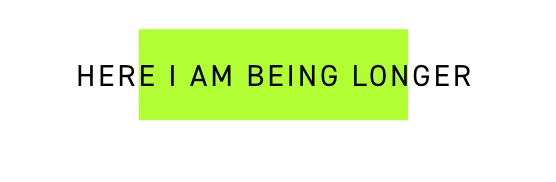


<The Title was renamed by moderator>

This topic has been closed for replies.
Correct answer Chethan Girish

Hi Nikki,


Thank you for reaching out and sorry to hear that you're facing issue with responsive button resizing. 

Please check in the below link for how to Create a button that resizes based on the text inside ,Please download the latest version of XD, and enjoy the new features.

https://community.adobe.com/t5/adobe-xd/create-a-button-that-resizes-based-on-the-text-inside-xd-26/td-p/10885505?page=1


Please let us know if that helps.


Thanks,

Chethan

2 replies

HARSHIKA_VERMA
Community Manager
Community Manager
January 29, 2020

Hi Nikki,


Thank you for using Adobe XD and trying the new feature. As Chethan suggested, please let us know if you are able to recreate the same effect or if you need any further assistance from our end.


We would be happy to help.


Thanks,

Harshika

alejandroc12899862
New Participant
October 11, 2020

Hi Harshika,


I have the same need but I don't see the padding option in the rigth panel. I follow in the next steps:


1- Create a square

2- Créate a text

3- Make a group

4- Make a component of this group

5- I don't see te padding option


What is the problem? I have the 33.1.12 version of Adobe XD

HARSHIKA_VERMA
Community Manager
Community Manager
October 12, 2020

Hi Alejandro, 


Sorry to hear you are unable to see the padding option in XD. I tried your steps and I am able to see the padding option at my end on windows machine. Please see the attached screenshot below-


Which Operating system you are working on?


We will try our best to help.


Thanks,

Harshika

Chethan GirishCommunity ManagerCorrect answer
Community Manager
January 29, 2020

Hi Nikki,


Thank you for reaching out and sorry to hear that you're facing issue with responsive button resizing. 

Please check in the below link for how to Create a button that resizes based on the text inside ,Please download the latest version of XD, and enjoy the new features.

https://community.adobe.com/t5/adobe-xd/create-a-button-that-resizes-based-on-the-text-inside-xd-26/td-p/10885505?page=1


Please let us know if that helps.


Thanks,

Chethan

New Participant
August 26, 2021

Hi! I have a follow up question for this one. 


Is this possible to do with a "non-square" shape? I have a parallellogram with sides angled to 60 degrees. Can I get the box with this irregular shape to act like a square box without messing up the 60 degree angles?