New Participant
November 15, 2021
Answered

Different size carousel

  • November 15, 2021
  • 1 reply
  • 625 views

Hi all, 

I try to google all about this question, but I can't find any soultion. 


Do you know how to do a carousel, but it come with different size and with animation when we swipe on screen. 


Here is the image:
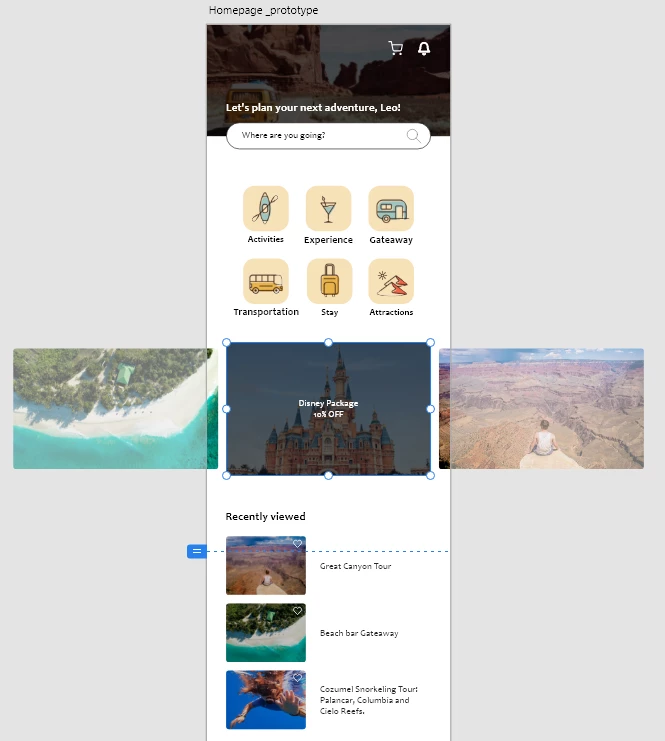
This is just a example. As you can see the left and right pictures are smaller than the middle one. 

Therefore, how do we moothly display when we swipe to the left? 

(BTW, I'm doing prototype)


Thank you  

This topic has been closed for replies.
Correct answer Spas K.

1. Add a drag interaction to the group with the slides, that points to the second artboard, and set the action to "auto-animate". This will create a smooth transition as you drag from one artboard to the next.

2. On the second artboard, move the group with the slides to the left, and match the smaller image to the "active" image (make it a bit bigger, add the overlay / text). At the same time, the image that was in view should lose the overlay and become smaller like the one on the left.


This tutorial shows exactly your use case.

1 reply

Spas K.
Spas K.Correct answer
Inspiring
November 15, 2021

1. Add a drag interaction to the group with the slides, that points to the second artboard, and set the action to "auto-animate". This will create a smooth transition as you drag from one artboard to the next.

2. On the second artboard, move the group with the slides to the left, and match the smaller image to the "active" image (make it a bit bigger, add the overlay / text). At the same time, the image that was in view should lose the overlay and become smaller like the one on the left.


This tutorial shows exactly your use case.