



okravetz2
New Participant
June 9, 2020
Answered

Document Unavailable Error

  • June 9, 2020
  • 1 reply
  • 1880 views

I had a cloud document open that is shared with others and has co-editing enabled. I am the document owner. I stepped away from my computer for a minute and when I came back I saw the following error:
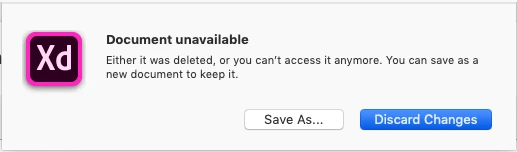


I received this error once before and selected "Save As..." only for the document not to save and and for my changes to be lost.

What is causing this and how do I prevent it in the future? And is there a better way to restore changes if it manages to Save As... successfully other than copying & pasting those changes in?

This topic has been closed for replies.
Correct answer HARSHIKA_VERMA

Hi @Balaji_Dhayalan,


Sorry for the trouble, and thanks for trying the steps suggested. Would you mind checking the file here: https://assets.adobe.com/cloud-documents? Please ensure you're logged in with the right Adobe ID.


Let us know if that helps.


Thanks,

Harshika 

1 reply

Rishabh_Tiwari
Community Manager
Community Manager
June 9, 2020

Hi there,


We're so sorry to hear about the trouble. We will need a few more information so that we can troubleshoot this for you. Please help us with the details like:


  1. A screenshot of the About XD info page.
  2. Is there any possibility of internet disruption when you left the system? This may not be the reason for this error however this information is required to isolate the issue.
  3. Does this happen with this specific file or with other files as well?
  4. Please try the steps shared here: https://helpx.adobe.com/xd/kb/issue-saving-xd-file-creative-cloud.html and let us know if it helps.


Regards

Rishabh

okravetz2
okravetz2Author
New Participant
June 9, 2020

Thank you Rishabh,


  1. It's possible theoretically, but no one in my home noticed if an internet disruption occurred.
  2. I've been primarily working with one specific cloud file, so I have not been able to test with other files.
  3. I will try these steps.


I will update the post if it occurs again.

Rishabh_Tiwari
Community Manager
Community Manager
June 11, 2020

Sure, feel free to update this discussion in case if it still doesn't work, we'll try our best to help you with it.