


New Participant
December 7, 2022
Answered

Drag Animation not working properly

  • December 7, 2022
  • 3 replies
  • 1035 views

Hi, I have made this design (for reference). You can see the prototypes and design.
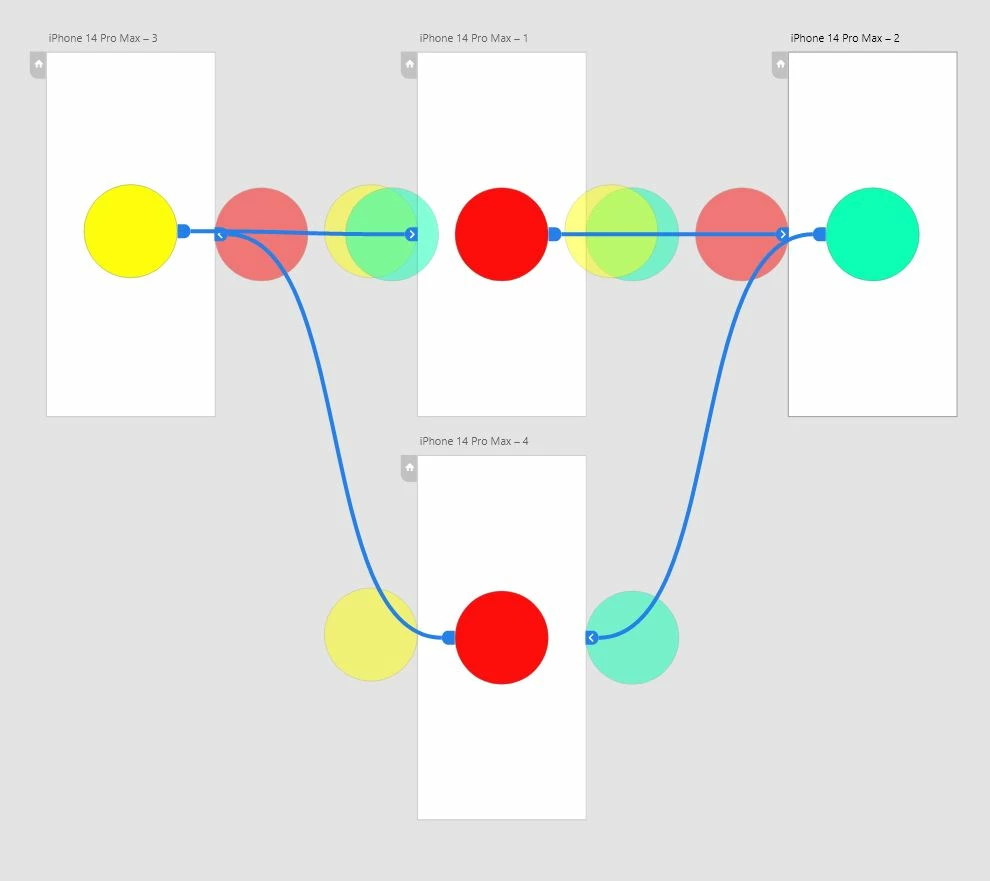
 

So here's the animation preview (attached), I can't go back to the first page without scrolling all the way to the front. How would I be able to do that?


Thanks,

Hamza.

    This topic has been closed for replies.
    Correct answer Dan Rodney

    XD can't have 2 drag interactions on the same element. You can only drag one direction (such as forward, but not back), so what you're looking to do is not possible.

    3 replies

    Dan Rodney
    Dan RodneyCorrect answer
    Adobe Expert
    December 8, 2022

    XD can't have 2 drag interactions on the same element. You can only drag one direction (such as forward, but not back), so what you're looking to do is not possible.

    — Adobe Certified Expert & Instructor at Noble Desktop | Web Developer, Designer, InDesign Scriptor
    Dan Rodney
    Adobe Expert
    December 8, 2022

    I forgot to mention, Figma can do 2 drag interactions so what you're looking to do is possible in Figma.

    — Adobe Certified Expert & Instructor at Noble Desktop | Web Developer, Designer, InDesign Scriptor
    New Participant
    December 8, 2022

    Ok, Thanks for letting me know.

    Ares Hovhannesyan
    Brainiac
    December 7, 2022

    IMHO you need to add trigger from the last page to start page.

    HARSHIKA_VERMA
    Community Manager
    Community Manager
    December 7, 2022

    Hi @Rana Hamza,


    Thank you for reaching out and sharing the design and video. Could you please share the screenshot of the property panel on the right side so that we can check the triggers set up in the design? 


    We will try our best to help.


    Thanks,

    Harshika

    New Participant
    December 8, 2022

    Hi, Thanks for replying.

    The screenshot is attached, all the prototypes have the same drag Trigger and type as Auto-Animate.