


Participating Frequently
June 7, 2023
Answered

Editing character styles not working

  • June 7, 2023
  • 10 replies
  • 5068 views

Steps:

  1. Install 57.0.12.14 x64
  2. Open (cloud) file created in previous versions.
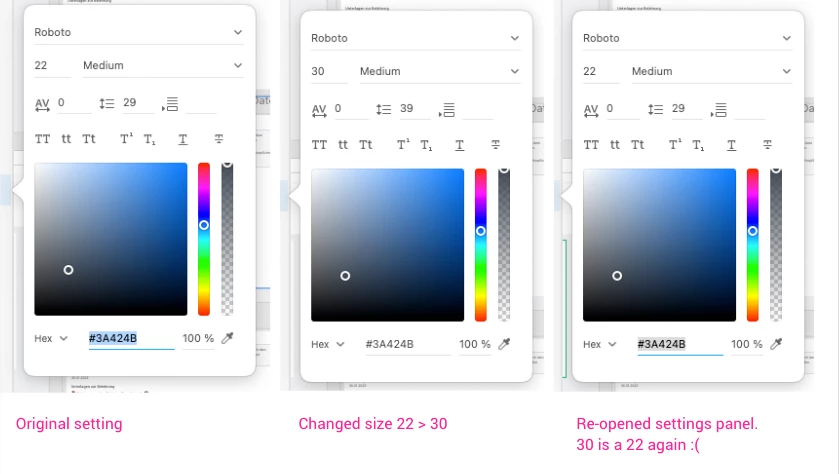
  3. Character Styles > select custom style > click Edit
  4. change color, font size, whatever
  5. close edit panel and open it again (repeating step 3)


Result: It is still showing the previous character settings.

Expected: I see the changes I made.


When I use a file created with the newest version, everything is working fine. Can someone help me?

Thanks!


    Correct answer HARSHIKA_VERMA

    Hi All,


    Thank you for your patience and cooperation.


    The team has addressed this issue in the latest release (XD 57.1). Please check for updates in the Creative Cloud Desktop and update XD.


    Let us know if the issue is resolved. We will be waiting for your response.


    Thanks,

    Harshika

    10 replies

    HARSHIKA_VERMA
    Community Manager
    HARSHIKA_VERMACommunity ManagerCorrect answer
    Community Manager
    July 11, 2023

    Hi All,


    Thank you for your patience and cooperation.


    The team has addressed this issue in the latest release (XD 57.1). Please check for updates in the Creative Cloud Desktop and update XD.


    Let us know if the issue is resolved. We will be waiting for your response.


    Thanks,

    Harshika

    BrianS23
    Participating Frequently
    July 11, 2023

    The issue is with 57.1.12 


    that's still the one on creative cloud. 

    HARSHIKA_VERMA
    Community Manager
    Community Manager
    July 11, 2023

    Hi @BrianS23,


    The issue first appeared in the XD 57 version, which the team later investigated and fixed in the Xd 57.1 release. Are you still experiencing the issue in XD 57.1? Could you please check on the new XD file and share the observations?


    We will try our best to investigate further.


    Thanks,

    Harshika

    New Participant
    June 30, 2023

    I have uninstalled XD 57 and reinstalled XD 56. And now my character styles are working again. Guess this is thhe only solution so far.

    New Participant
    June 22, 2023

    Hallo liebe Community,


    ich habe bei all meine Projekten mit den Dokumentelementen gearbeitet. Also dort Farben, Font/Zeichenformate, Komponenten erstellt.

    Wenn ich z.B. einen Font ändern möchte, dann habe ich ihn links bearbeitet und er wurde automatisch überall geändert. Dies geht nun nicht mehr. Ich kann zwar auf bearbeiten klicken und dort andere Daten eingeben, aber der Style links bei den Zeichenformaten bleibt immer der alte.


    Der Support hilft nicht wirklich weiter. Habt ihr hier Erfahrung?

    HARSHIKA_VERMA
    Community Manager
    Community Manager
    June 22, 2023

    Hi @Denis Pellegrini,


    Thank you for reaching out and bringing this issue to our attention. We understand the inconvenience you're experiencing. We are unable to replicate the problem on a Windows machine so far. In order for us to better assist you, could you kindly provide a short video demonstrating the issue?


    Additionally, it would be helpful to know if this problem occurs with all files or just a specific one. Please also provide us with the version of XD installed on your machine and the details of your operating system.


    We will make every effort to assist you with the issue.


    Thanks,

    Harshika

    New Participant
    June 22, 2023

    Hi @HARSHIKA_VERMA 

    Here a video about the issue & i think i found also the solution.


    I have the this problem since a few days & it appears on all projects which i made so far.
    XD Version: 57.0.12 (cloud); Windows 11 - Version 22H2, Build 22621.1702

    Dan Rodney
    Community Expert
    June 21, 2023

    I just saw there's a new update for XD. I haven't tried it yet, but maybe that includes the bug fix.

    — Adobe Certified Expert & Instructor at Noble Desktop | Web Developer, Designer, InDesign Scriptor
    DavidMatos
    Inspiring
    June 13, 2023

    Exact same thing here. Adobe, why ignoring the pain in the ass for so long?

    New Participant
    June 12, 2023

    I have the same exact problem. Asset editing is not saved across all component instances, it goes for all type of components, not only character styles. It's unbelivable how updates are released with that kind of bugs. Now it's preventing me from work as file autosaved on new version and now I can't open it with older, working version.


    My patience toward XD is wearing really thin and I'm close to switching it for competition's software.

    Dan Rodney
    Community Expert
    June 12, 2023

    With Adobe trying to purchase Figma, they have stopped selling XD to new customers and will not be adding any new features (just bugs fixes, which in this case accidently added a bug). You should switch to Figma as soon as possible.

    — Adobe Certified Expert & Instructor at Noble Desktop | Web Developer, Designer, InDesign Scriptor
    New Participant
    June 12, 2023

    I'm currently experiencing the same issue. Any edits on a character style does not change it.


    Running on XD v57.0.12, Mac OS Ventura 13.4

    Adobe Employee
    June 9, 2023

    Hi @thomask81164319 

    Sorry for the inconvience. We have rectified the issue and logged the ticket.
    Our team is actively looking into this issue. We will update you for the fix.
    Please let us know if any further assistance you need.

    BrianS23
    Participating Frequently
    June 27, 2023

    Why can't you guys just push out the older version as an update since there is clearly no headway on this..... My team has not been able to work efficiently for the past 16+ days... We have all installed an older version but most of our stuff was Autosaved to the cloud in the newer version and XD keeps telling us to update to access these files.... 

    New Participant
    July 4, 2023

    Same here! Our entire team has to use workarounds wherever possible, but this is getting very frustrating. Can we at least assume that this bug will be fixed in the next 1-2 weeks?

    brnhrst
    New Participant
    June 8, 2023

    I can confirm this buggy behavior. Editing character styles no longer works reliably and components no longer update when the primary component is updated.

    HARSHIKA_VERMA
    Community Manager
    Community Manager
    June 8, 2023

    Hi @brnhrst@thomask81164319 


    We are sorry to hear you are having trouble with character styles in XD 57 version. Would you mind telling us if it's happening with new files also or with old files only?


    Please share the details of your operating system. 


    We will try our best to help.


    Thanks,

    Harshika


    brnhrst
    New Participant
    June 9, 2023

    Hi! In new files created with XD 57 everything works fine. Unfortunately, I have a lot of project template files created with older versions, so recreating them is not a solution. I have now reinstalled XD 56 where these "broken" files still work.


    My operating system is macOS 13.4 on a M1 MacBook Pro.


    It would be great if you guys can find a solution! Thanks!

    Dan Rodney
    Community Expert
    June 7, 2023

    I see an update for XD was just released yesterday, did you install that update? Does that fix your issue or did it create the problem?

    — Adobe Certified Expert & Instructor at Noble Desktop | Web Developer, Designer, InDesign Scriptor
    Participating Frequently
    June 7, 2023

    Thanks for your reply! I just updated this morning (Germany, new version in my previous post). This created the problem.