sutteng
Participant
October 29, 2021
Answered

How can I change xxhdpi resource to mdpi?

  • October 29, 2021
  • 1 reply
  • 970 views

I confirmed that 'design at' disappeared after the Adobe xd 45.0 version update.
Then, how can I make the xxhdpi resolution resource into mdpi?
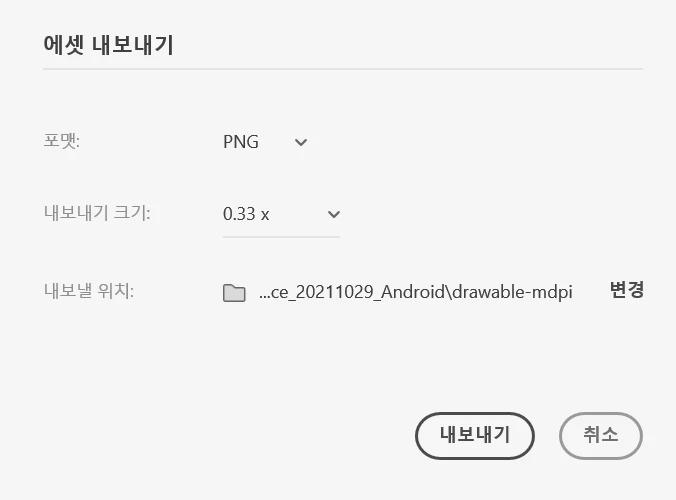
Is it best to write 0.33x (approximate value) directly in 'Export size'?


This topic has been closed for replies.
Correct answer Corina Murgila

Hi Corina.


How is one supposed to divide exactly by 3 when exporting? The field doesn't seem to accept fractions. A decimal doesn't work. 0.33 x isn't exactly 1/3rd. Given this user's case, a 2280 width artboard exported into 1/3 of the resolution should result in 760. 0.33x gives a width of 753.


Before we could pick "Designed at" 3x, and the export would divide exactly into 3 for 1/3rd of the resolution. Now it seems you can't really do that.


The previous implementation might have been confusing for some people, but I don't think just removing the "designed at" field was the right fix. Now it seems more limiting than it was before...


Ok, now I understand you usecase here.

My apologies, this was indeed a slip from our side.

I'm working with the team as we speak to find what’s the best solution here.

I'll let you know once I have more news.


Thank you, 

Corina

1 reply

Rishabh_Tiwari
Community Manager
Community Manager
October 29, 2021

Hi there,


Thanks for reaching out. Please try the suggestions shared here https://helpx.adobe.com/xd/help/export-design-assets.html and let us know if this helps or if you need any further assistance.


Regards

Rishabh

sutteng
suttengAuthor
Participant
November 1, 2021

Hi.

Thank you for your reply.


I read the help suggestion, but it didn't help me.

That site explains it based on 'mdpi' (ex)360×760),

But what I want to know is 'If the basic screen is made into xxhdpi (ex)1080×2280)

In this case, how can I make xxhdpi Resource into mdpi?

Is there only a way to directly enter an approximate value of 0.33x?


+) I've been choosing xxhdpi in the 'designed at' before the update.

Corina Murgila
Adobe Employee
Adobe Employee
November 1, 2021

Hi,


Yes, you can enter by hand any value between 0.1x and 10x. Just type in your input.

Pleae let me know if this helps!


Thank you

Corina