


How to create an animated button and transaction to next artboard in XD?
Hello everyone, im Niki.
I'm a beginner in adobe xd and could use your help, since i cannot find all the answers on youtube 🙂
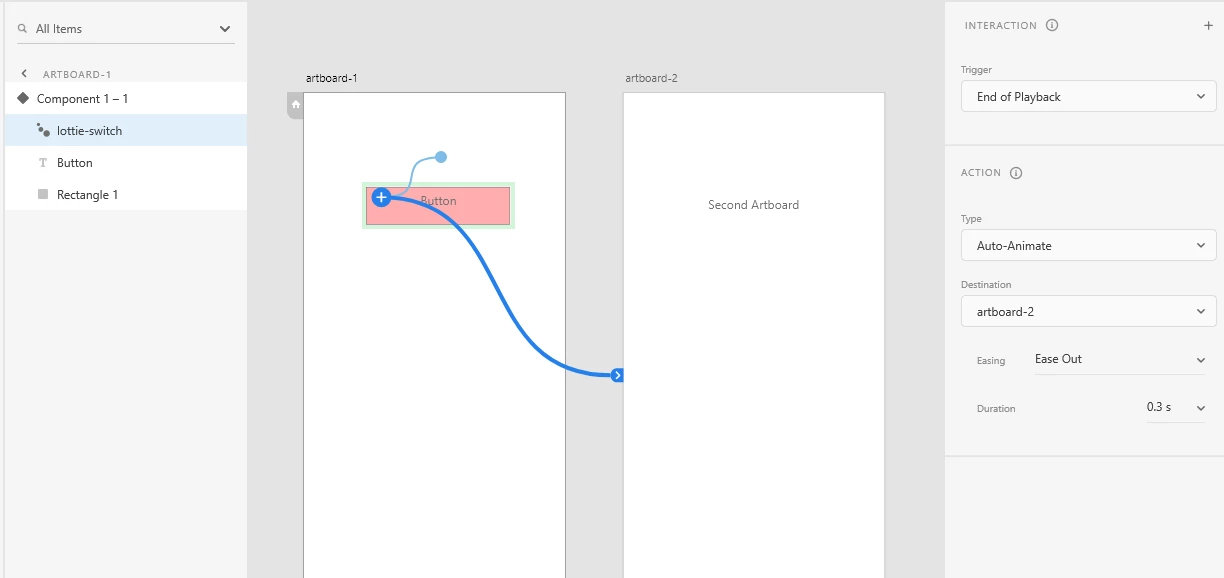
Ive created a component, which is an action button, that has two states: the default state and the "click" state. Now on the click state I did a few visual changes, so the users gets the feeling of a real button when clicking on it. I managed to connect the default state to the click state and get the animation done. My problem now starts here: When Im in prototyping mode and trying to connect this button to the next page, I want that when I click/tap on the button to see the animation and transact on the same time to the next page, but so far i didnt manage to do that. What is happening is that i do one tap and i get the animation and then i need to click AGAIN to transact to the next artboard. Is there a way to connect this, so i wont have to click twice on the button? Coz also in real apps when you click you see the animation and you transact immidiately, you dont have to click again....
Hope you guys understand my question, I've tried to explain it the best i could :S
Looking forward to hear from any of you 🙂
Kind Regards
Niki
<Title renamed by moderator>
 AdChoices