


Participant
June 24, 2022
Answered

How to get correct dp number from xdpi sketches

  • June 24, 2022
  • 1 reply
  • 569 views

Hi.
Regarding development link, it is so convinient solution to sharing design spec.
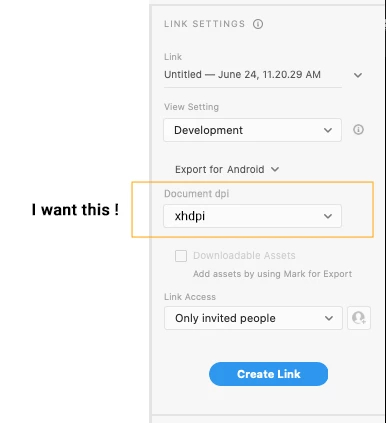
But Export for Android mode looks only for mdpi sketch.
I strongly want to set Document Dpi. If already have some solution, please let me know.
    This topic has been closed for replies.
    Correct answer Spas K.

    Development view will always show exactly the size inside Xd. You can't modify that, unless you scale down the elements / assets manually to half their size.

    1 reply

    Spas K.
    Community Expert
    Community Expert
    June 24, 2022

    Hi there, can you tell us more about what you're trying to do exactly?


    We used to have an option through the Batch Export window, which was a field called "Designed at", where you could set what dpi / resolution your designs were, and Xd made calculations based on that. Unfortunately, many users were confused due to the way the interface was designed and how it was worded, so the team decided to remove that feature altogether.


    I raised the issue 2 years ago, since there were some cases where the "new" solution didn't work, similar to your case, but I guess the team didn't want to go back on their decision or find another solution.


    Nevertheless, you can either downscale your files to fit the 1x box artboard sizes, and Xd will scale them up / down accordingly upon export. You can also have them at the xhdpi res and manually export through batch (File > Export > Batch) whatever percentages you need.

    Y_nkzAuthor
    Participant
    June 26, 2022

    Hi, Thank you for your quick reply.
    I mentioned about the case sharing development view like below, not about exporting assets.

    Since I made a sketch as xdpi resolution, the dp unit is always x2 scale in development view.
    I want to get 1/2 dp from this, somehow.


    Spas K.
    Community Expert
    Spas K.Community ExpertCorrect answer
    Community Expert
    June 26, 2022

    Development view will always show exactly the size inside Xd. You can't modify that, unless you scale down the elements / assets manually to half their size.