



Edu Couchez
Inspiring
June 10, 2021
Answered

Infinite loop updating libraries in XD 41 and 44 versions

  • June 10, 2021
  • 12 replies
  • 6582 views

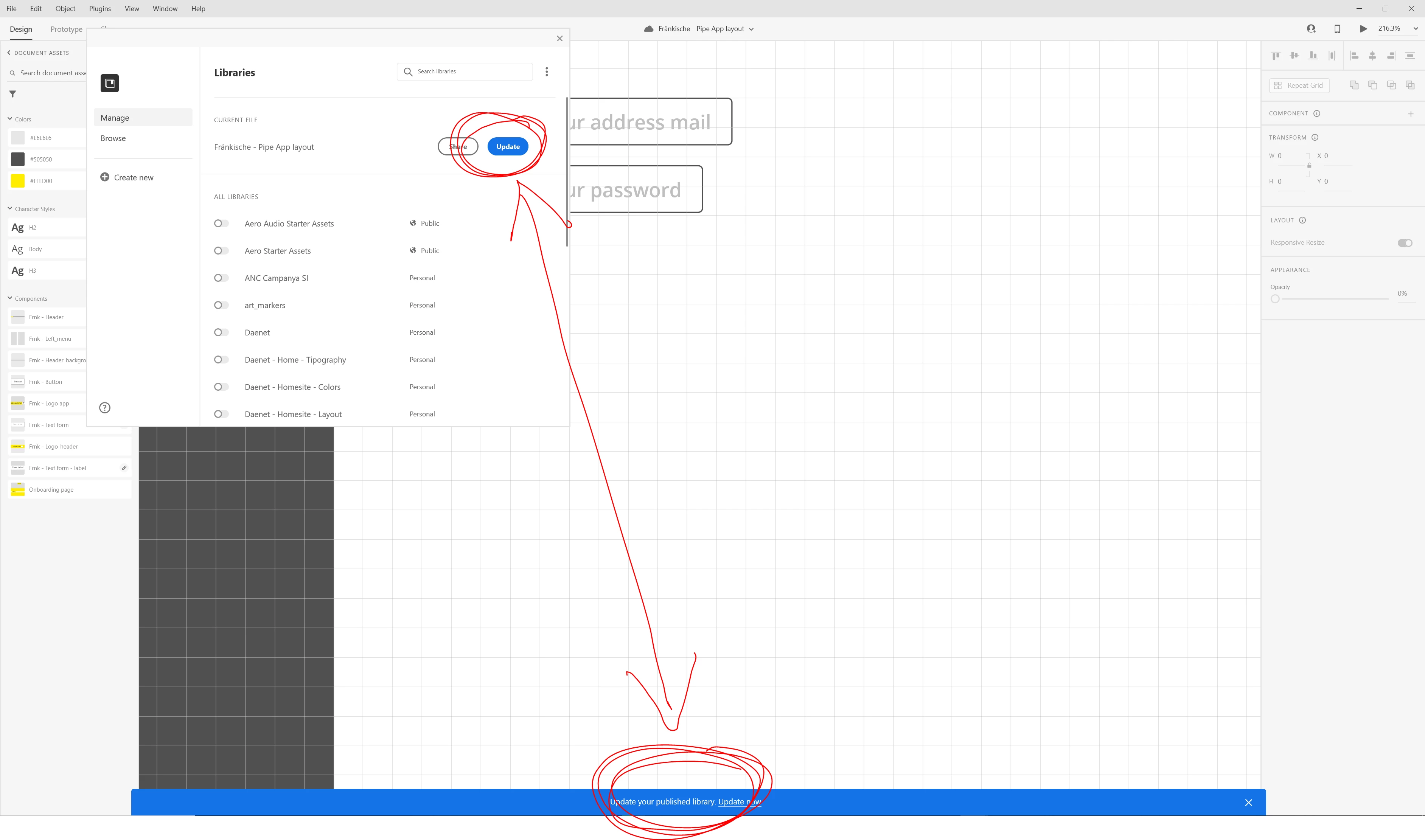
Well... think I wrote about it some time ago, but haven't found it. So here goes again... its a time wasting and annoying issue, that prevents to update libraries between XD files, becoming tedious and frustrating to work and keepping updated any design system.

As you can see in the picture, it is what I see regularly after constantly jumping from original component libraries back and forth. Usualy, I've to wait for a while or repeat adjustments to update it into the linked files.

Now this looping prcess is getting more and more often. I log in-log out almost each day fro Adobe CC to avoid the daily issues... but it should to be solved. It's another wasting of time.
<Title renamed by moderator>

This topic has been closed for replies.
Correct answer prerank28948274

Hi all,

Here's a workaround solution that we would like you to try in the time this issue is fixed in the product.

  • Group, and then ungroup, all elements in the document assets view of the libraries panel
  • If you do not have any custom groups, do the following
    • Give the new group a name
    • Select all assets of a specific type (i.e. all colors, all character styles, or all components)
    • Right click and select “New group from selection”
    • Select all the assets and drag them back to the top-level group
    • Delete the temporary group

This process needs to be repeated for each asset type

    • If  you have custom groups – the same process works, but you may need to do it individually for each custom group so that it is easier to get back to their previous structure.


If this solution doesn't work, we will need a local copy of your XD file. Upload your file to a shared space and send the shared link to Harshika Verma who has replied to the other posts in this thread.


Let us know if you need more info.


Thanks,

Preran


12 replies

New Participant
October 15, 2023

nice article with a sequence for talking

New Participant
July 26, 2022

Reproducible at Windows 11
Adobe XD 51.0.12.6

Crearive Cloud Sync 5.14.2.1


Advice to grop/ungroup all components resolves the issue. But it breackes all my sub groups. 😕😕

HARSHIKA_VERMA
Community Manager
Community Manager
July 26, 2022

Hi @eugene.gheruha,


Thank you for reaching out and sharing the workaround. I assume that issue has resurfaced, and we'd need to highlight the issue to the team again. Could you please record a video of your workflow? As you mentioned, you can reproduce the issue on your machine.


We would also request you to please share the local copy of your XD file and upload them to a shared location such as CC or Dropbox and share the URL with me over a private message. 


We will try our best to investigate it.


Thanks,

Harshika

New Participant
July 27, 2022

Hi, @HARSHIKA_VERMA.

Sorry, I was too quick by fixing the issue by grop/ungroup all components 😞

Don't want to revert file to previous versions as I have to update the company public library to try to reproduce it again. Did a try to revert and publish to new CC library - it works fine.


In case I dump into this issue again I'll let you know.

Best regards, Eugene.

January 8, 2022

I just hit this issue for the first time. I am in the latest version as of right now (45.1.62.3 x64) on a mac.


There was a document with a component and it was the source. It had the same name that another component in a different document. Without any warning or reason, it became a linked component, so I went ahead to find out where the source was, and then it went into a loop, opening the old document, which then switch to the new document, then back to the old document and so on and so forth. I had to kill XD.


Adobe, could it be that you are using names as a reference rather than GUIDs when doing this? Sounds kind of crazy, but a thought of what could be going on.


I have now opened again the new document, updated the library, and check that component, and still appears as a linked component. And on trying to get to the source to continue working on it, boom! LOOP!


The screen keeps flipping between the two documents. It would be funny if it didn't cause so much lost work. On one of the screen swaps I managed to right-click on the new document's original source (now linked) and choose Unlink. This made XD unresponsive. Killed it and then submitted the report.


Now opening the new document again... the unlinked component has lost it being a component (and because I had a bunch of states, worried work is lost. But one of the instances of the original component sits just next to it. Right clicking it to edit source just created a new source item in the original document (JOY!).


Hope this helps the team to figure out what's going on and fix it. Happy to provide more details over DM if needed.


prerank28948274Community ManagerCorrect answer
Community Manager
October 14, 2021

Hi all,

Here's a workaround solution that we would like you to try in the time this issue is fixed in the product.

  • Group, and then ungroup, all elements in the document assets view of the libraries panel
  • If you do not have any custom groups, do the following
    • Give the new group a name
    • Select all assets of a specific type (i.e. all colors, all character styles, or all components)
    • Right click and select “New group from selection”
    • Select all the assets and drag them back to the top-level group
    • Delete the temporary group

This process needs to be repeated for each asset type

    • If  you have custom groups – the same process works, but you may need to do it individually for each custom group so that it is easier to get back to their previous structure.


If this solution doesn't work, we will need a local copy of your XD file. Upload your file to a shared space and send the shared link to Harshika Verma who has replied to the other posts in this thread.


Let us know if you need more info.


Thanks,

Preran


Andrea5C7A
Known Participant
November 10, 2021

Hello, so the library updating problem is still lingering for me. I eliminated groups of assets and that did not resolve the issue. Is anyone else out there still having this library update problem? If you are, do you have any suggestions for workarounds? I am now just building everything in my library file which is a little messy.

New Participant
January 13, 2022

The describe solution works, only the last created group or symbol may cause issue. In my case i add only to move to root folder the symbols of the componant i was working on this day.


Another amazing solution is to ungroup all folders and then to undo all those ungroup actions (control Z) to have back all folders, and it works. It has worked for me. In fact i was trying to unfold folder one by one to find the one causing problem, i ended up with ungrouping everything but it was not working, so i revert back. And magic no more infinite publish 😉

Randy Edmunds 2
Adobe Employee
Adobe Employee
October 6, 2021

After you Publish your source document, any time you make an edit to that document (whether it's to an asset or not) you will receive this notification to remind you that Library may be out-of-date. This is expected. You don't need to Update your Library after every change (which is not desirable when developing a new or updating an existing asset). Wait until your document reaches a stable point that you want to share and then Update (re-Publish) it.


If it's something else, do you have a recipe so that we can reproduce this problem?


Hope this helps,

Randy


riascureman
Inspiring
October 6, 2021

@Randy Edmunds 2  What we are saying is that the "Update your library" notification never goes away. Click update, and it updates, then you get the notifications again (both the blue dot on the left taskbar icon AND the blue notification bar at the bottom, over and over again, as if it wasn't done at all. This persists even if we haven't touched or changed the document at all. Thus, the description we've already supplied to you as "endless loop".

Randy Edmunds 2
Adobe Employee
Adobe Employee
October 6, 2021

Is this a document that you created and have not shared with anyone? If so, it sounds like the Library is not updating. 

If not, then make sure nobody else is editing the same document. 


Did someone else create the document and share it with you, but did not share the Library with you? I think that could cause this problem.


Is this a document that was used to create another Library, and then copied using Save As... to try to create a new Library?


HTH,

Randy


Randy Edmunds 2
Adobe Employee
Adobe Employee
October 5, 2021

Some fixes for handling of CC Libraries were released in v44.1. Please upgrade to this release and let us know your results.


Thanks,

Randy


Inspiring
October 6, 2021

Thank you Randy, but I already use Version 44.1.12

HARSHIKA_VERMA
Community Manager
Community Manager
October 6, 2021

Hi bs28090165,


Thanks for updating XD to the latest version. Are you still experiencing the same issue?


We will try our best to help.


Thanks,

Harshika

riascureman
Inspiring
October 5, 2021

Same issue here, along with a myriad of other issues such as shared prototypes not showing in (any) browser, and severe performance lag due to nonstop "updating" of my XD documents. None of the troubleshooting tips have made any improvement. 

Inspiring
October 5, 2021

Hi there, same problem here. Please fix this basic feature. It's like @jontarbuck123 said. We can stop working with XD until this issue is fixed.

Please put this on highest priority, Adobe.

Thanks, Benni

Known Participant
July 15, 2021

I'm getting this issue too, and it makes my design system essentially useless until fixed. Adobe, what's the time frame for a fix for this issue?

Celestine.Fisser
Inspiring
July 2, 2021

I have the same issue. I tried to log out adobe creative cloud, restart my computer, log back in, click on the update library button, but still stuck in an infinite loop. 

Community Manager
July 2, 2021

Hi There,


Thanks for reaching out and sorry to hear that you're having trouble using Adobe XD.we already have a bug logged for this issue, the team is working on it and a fix is underway. You should be able to see this issue resolved in the upcoming releases.please download the latest version of XD and enjoy the new features.


Please feel free to update this discussion in case you need further assistance and we will be happy to help.


We are sorry for the inconvenience.


Thanks,

Chethan