loucass31997555
Participant
March 21, 2019
Answered

Issue Opening Adobe XD (Your developer license has expired. To continue to use this app, please renew your license.)

  • March 21, 2019
  • 25 replies
  • 39374 views

Hi can anyone help with this > I got this error today after opening XD once I tried to open it again and receive a license expired Popup saying  ("Your developer license has expired. To continue to use this app, please renew your license.") Please note my creative cloud license is up to date and there doesn't seem to be any issues with my account. thanks

This topic has been closed for replies.
Correct answer Preran

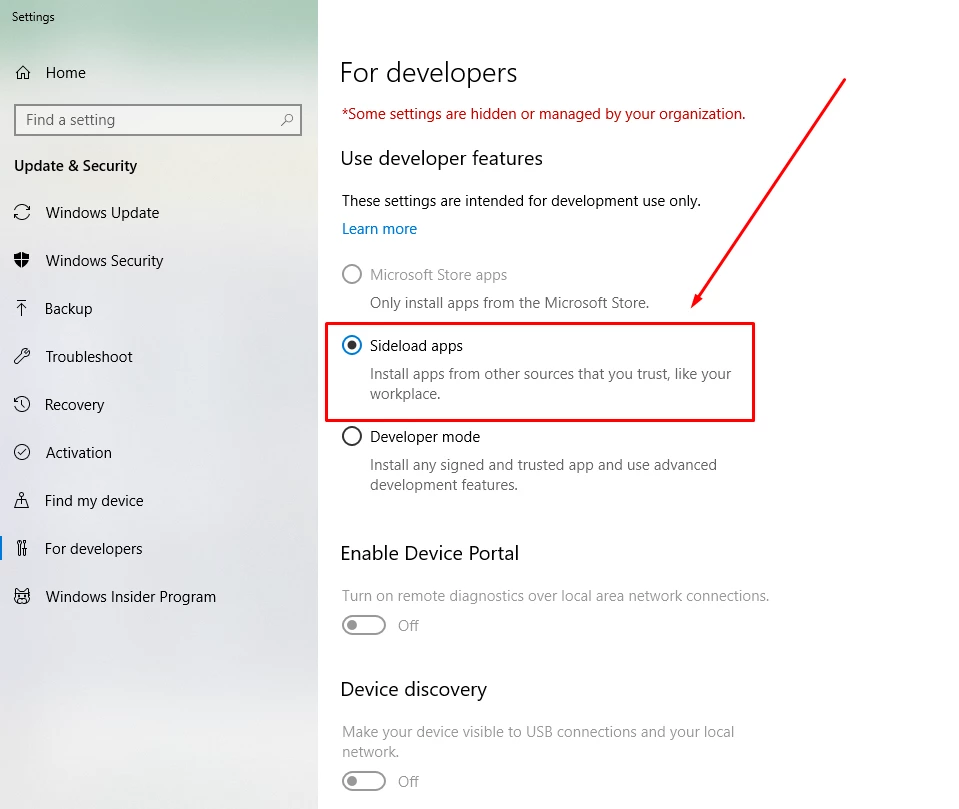
Can you try enabling side loading of application as described in the screenshot below? Let us know of it helped.

25 replies

Participant
June 21, 2019

this warning comes up when selecting the option you suggested. did i download a developer version by accident? how can i avoid sharing this data?

Participant
May 1, 2019

Hey! Thank you, there was similar error for Acrobat Pro DC to launch and this setting change did resolve that either. Bravo!

But to reach to this window was bit of a task.. here is how I did it.

Go to Windows settings option (gear icon  at the start button side panel) Type on the search bar on top "For developers" the option auto popped up for "For Developers Settings" came up, clicked on it and got to this this window.

Thanks much again. Hope this helps.

Participant
May 30, 2019

This worked. The "For Developers" section is hidden on my Windows 10 Home OS version. So go to "Settings" and search for "For Developers" and you can find the screen there. And then enable the "Sideload apps" setting. And Bingo!

loucass31997555
Participant
March 27, 2019

Thanks for the help everyone , XD ended up working again after re-installation

Preran
Community Manager
PreranCommunity ManagerCorrect answer
Community Manager
March 26, 2019

Can you try enabling side loading of application as described in the screenshot below? Let us know of it helped.

Known Participant
November 14, 2019

Thanks it did work for me too. But I wonder why one would have to do this? I don't think that's a normal situation. To your knowledge, has the issue been reported to the developers? Cheers!

candert
Participant
November 14, 2019

I agree. This seems like a simple – though an unnecessary – solution.

sjorsp68900097
Participant
March 26, 2019

Same here, problem occurred today. Let me know if you found a fix.

What I tried so far and doesn't work:

- Relogging CC

- Restarting PC

- Going back 1 update

- Re-installing XD