loucass31997555
Participant
March 21, 2019
Answered

Issue Opening Adobe XD (Your developer license has expired. To continue to use this app, please renew your license.)

  • March 21, 2019
  • 25 replies
  • 39374 views

Hi can anyone help with this > I got this error today after opening XD once I tried to open it again and receive a license expired Popup saying  ("Your developer license has expired. To continue to use this app, please renew your license.") Please note my creative cloud license is up to date and there doesn't seem to be any issues with my account. thanks

This topic has been closed for replies.
Correct answer Preran

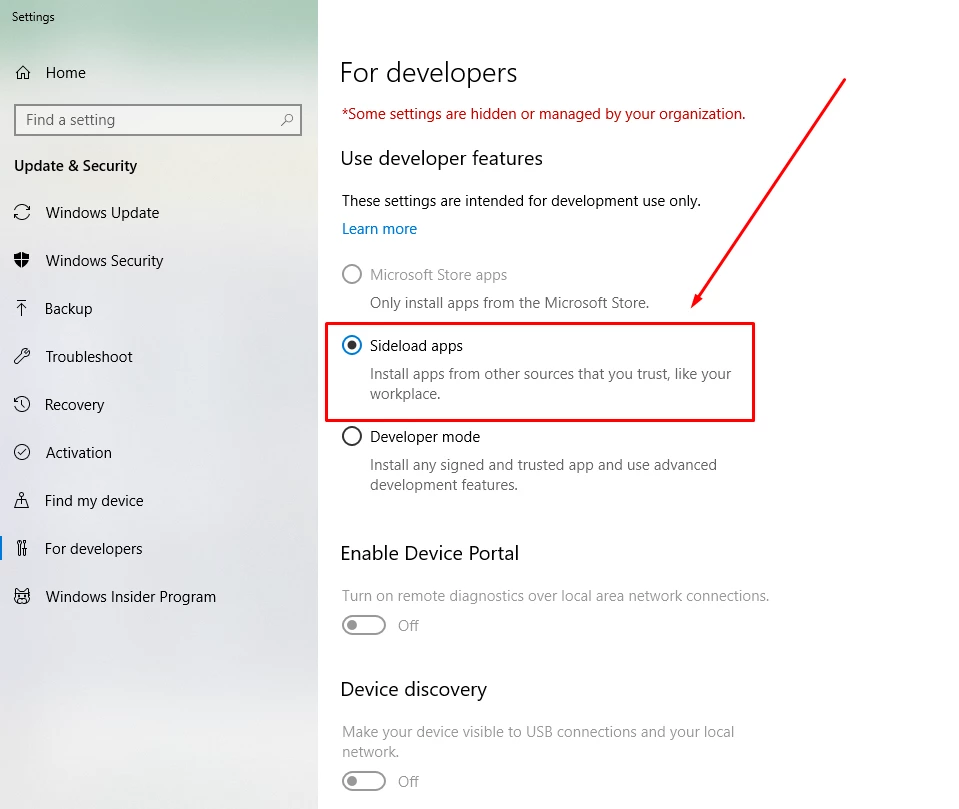
Can you try enabling side loading of application as described in the screenshot below? Let us know of it helped.

25 replies

Participant
July 23, 2020

Worked for me, thank you!

Participant
March 14, 2020

Thank you soo much, this worked for me as well 

Participant
November 15, 2019

Thanks a lot Preran. It's usefull. 

Participant
November 15, 2019

Thank You. Its working for my end... Cheers!

Participant
November 13, 2019

Solved. Thanks

Inspiring
November 14, 2019

Ouch. Adobe didn't renew their XD developer license? How embarrasing! Please fix, as this is preventing me from working. This is the first time I've encountered this error since I started working here at my new company in 3 months.


This is on Windows 10.


VivekP
Community Manager
Community Manager
November 14, 2019

I tried the solution that the support gave about setting up as a "sideload" but my system is already set to sideload.


Hi John.mb,


I am sorry to hear that you are facing this issue after haveing sideloading enabled on the machine. By any chance are you using  machine that it managed by your IT team? if this is the case then it could be possible that the domain level group policies are overwriting the local settings.If your IT make changes to the domain level then I should work fine for you after a reboot.


There are few more methods in the link below that can enable sideloading. Please try them and let us know if it works.

https://docs.microsoft.com/en-us/windows/uwp/get-started/enable-your-device-for-development


Regards

Vivek

Participant
November 13, 2019

thanks a lot it work for me

Participant
November 10, 2019

This worked thank you

Participant
August 21, 2019

Worked for me

HARSHIKA_VERMA
Community Manager
Community Manager
August 21, 2019

We're glad that the above solution worked for you all. Please let us know if you face any other issues with XD. We'd be happy to help.

Thanks,

Harshika

noorbhati
Participant
July 25, 2019

Thank u so much. working....

Participant
June 27, 2019

thx!! solved