


Scroll Groups not working with Fix Position When Scrolling
I have found a rather problematic conflict between the scroll group option and the "Fix Position When Scrolling" option, which unfortunately renders the new feature useless for about half of my intended use cases for it. Details below.
Steps to reproduce:
- Create an artboard taller than the viewport height (simulating a vertical scrolling mobile experience)
- Create a group intended for horizontal scrolling within the viewport area
- Apply the Horizontal Scroll option in the sidebar (optional: preview to ensure it's working correctly)
- Check the box for Fix Position When Scrolling
Expected Outcome:
In my design, I want this to be a fixed UI element that stays fixed at the top or bottom of the screen while the rest of the content scrolls by. So I'm expecting the scroll group to horizontally scroll because I've checked that option, AND I'm expecting the group to be fixed in position because I've selected that option. My expectation of this outcome is reinforced by the tool UI because selecting one option does not disable or unselect the other:
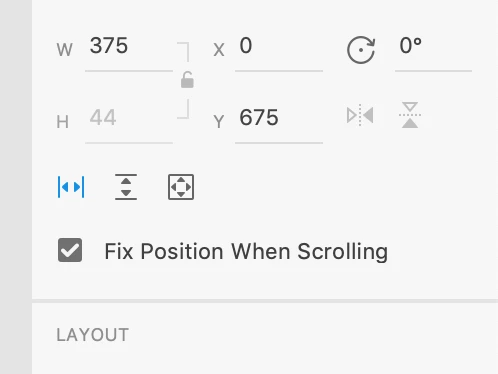
In most cases where the options are mutually exclusive, an intuitive UI will not allow a user to apply conflicting or overriding settings, which is why I believe this to be a bug instead of an intended feature. One could rationally argue therefore that the bug is entirely UI related, but regardless there IS a bug. It's just up to Adobe to decide whether it's an issue with stacking settings or a UI signaling issue. If you're on Team UI Bug, I won't disagree with you. I would just like to state that I personally would have more to gain if Adobe fixed the issue to allow these settings to stack rather than quick fixing the UI to indicate that they cannot.
Actual Outcome:
If you test the prototype between steps 3 and 4, you should have a successfully working horizontal scroll group. However, as you scroll down the page (not pictured), the scroll group continues with the page content:

Once you execute step 4, the scroll group is now fixed to the screen correctly. However, the scroll group will no longer scroll:

In my demonstration, I have some layers above the scroll group to create the illusion that it appears once you've scrolled past a certain point down the page. But aside from that, the only change I've made is checking that fixed position option. I tried it without revealing the hidden layers with the same result, and the scroll group worked fine with the hidden layers prior to fixing its position. So I can say with confidence that it is the setting and not the hidden layers that is causing the issue.
At the very least, I hope this was helpful for someone, even if it was just letting you know that you're not the only one with this issue. One final note: I did try to search for a similar issue on this subject. But since it's a relatively new feature, I don't think anyone else has encountered it yet. If this is a duplicate issue, I apologize.
 AdChoices