


New Participant
July 16, 2020
Answered

Scroll Groups not working with Fix Position When Scrolling

  • July 16, 2020
  • 16 replies
  • 18395 views

I have found a rather problematic conflict between the scroll group option and the "Fix Position When Scrolling" option, which unfortunately renders the new feature useless for about half of my intended use cases for it. Details below.

Steps to reproduce:

  1. Create an artboard taller than the viewport height (simulating a vertical scrolling mobile experience)
  2. Create a group intended for horizontal scrolling within the viewport area
  3. Apply the Horizontal Scroll option in the sidebar (optional: preview to ensure it's working correctly)
  4. Check the box for Fix Position When Scrolling


Expected Outcome:

In my design, I want this to be a fixed UI element that stays fixed at the top or bottom of the screen while the rest of the content scrolls by. So I'm expecting the scroll group to horizontally scroll because I've checked that option, AND I'm expecting the group to be fixed in position because I've selected that option. My expectation of this outcome is reinforced by the tool UI because selecting one option does not disable or unselect the other: 
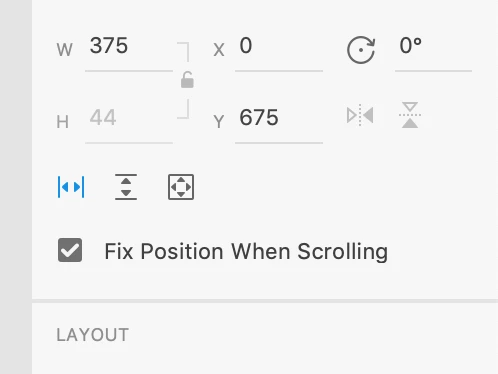
 

In most cases where the options are mutually exclusive, an intuitive UI will not allow a user to apply conflicting or overriding settings, which is why I believe this to be a bug instead of an intended feature. One could rationally argue therefore that the bug is entirely UI related, but regardless there IS a bug. It's just up to Adobe to decide whether it's an issue with stacking settings or a UI signaling issue. If you're on Team UI Bug, I won't disagree with you. I would just like to state that I personally would have more to gain if Adobe fixed the issue to allow these settings to stack rather than quick fixing the UI to indicate that they cannot.


Actual Outcome:

If you test the prototype between steps 3 and 4, you should have a successfully working horizontal scroll group. However, as you scroll down the page (not pictured), the scroll group continues with the page content:



Once you execute step 4, the scroll group is now fixed to the screen correctly. However, the scroll group will no longer scroll:



In my demonstration, I have some layers above the scroll group to create the illusion that it appears once you've scrolled past a certain point down the page. But aside from that, the only change I've made is checking that fixed position option. I tried it without revealing the hidden layers with the same result, and the scroll group worked fine with the hidden layers prior to fixing its position. So I can say with confidence that it is the setting and not the hidden layers that is causing the issue.


At the very least, I hope this was helpful for someone, even if it was just letting you know that you're not the only one with this issue. One final note: I did try to search for a similar issue on this subject. But since it's a relatively new feature, I don't think anyone else has encountered it yet. If this is a duplicate issue, I apologize.

    This topic has been closed for replies.
    Correct answer AkinGn

    As I see it (and having replied to another post about it), the issue looks fixed now, you can see the sample prototype here: https://xd.adobe.com/view/294167e2-f403-4d1c-8c76-af1348a1762c-7c12/ and the file here: https://www.dropbox.com/s/024azpc6og1eh6r/horizontal-scroll-test.xd?dl=0 Hope this helps!

    16 replies

    AkinGn
    AkinGnCorrect answer
    Community Expert
    December 23, 2022

    As I see it (and having replied to another post about it), the issue looks fixed now, you can see the sample prototype here: https://xd.adobe.com/view/294167e2-f403-4d1c-8c76-af1348a1762c-7c12/ and the file here: https://www.dropbox.com/s/024azpc6og1eh6r/horizontal-scroll-test.xd?dl=0 Hope this helps!

    Known Participant
    December 26, 2022

    Hi @AkinGn thanks for getting back to me. 


    This stops working as soon as you create a group and place some elements in it.

    Here is your prototype updated: https://drive.google.com/file/d/1dyJnyRWje9ZaMA2JK-02JMjewhK2Fohs/view


    Thanks in advance.


    And this is actually important as it is common to create an header with just the tabs area that scroll.

    Known Participant
    December 11, 2022

    Is there any update about this bug report? 

    I'm facing this issue again, 


    Steps to reproduce:

    1. Create an artboard taller than the viewport height (simulating a vertical scrolling mobile experience)
    2. Create a group intended for horizontal scrolling within the viewport area
    3. Apply the Horizontal Scroll option in the sidebar (optional: preview to ensure it's working correctly)
    4. Check the box for Fix Position When Scrolling


    As soon as I check the "Fix position when scrolling" option the horizontal scroll won't work anymore. 

    New Participant
    December 12, 2022

    It's probably best to create a new issue for this. Since Adobe closed this one almost 3 years ago without doing anything about it. If they refer to this one, just mention it has not been solved, and closed incorrectly.

    New Participant
    August 10, 2022

    As of several weeks ago, this same issue is occuring for me as well. PLEASE fix, it's important for our team and this issue renders a lot of past work we have done in adobe XD useless. 

    Participating Frequently
    June 24, 2022

    Is there any update on this issue?

    New Participant
    February 4, 2022

    Unfortunately this still not working 18 months later. I think you need to able to prioritize your own features breaking the functionality of another feature. Any updates on this?

    Participating Frequently
    September 2, 2021

    This bug has been reported over a year ago, along with my addition almost a year ago. What steps have been taken to remedy this?

    Participating Frequently
    September 2, 2021

    Any updates on this bug?

    New Participant
    April 12, 2021

    Hey, Are there any news regarding this bug? 

    Thank you

    New Participant
    June 3, 2021

    Any updates please??? This is a very important thing for you to fix. 

    Participating Frequently
    November 9, 2020

    When using horizontal & vertical scroll with fix position, the scrolling stops working after a couple of interactions.


    It's effectively the same bug as https://community.adobe.com/t5/adobe-xd/scroll-groups-not-working-with-fix-position-when-scrolling/m-p/11570738?page=1


    Can you assist?

    Rishabh_Tiwari
    Community Manager
    Community Manager
    November 9, 2020

    Hi there,


    Sorry to hear about the trouble. Could you please share a few more details like:


    1. The version of XD and OS.
    2. Is this happening on a specific file or multiple files?
    3. Please share a small video of the workflow and what exactly is happening?


    Regards

    Rishabh

    Participating Frequently
    November 9, 2020

     - XD 34.212 | Windows 10 Enterprise 10.0.17763

     - Happens in all files

     - See gif with occurence below:

    It simply stops after a couple of interactions, the number of which differs every time. 

    Participating Frequently
    November 5, 2020

    Hi Adobe, I currently suffer from this issue in XD34.212 using the combined function Horizontal & Vertical scroll. Can you assist?

    Participating Frequently
    November 5, 2020

    Btw it happens after 4 interactions, then it freezes up and won't move anymore