



Barbara25100005rd9d
Participating Frequently
August 30, 2022
Answered

Shared link do not open

  • August 30, 2022
  • 2 replies
  • 2005 views

Hi, Xd version 54.0.12./ Mac Monterey 12.5.1.

I saved a prototype and wanted to share with my team. 

Links bring them to log-in Adobe window. I wasn't aware that you need to have an Adobe account if you want to view and comment to a  prototype. 

I tested it to myself via another Mac and I could not open the link even though I m logegd in, with a different Adobe Account. Its says: You can't request access to this link (contact your administrator).

Is this an IT issue, I work in a large org where IT rules.

It is very frustrating as I produce prototype nobody can see.

Can you help?

Tx

Barbara
This topic has been closed for replies.
Correct answer Atul_Saini

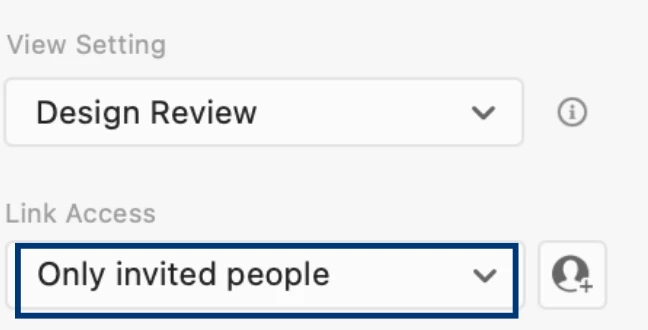
I see what's happening here. Thank you for sharing the screenshots. Actually, creating a public link is disabled in your organization. You must now switch to the following link settings and invite your team. 


Please look at this article for more info on group sharing for the enterprise.

I hope this helps. Please update this discussion if you need further assistance. 


Thanks,

Atul_Saini

2 replies

Atul_Saini
Community Manager
Community Manager
August 30, 2022

Hi Barbara25100005rd9d,


Thank you for reaching out. If you'd allow, I'll try my best to assist you here. There are a couple of things that I'd like to know before we proceed. 


  • Is it happening with all the prototypes that you have published or just this one? Can you create a new sample file and see if that works? 
  • Please take a screenshot of the link settings from Share mode and share it here, along with the screenshot of the message you're getting.
  • If possible, please share the prototype link in the private message (Go to my profile, click on send a message button)along with the adobe ID you have used to create it. 


Here is a sample prototype. Please check if you can access it- https://xd.adobe.com/view/98744c6a-baca-4bdd-9eb0-d91bc741eb60-cd27/. Suppose you're unable to open the sample prototype. There may be network restrictions that may cause this to happen. In that case, please ask your IT team to allow the Adobe XD-related URLs and domains from this link- https://helpx.adobe.com/enterprise/kb/network-endpoints.html. 


If you're getting the following message, this also means that the link doesn't exist anymore or has been deleted.


Awaiting your response. 


Thanks,

Atul_Saini
 

Barbara25100005rd9d
Participating Frequently
August 30, 2022

HI, its happening with all files, however, I haven't shared heavily. 

Heres a test https://xd.adobe.com/view/7fefa381-9efd-4fb5-9b3e-f4759820b8b8-2abc/ 


So there are 2 things happening here:

Within my org, I share and they get Adobe log in page. They do not have an Adobe Acc.

When I tested it with my son's Adobe Acc Ive got the message below. (attached)

To be note that I'm not the Admin of this accunt and I cannot go on and off Adobe Cloud App without IT assistance, as they are admin.


AkinGn
Community Expert
August 30, 2022

Hi @Barbara25100005rd9d, I tested with a previous test prototype link I shared before without logging in to my Adobe account and it works ( you can also see here https://xd.adobe.com/view/cb941686-3592-4d31-899f-a80c09a8a9e2-9ec7/ ), Adobe account maybe only necessary for commenting on prototypes/designs. I suggest you to review your sharing options by comparing with the info here: https://helpx.adobe.com/xd/help/share-designs-prototypes.html Hope this helps!