


henryyjjames
New Participant
December 29, 2016
Question

Top menu bar with options ('File', 'Edit' and 'Object') are missing in XD on windows.

  • December 29, 2016
  • 45 replies
  • 87561 views

Hi,

I recently became very interested in Adobe Xd and I just discovered this problem. Mine does not have the bar at the top of the page with the File, Edit, Object View, etc.... This is annoying and is very hard to work without. It is also hard to work with tutorials on projects. I noticed this in a youtube video on how to do something. Here is a screenshot from my computer:
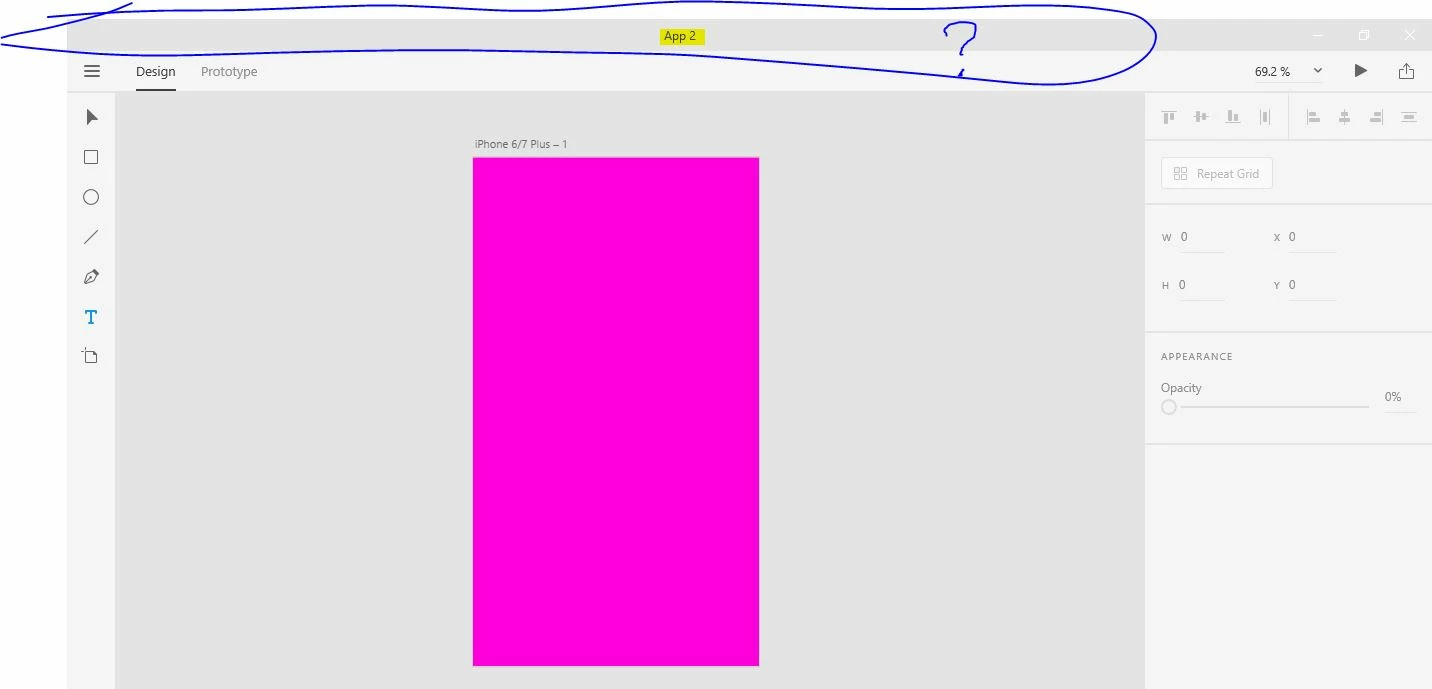
Here is a screen capture fro youtube:
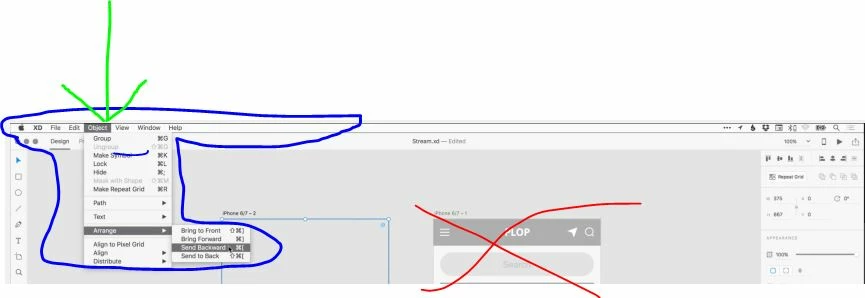
I don't know if this has to do with it being in Beta stage or windows vs. mac, but this is highly annoying.


Thanks,

H.


<The Title was renamed by moderator>

This topic has been closed for replies.

45 replies

Known Participant
December 11, 2019

using XD in Windows. The top bar is missing, so how do I edit objects, masks, and so? It seems XD is made only for MAC users. Right click won´t show any of those options


Frustrated!

Ares Hovhannesyan
Community Expert
Community Expert
December 11, 2019

Win version of Adobe XD do not use top bar you need to click "hamburger icon" on the left top to activate menu. Also right clicking object activate context menu from where you can use commands


New Participant
July 25, 2019

this is a total JOKE that you can't access the menu items from PC. And please don't respond ADOBE that you can access most of the menu items by right clicking or opening the hamburger menu - FALSE! they are not there!

Why would you even bother releasing a POS like this without those options available?

Terrible.

New Participant
November 1, 2019

When I right click on anything--be it an object, asset, whatever--I get no right click menu at all. My only option is to know all of the keyboard shortcuts from memory? What about all of the cool stuff that XD can do that I don't know about yet? I guess I'll never find out because there are no menus!

HARSHIKA_VERMA
Community Manager
Community Manager
November 1, 2019

Hi there,


We apologies for the frustration. We have a similar discussion going on this thread: https://community.adobe.com/t5/Adobe-XD/Right-click-on-Windows-is-not-working-in-XD-v23-1/td-p/10662865. We would request you to please try the solution mentioned and let us know if that helps.


Thanks,

Harshika

New Participant
June 14, 2019

Adobe XD is only good for PCs because for MAC Sketch is the best! Why would anyone use Adobe XD when they have Sketch? Only if they are stuck with working on PC! Adobe should make it their absolute priority to update this application to be stellar on PC platform before anything else. it's 2019, PC users still don't have top menu. And I am a paying client.

New Participant
March 12, 2020

Seems to me like Adobe XD is more interested in garnering Sketch's market share on the Mac platform vs trying to make it usable for PC users. Oh the irony of user experience software that's supposed to help designers create usable products and yet it is unusable itself?! And after many years of comments from frustrated users, you'd think Adobe would have come up with a solution and have remedied its user's paint points by now. SMH. 

New Participant
April 8, 2019

It's been a couple of years. C'mon Adobe.

Can we get a menu?

There's still no Object > Mask?

I right click, don't see it.

I look in the hamburger, don't see it.

It can only be done using a shortcut.

Worst user experience ever.

This is poor. I only use this software because my team uses it. It's otherwise useless.

kaylag50825411
New Participant
December 24, 2019

I am in complete agreement with the above. There is SUCH a lack of consistent UI design in the Adobe Suite. It's ironic really that designers use these programs to design things that make things easier for the world, yet countless times, updates and versions later, Adobe continues to make assumptive, unfounded in research decisions. At least point it out! 


It really interferes with all of our workflows immensely!

BillyBowyer
New Participant
January 21, 2019

HOLY ######!!! I just Bought a new Microsoft Surface Studio to cross over from Mac, I have just set it all up, and now discover that XD is Microsoft crippled!?

What the actual?

Where are all the functions that I used with MAC?

Hamburger menu? Hamburger menus are the worst! It's super ironic that a UI software is making basic UI blunders like hiding stuff from its users, instead of putting it where we've all learned it to be!

What is going on there at ADOBE?!!!

I'm just lost for words and in disbelief.

Bring back the standard menu! And for crying out loud - update the software so it's on par with the Mac version!! Unbelievable!!!!

litonfiredesign
New Participant
January 26, 2019

Hey Billy,

I was frustrated at first too, but I realized that everything is here now, its just contextual.

Select the objects that you would normally go to a menu option for, then right click, you will see the options there.

Hope that helps ;-)

-Kyle

New Participant
January 6, 2019

I'm honestly quite shocked with the disrespect shown for the users! I was happy to learn this new program when i started to notice the discrepancies   between my interface and the tutorials I was following. I'm drooping this right now  and looking for a better solution.    And whoever is making the decisions here is not having anyone best interest in mind but they own twisted business inclinations! Hoping for better days!

prasadv22445395
New Participant
January 1, 2019

Hi


I started working on XD on a windows system, I have noticed there is no top menu except the blank space.


can someone help me how to enable the top menu for Adobe XD.

Atul_Saini
Community Manager
Community Manager
January 1, 2019

Hi Prasadv,

Could you please check the Hamburger menu on the top right corner? Please update this discussion in case you need further assistance.

Thanks,

Atul_Saini

prasadv22445395
New Participant
January 2, 2019

Hi Atul,

Thanks for your reply.

I am talking about the top menu bar which shows File, Edit, Object, View, Window, and help, refer below screenshot from one of tutorial video from Adobe site.

I don't see this menu on my windows system, it has an empty place instead of the menu.

New Participant
November 14, 2018

Adobe if you're listening: I feel like the solution would be to do what Firefox does.  Hitting "Alt" toggles the traditional menu on and off at the top.

Sometimes we users get frustrated trying to dig for something when there's a time crunch.  It's often a better experience to fall back on muscle memory in these cases, so please consider this.

Colin Holgate
Inspiring
November 14, 2018

Firefox, Safari, and IE 11, all can use the Alt trick to show the menu bar, but more recent apps like Edge or Chrome can't work that way. Here's a long thread begging for a menu bar in Edge:

Displaying Menu Bar in Microsoft Edge - Microsoft Community

If you can find a solution for showing a menu bar in either Chrome or Edge, maybe the same thing could work for XD. But if it's a hard enough challenge that neither Google or Microsoft can provide a solution, maybe it will be hard for Adobe too.

New Participant
November 15, 2018

Interesting, although that thread is from 2015 and the newest overhaul of Firefox (Quantum) was released less than year ago.  It does the Alt trick just fine.  If Mozilla can do it, I have faith in Adobe.  I think the issue here is probably a matter of design vs "can we do it", but it seems like the best of both worlds to be able to toggle the menu.

henryyjjames
New Participant
November 8, 2018

This is an old post and since then, it has been solved. I found that because the time I posted this, the application was still in beta testing and this was an issue with it then.

carlt2018
New Participant
November 9, 2018

Hi henryyjjames,

I'm not sure what you mean the issues are resolved.  I am Windows user and when I access XD CC, I see neither a top menu nor do I see a menu. Also, the hamburger menu has none of the menu items described and I don't see Object, Edit, View, etc.

New Participant
September 6, 2018

I'm using Windows 10 Pro.

It's now September 2018 and I still cannot find the File, Edit,... options in Menu side bar.

No such thing called "Mask with Shape" feature was found.

Try googling around and got nothing.

Can someone help?

elainecc
Community Manager
Community Manager
September 7, 2018

The UI on Win is different than the UI on Mac. Mask with Shape on Windows can be found in the context menu – simply select two objects (one of them a basic shape like a rectangle, ellipse, or closed path), and then right click on the objects to find Mask with Shape.

-Elaine

New Participant
September 9, 2018

Thank you. I did it. But can you explain why in windows we don't have other menus (edit, file, object, etc.)?