


henryyjjames
Participant
December 29, 2016
Question

Top menu bar with options ('File', 'Edit' and 'Object') are missing in XD on windows.

  • December 29, 2016
  • 45 replies
  • 87561 views

Hi,

I recently became very interested in Adobe Xd and I just discovered this problem. Mine does not have the bar at the top of the page with the File, Edit, Object View, etc.... This is annoying and is very hard to work without. It is also hard to work with tutorials on projects. I noticed this in a youtube video on how to do something. Here is a screenshot from my computer:
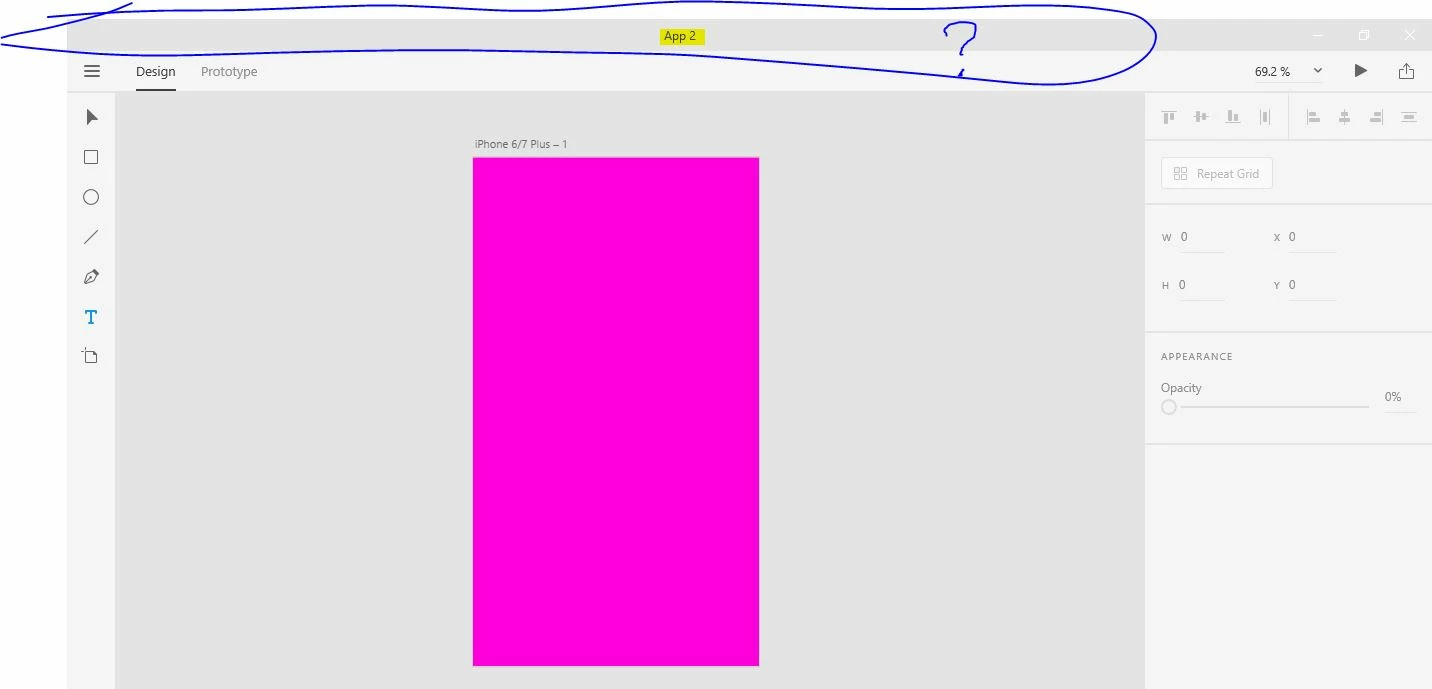
Here is a screen capture fro youtube:
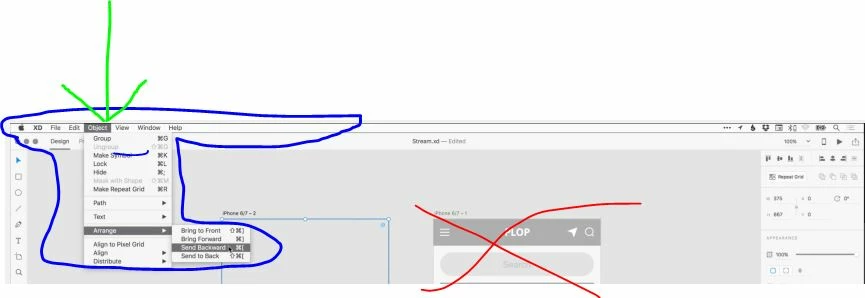
I don't know if this has to do with it being in Beta stage or windows vs. mac, but this is highly annoying.


Thanks,

H.


<The Title was renamed by moderator>

This topic has been closed for replies.

45 replies

Participant
May 13, 2020

Options like file objects edits plugins and etc that which is supposed to be appear at the top of the page is niot available for my use.

can someone help me out with this


{Renamed By MOD}

Rishabh_Tiwari
Community Manager
Community Manager
May 13, 2020

Hi there,


Thanks for reaching out. The top menu options of File, Edit, Object, View, Window, and Help are only available on macOS. For Windows operating system there is a Hamburger menu on the top left-hand side corner. For more information, you can refer to this similar discussion: https://community.adobe.com/t5/adobe-xd/top-menu-bar-with-options-file-edit-and-object-are-missing-in-xd-on-windows/m-p/8806293?page=1#M933


Regards

Rishabh

Participant
November 15, 2021

Why are those menus only available for mac not for Windows. This is not fair. Is there any reason behind this? we, the window user also need a menu bar. That Hamburger menu only shows the list of file menus. It has not had all the elements under other menu bars have. please consider the issue and rectify it.

Participating Frequently
May 4, 2020

That is beyond stupid.

I understand simplifying UI for a functional app to a consumer.

But this is a B2B product. And you're just adding another step of work for people.

HATE THIS.

HARSHIKA_VERMA
Community Manager
Community Manager
May 11, 2020

Hi there,


We understand it could be frustrating for you. We have seen a similar request has been raised here: https://adobexd.uservoice.com/forums/353007-adobe-xd-feature-requests/suggestions/18478660-full-featured-top-menu-for-windows-10 Please submit your feedback and upvote the request to add your voice.


Hope it helps.


Thanks,

Harshika

Participant
May 15, 2020

Hi Harshika,


Does that even worth doing or is it just a polite way to ingore what we are asking for? that post that you linked was opened more than 3 years ago. Since then XD users have been adding comments about how much they hate the current menu and they gave several good reasons and ideas to solve this problem. How much longer do we need to wait for this to be seriously reviewed again?

Participant
May 3, 2020

No need response, i solved

Participating Frequently
May 4, 2020

How did you solve?

Participant
February 28, 2020

Hey Adobe, it's been over 3 YEARS. Still no way to Mask with Shape from a menu.

And there's no way whatsoever to ungroup a mask from shape.

I dragged an image into a circle.... now I changed my mind. THERE'S NO WAY TO GO BACK?!?! Get ur s*** together

Peter Villevoye
Community Expert
Community Expert
March 1, 2020

On Windows (and as well on Mac) the right-click or otherwise invoked contextual menu will let you create a Mask from Shape, for as long as the Object menu is still missing from the dreaded hamburger on Windows. But you're right – there's still no way to release this construction afterwards on Windows ! This is not a matter of a paradigm, but a long-standing overlooked hiatus...

Participant
October 6, 2020

Currently (Version 33.3.12.4) there is no "Mask" in the object menu and the keyboard shortcut doesn't work either.

Any ETA?

Participant
February 4, 2020

I understand having a change in design and the theory behind it, but there are menu items that can't be found in the hamburger menu or in the menus on the right side of the screen.

Peter Villevoye
Community Expert
Community Expert
January 22, 2020

Well, that right-click is a typical knee-jerk reaction of many routined Windows user, and it is actually a nice contextual approach for anything important or dedicated to a specific selected or otherwise involved item. And for those who don't know or don't like to explore an application in such a way, there probably will be some "Hidden Gem & Secret Tip" video by an Adobe evangelist, pointing it out with much fanfare...


However, I also find the dogmatic omission of the menubar a bit far-fetched. And it's actually re-appearing in a different and less consistent form, just look at the row of tabs/buttons in the top bar of the window, becoming the entrance to a mix of modal states and extra panels on the right. It's astonishing to experience how quick your fingers find their way on a touch screen. But with a mouse, you first need to tick the Share tab on the left, and then go to the far right panel to make your subsequent choices in a panel.


It would probably be better if the interface would sense if the device is used in a touch-only state (like a Microsoft Surface with a detached keyboard/trackpad), and offer its interface modes as a preference.

Participant
January 29, 2020

I agree, 


I'm sure Microsoft would have implemented a way for the developer of a UWP application to detect what pointing device was used or is being used upon opening of the application. For example, in C# there is an event handler to detect what device was used upon "PointerPressed".


With a little research, I was able to find this posted by a Microsoft Employee.

private void OnPointerPressed(object sender, PointerRoutedEventArgs e)
    {
      switch (e.Pointer.PointerDeviceType)
      {
        case Windows.Devices.Input.PointerDeviceType.Touch:
          break;
        case Windows.Devices.Input.PointerDeviceType.Pen:
          break;
        case Windows.Devices.Input.PointerDeviceType.Mouse:
          break;
        default:
          break;
      }
    }


This particular switch statement will perform tasks based on what PointerDeviceType was used upon "pressing". Here we have three device options, Touch, Pen and Mouse. So there's no lack of ability.

My assumption is (and I may be incorrect, but..) that it wasn't Adobe's decision to not implement a changing interface based on device, rather Microsoft's UWP design paradigm mainly focuses on touch-based devices and that Adobe was simply following that.


Nonetheless, I completely agree that there should be a changing UI that is relative to the input methods used.

Participant
January 22, 2020

This is beyond ridiculous, I just wasted half an hour of my time trying to figure out how to copy & paste guides. Only to find out that you have to right-click the bar just above the artboard (where you drag down a guide) > Guides > Copy Guides.


I fully understand Adobe's decision to completely embrace the UWP design paradigm but for those of us who are not on a touch-based windows computer or have specific workflow requirements, it would be wise to allow us the option of having the top bar menu. It's absurd that I have to fumble around with an application that is supposed to help make my workflow faster and better, yet it's doing the complete opposite. I'm now sitting here contemplating abandoning XD. It's a shame because I was very fond of XD when I first started using it on my Mac. However, now that I've switched to Windows, I'm sitting here completely dumbfounded that there isn't some type of similarity between both devices.


I will remain optimistic in Adobe. However, for the sake of my workflow and business, I must reconsider using XD.

Participant
January 21, 2020

This is ridiculous, I mean this is software for UX Design, and this is a bad example of if, most of us are using laptops for our work, and you are showing a bar in your tutorials that doesnt exist in windows, then I go into the so stupidly call hamburguer menu, to look fot this copy paste interaction and I found nothing, even if it was there, that is more effort, more innecesary clicking.


Ok, after more research, I found it in the right click option, that is nice, to think that my fustration could have been avoided if the tutorial would have explained this.... is in itself fustrating.

Peter Villevoye
Community Expert
Community Expert
January 21, 2020

Yes, it's irritating and worrying, how mainstream developers like Apple, Microsfoft, Adobe, Google, and many others are (re)inventing ways to offer users overview and clarity in the features and functionalities of an application. Their tendency to focus on task-based workflows (features and functions becoming available when needed and/or appropriate) sounds like a good idea. And users have habituated to panels appearing and disappearing again, so there's no need anymore to keep all UI elements always in sight, even if they're not applicable.


But still, that good-old menubar has served us well for many decades, and for mouse/keyboard-operated tasks and environments, its consistent shape and reliable position still trumps all these other floating ribbons, extra bars, panels, pallettes, and pop-ups.


Moving – back – to the elegance of simply working with our fingers poses real challenges to modern interface designers and developers – hey, Adobe XD caters for those designers ! 

Peter Villevoye
Community Expert
Community Expert
January 17, 2020

The whole debate about whether or not a menubar should be banned or shunned and replaced by a hamburger, is just one of the doubtful considerations. The idea of having buttons and contextual tabs in stead sounds nice, but we already see how current incarnations of this paradigm are gradually returning to something that looks like... a menubar !!


A flawed one, though. Because the hamburger requires an extra tap to explore, and the initial menus (Design, Prototype, and Share) are on the far left, with their corresponding tabs appearing on the far right. Now that's a silly case against the Gestalt Principles (Laws of Proximity and Mapping) and other principles of interface ergonomics (Fitts' Law), isn't it ?


But besides these interface shenanigans, I'm more worried about the way how developers and applications completely confuse users with their cloud based workflows and storage. Libraries, Components, Creative Cloud Files, Cloud Files, Published Files, Shared Links, Linked Assets, etcetera. And all these workflow tools like Zeplin, Slack, Jira, and other cloud storage services like DropBox and iCloud, are only making it worse. I bet that within a few years, no one has any clue anymore where their 50+ copies of their files and fragments reside...


I noticed that many UX and UI designers spend a good part of their day just shoving around files and fragments through a myriad of networks, trying to cater for everyone, anywhere. No my dears, unfortunately it's not "one size fits all". There's always some crucial co-worker or tiresome tool missing out on something, so redundancy is abundant and ubiquitous, leading to mass-confusion. And I don't trust companies like Apple, Adobe or Microsoft to prevent or solve this problem. They're all still touting their own half-baked solutions.

Participant
January 16, 2020

Booooo!  Not a fan of minimalism.  Having File, Edit, etc. tabs is a format everyone is familiar with.  It works.  I am brand new to XD and I just watched the tutorial, which showed how to use it with those tabs in place and I make my first attempt - no File.  Not cool.  I don't have a touch tablet, so your suggestion is not at all helpful to me.  Please stop designing for the cutting edge users and consider the rest of us.

HARSHIKA_VERMA
Community Manager
Community Manager
January 17, 2020

Hi Kelly,


Welcome to the Adobe XD Community!

Thank you for reaching out and using Adobe XD. If you are on windows machine, you will find all the option under the hamburger menu. Please see the attached screenshot below.


Hope it helps.


Thanks,

Harshika

martint97956919
Participant
January 20, 2020

Notably missing from this new hamburger side menu is the VIEW tab, which I have spent most of my $#&*ing afternoon trying to find!