


henryyjjames
Participant
December 29, 2016
Question

Top menu bar with options ('File', 'Edit' and 'Object') are missing in XD on windows.

  • December 29, 2016
  • 45 replies
  • 87561 views

Hi,

I recently became very interested in Adobe Xd and I just discovered this problem. Mine does not have the bar at the top of the page with the File, Edit, Object View, etc.... This is annoying and is very hard to work without. It is also hard to work with tutorials on projects. I noticed this in a youtube video on how to do something. Here is a screenshot from my computer:
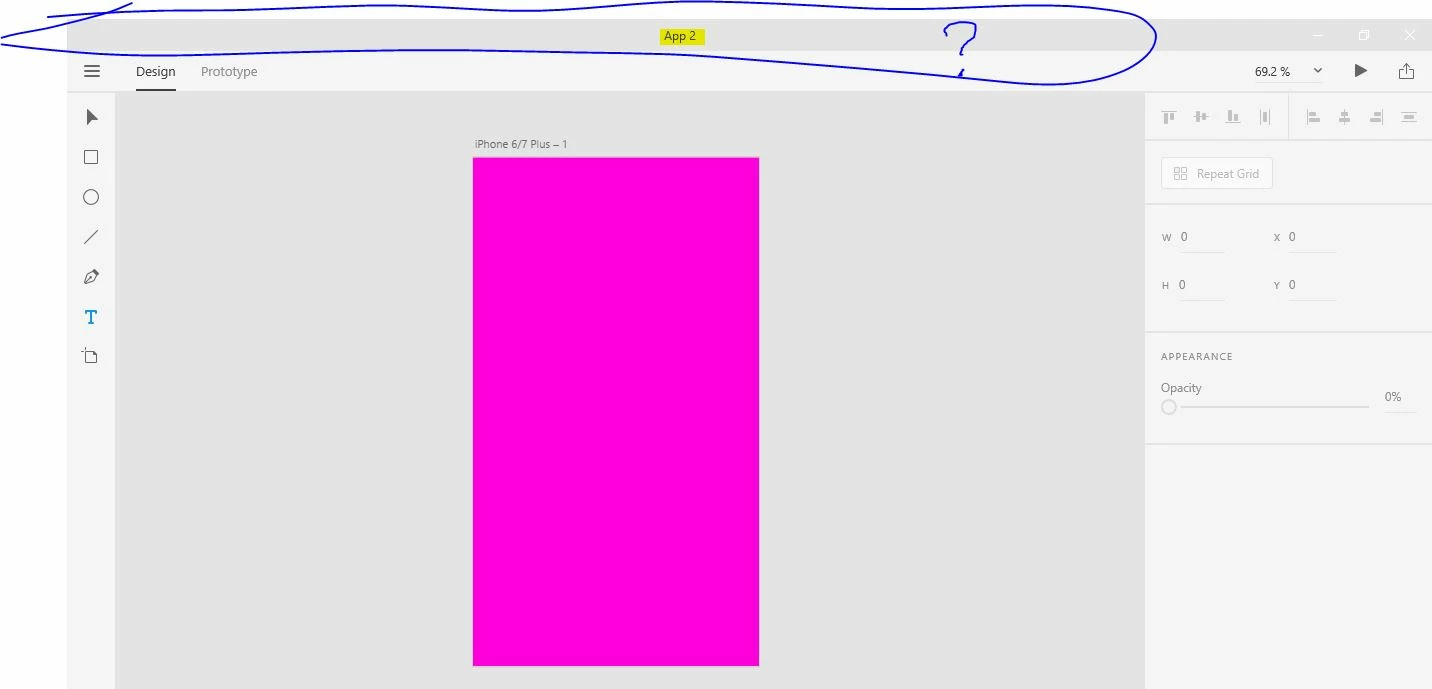
Here is a screen capture fro youtube:
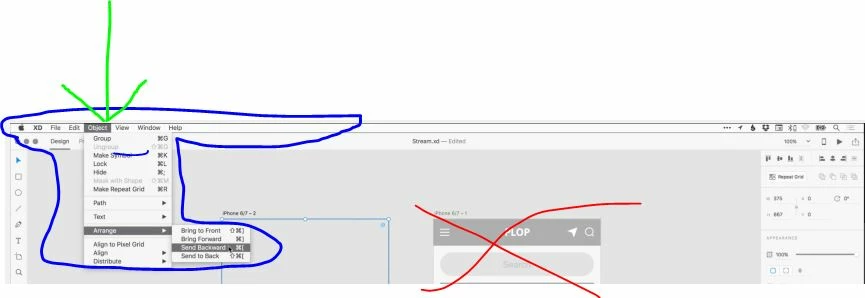
I don't know if this has to do with it being in Beta stage or windows vs. mac, but this is highly annoying.


Thanks,

H.


<The Title was renamed by moderator>

This topic has been closed for replies.

45 replies

Participant
February 23, 2018

Honestly, I'm so over this whole 'Pen and Touch' and 'UWP Apps' hype train Microsoft keeps trying to push on us. The fact is it sucks compared to classic windows apps UI found in programs such as photoshop and illustrator. I'm not using a stylus or my FINGERS for professional design work where pixel-perfect accuracy matters. You know what I'm using? A good ol' keyboard and mouse. And I'm going to take a wild guess here and say that probably like, 99% of other user's using Xd are doing the same.

Yes a touch interface is great for sketching out ideas/wireframes or creating digital artwork and sculpting. But for accurately placing content and TYPING out headings, text fields etc. I'm not going to be using a stupid stylus. Sorry. It's just so much faster with a trusty keyboard and mouse. These new UI's with a single hamburger menu for 'File' and every other function hidden in sidebars and right-click context menus or hotkeys is horrible. I spend more time hunting around looking for the function/features I want (A lot of the time it's faster to just Google and see if anyone else has figured it out. Because I'm almost guaranteed someone else has been just as puzzled about it before me) when I could have added 2 more sections of content in that time!

Not to mention we lose screen real estate because every panel, menu and button has to be so much damn bigger to make the whole interface 'touch friendly'. Please don't let Xd or future Adobe products turn in to a watered down 'Microsoft Paint 3D' of an app just to suit Microsoft's horrible UI/UX Design choices :/

Ishank_Jhatsd740xe
Participant
June 9, 2020

Bravo Man, I feel ya!

Be cool, savage and positive! ;)
terrim82506662
Participant
February 15, 2018

It's a year since this has been posted. NEWS FLASH MAC HAS ONLY A TINY MINORITY OF THE MARKET.

When you block windows users from a function (and you can put that function elsewhere in a menu), you block 88 percent of the computer users to serve only 9 percent of the market. (The other few percent are Linux users).

IS THAT SMART BUSINESS????????????????

I love your products, but you keep rewarding a company that trashed your FLash program. Does this make sense?

Please at the very least in your tutorials make it clear what functions are avaiable on Mac and which are available on PC and if they are available in different places, show us that.

elainecc
Community Manager
Community Manager
February 15, 2018

So, first of all, I hear your frustration about a top menu bar. We invested a huge amount of time in working on our Windows UWP experience because we believe it’s the future of the platform, one that represents a large part of the market, as you pointed out. As a part of our investment in the Windows UWP experience, we decided to commit completely to the UWP design paradigm, which is touch-friendly and removes the menu bar, replacing it with the hamburger menu in the upper left hand corner. You’re seeing Microsoft’s own products (think: Office) begin to move away from reliance on a traditional menu bar to an chunky icon-based strip at the top.

With our most recent release, we introduced basis pen and touch support support on Windows UWP only, and we’re making additional investments in this area.

You’re more than welcome to upvote the idea in UserVoice (https://adobexd.uservoice.com), and I’m not ruling it out for the future. But, for now, the current design paradigm set by Microsoft pairs well with the pen and touch support we’re bringing to the market as a Windows-only experience.

Hope that helps!

-Elaine

Product Manager

Adobe XD

Participant
December 18, 2018

It's all fine that instead of making top bar you people has added it in hamburger but it also not showing 'File', 'Edit' and many other options in left side of menu under hamburger.

Or we have to wait for more time to have these options on windows ?

juliej14474030
Participant
August 18, 2017

Hi -

I'm using XD on Windows 10.  Group doesn't appear to be in either the hamburger menu or the contextual menu. How do I group objects together?


Inspiring
June 7, 2018

Ctrl + g will group objects, just like in another adobe programs. Fortunately a lot of the short-cuts do carry over.

Adobe Employee
January 3, 2017

Hi,

Thanks for the interest in using XD for Windows! Some of the Mac version features are not yet available on XD for Windows , but we will be adding them with each subsequent monthly release.

However, most of the features from the upper menu (File, Edit, Object, etc), on Windows version can be found under the upper-left area hamburger menu or in the contextual menu. We had a different approach here, as the Windows version is an Universal Windows Application and we aligned with the platform's design language and guidelines.

If you're not finding a particular feature there, please let us know.

Thanks,

Dan

s.todev
Participant
February 27, 2017

I find one missing on Windows 10. For example  -> Object -> Mask with Shape... Only works with keyboard shortcut (Ctrl+Shift+M) but there is no such action link in the main menu or in the context menu. My release is Version: 0.6.16.7 Beta(downloaded via CCM on 27 feb 2017)

Participant
December 5, 2017

We're following the UWP design paradigm, where the hamburger menu only has file-level or application-level commands. For object commands, you'll find them either in the property inspector (which is contextual based on selection) or via the context menu (right click).

Hope that helps!

-Elaine


Two issues here.

  1. It's December 2017, and still no top-line menu options for Windows XD? You are forcing my organization to choose a competitor because your product doesn't support our workflow. Hint to Product Team - you're losing the Mac crowd. It's happening. Shore up your Windows users, and come to the market from a position of strength - not desperation.
  2. I understand the UWP design paradigm - but does forcing this paradigm at all breakpoints really make sense today? Are people clamoring for their top-level app functions to be hidden at all times? Put your UX/UI designer hat on for a second, and give it a real turn. Hint: the answer is an obvious "no."
Participant
December 30, 2016

I just found out that the Windows 10 app is missing quite a few features than the Mac version - which is the version shown in tutorials. This is very confusing indeed.

Windows support for Adobe XD

Does XD for Windows offer the same features as the Mac version?

At this time, no. The first release of XD for Windows includes core design and prototyping features, and will be updated every month with additional features. Eventually the core feature set across both Windows and Mac versions of Adobe XD will be consistent, with each version being optimized for performance and stability.

For a detailed list of the features supported in Windows, see Features currently supported on Windows 10.