
henryyjjames
New Participant
December 29, 2016
Question

Top menu bar with options ('File', 'Edit' and 'Object') are missing in XD on windows.

  • December 29, 2016
  • 45 replies
  • 87561 views

Hi,

I recently became very interested in Adobe Xd and I just discovered this problem. Mine does not have the bar at the top of the page with the File, Edit, Object View, etc.... This is annoying and is very hard to work without. It is also hard to work with tutorials on projects. I noticed this in a youtube video on how to do something. Here is a screenshot from my computer:
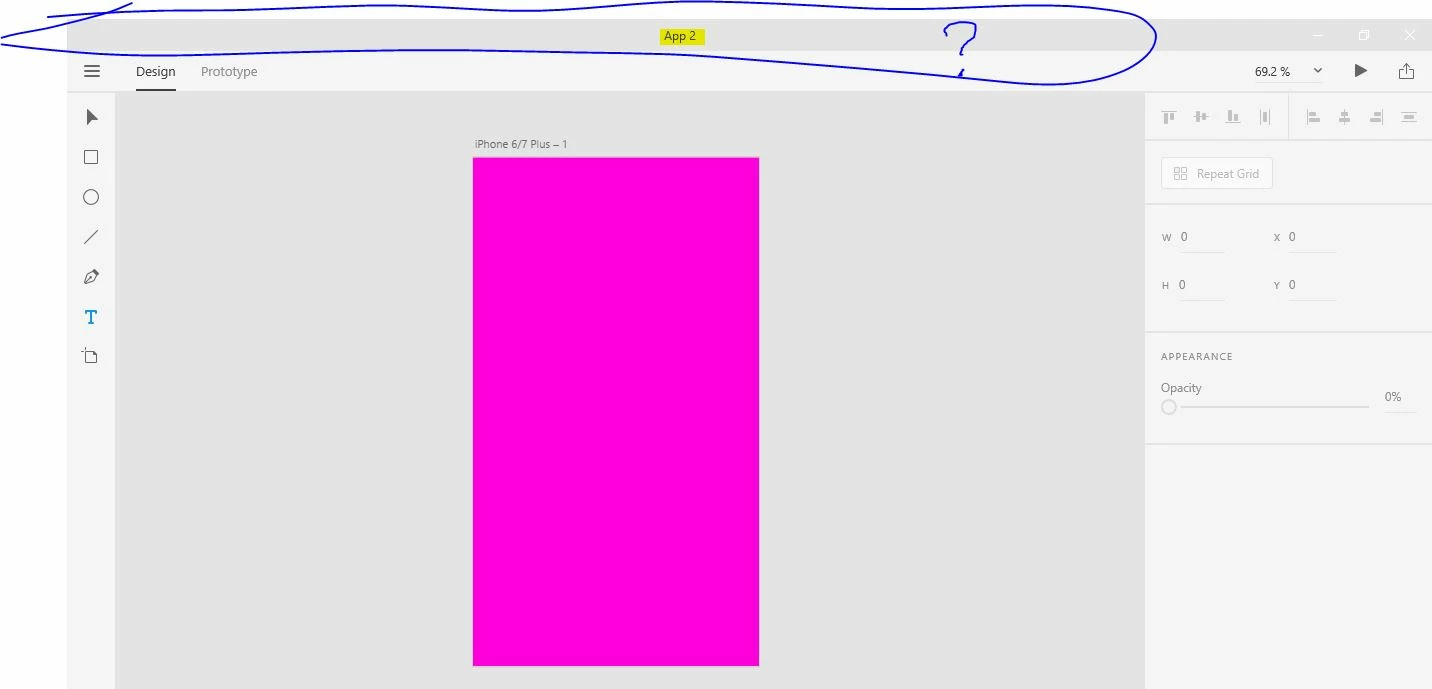
Here is a screen capture fro youtube:
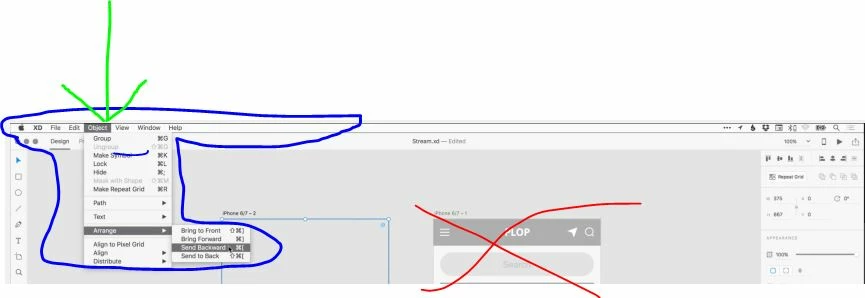
I don't know if this has to do with it being in Beta stage or windows vs. mac, but this is highly annoying.


Thanks,

H.


<The Title was renamed by moderator>

This topic has been closed for replies.

45 replies

New Participant
February 15, 2021

Hi,
I downloaded the app Adobe XD on my Windows laptop. Now I am running into a problem. When I am working in the app I can't see the menu bar where you can find the option as file, edit, object, etc. Because of this I don't have access to many options while working in Adobe XD. What can I do to fix this? 


{Renamed By MOD}

Rishabh_Tiwari
Community Manager
Community Manager
February 15, 2021

Hi there,


Thanks for reaching out. The Windows version of XD doesn't have the top menu, instead, it has a hamburger menu on the top left corner. For more information, please refer to these similar discussions:


https://community.adobe.com/t5/adobe-xd/xd-top-menu-missing-windows/m-p/10795237#M20334


https://community.adobe.com/t5/adobe-xd/top-menu-bar-with-options-file-edit-and-object-are-missing-in-xd-on-windows/m-p/8806293#M933


Feel free to reach out if you need any further assistance.


Regards

Rishabh

New Participant
February 15, 2021

Thank you for your help! This will help

New Participant
February 9, 2021

That doesn't really help, unfortunately. The hamburger menu has a lot of options but it looks like a disturbing number of functions are missing from the Windows hamburger menu. I can't figure out how to do a lot of simple tasks that are quite easy on Mac 😞


These are not even the same products and I don't feel like this should be a live product if this many options are missing.

New Participant
February 8, 2021

[abuse removed by moderator]

New Participant
February 9, 2021
I am calling you out on this comment. Hate speech is not tolarable. By
using such words, you discredit your own opinion. I might add, it's a
crime.

May I suggest you keep your interventions in the "positive criticism "
side. I understand you have free speech. You also have the liberty of being
civil. Say what you have to say by in a way that is acceptable.

XD isn't all that great, but wishing the death of an other person is
exaggerated. Try "I wish you stump your toes". It's proportional and it'll
make us smile.
New Participant
February 5, 2021

But most of the things still not in the hamburger, like option view and others too. So how we(Windows users ) get rid of these problems?


Participating Frequently
December 30, 2020

I would NEVER let MS dectate where UI design is headed!

Participating Frequently
December 30, 2020

dictate*  I couldn't find a way to edit my post.  Maybe the more link, but it doesn't show anything.

New Participant
November 27, 2020

Woaaahh. It's nearly the end of 2020 and still no simple toolbar for Windows? This is crazy.

New Participant
November 30, 2020

I found it depressing, either.

New Participant
November 24, 2020

A toolbar would be so much more helpful. I am trying to create an inner shadow through masks. I would create a mask through "object-mask with shape". Without a toolbar this is effectively impossible. Forums posts say all functionality can be found through context menus. Okay.. well that does not help me. I have no option to create a mask, and no way to access it as this is the ONLY adobe software without a toolbar.

Design is communication and benefits from consistency. Id rather that consistency be with adobe programs than Microsoft programs.

New Participant
November 14, 2020

Should be able to Add menu bar as option for those who like using it.


New Participant
October 7, 2020

It's so sad to see Adobe ignoring the needs of windows users by hiding behind Windows UWP experience. It might be the future, but as of now, 2020 it is a no brainer that not all designers work from what Adobe considers the future unless they have an Apple product. I don't have the time to invest in software that is not user friendly to my operating system. This is another piece of software that has become an Adobe product that has become less than desirable because Adobe refuses to listen to users. Good luck Adobe. I will now, again find another software comapny to serve my design needs. I'm very sad to say this, because I use to be a champion for Adobe.


New Participant
November 22, 2020

It's not sad,

I'd say it's pathetic.

They're introducing sh*ty features no-one cares about instead of actually looking at what really hurts people. I'm really thinking of switching to something else, pity it's the only alternative.

New Participant
October 6, 2020

Is there any timeframe for Masking in Windows? The <Ctrl>+<Shift>+M doesn't work and it doesn't show up in the context window. I'm using [Windows] verison 33.1.12.4