


New Participant
May 3, 2020
Answered

Unable to enable co-editing in Adobe XD

  • May 3, 2020
  • 2 replies
  • 2647 views

Hi, I'd like to to share my document and work together with other people. I can invite others, but I cannot enable collaborate & co-edit because there was no that option in my XD:
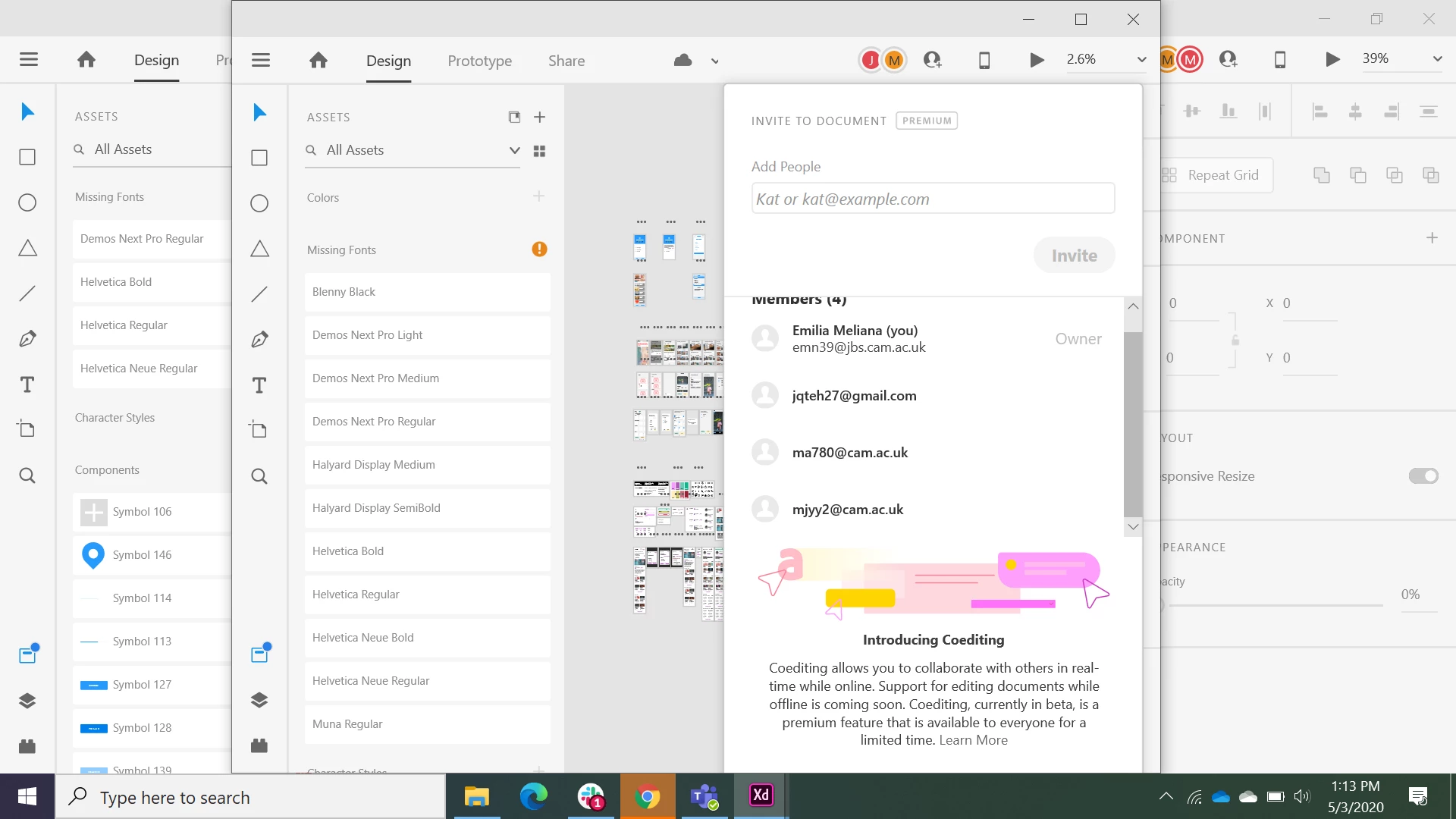
So, my friend created the file, and he has the option to enable co-edit.

My XD has the notification only "Introducing Co-edit" but I can't click, scroll, whatsoever to enable the co-editing. How to fix this?


Thanks

{Renamed By MOD}

This topic has been closed for replies.
Correct answer elainecc

Hi there! It looks like you're at a very small screen resolution, likely lower than our minimum screen recommendation. Please change your zoom level on Windows to a smaller percentage - the enable coediting button should be at the bottom of the screen you're showing. It only shows once, so once you click on it for any document, it should be higher up on the screen for you to select on your original zoom settings.

2 replies

elainecc
Community Manager
elaineccCommunity ManagerCorrect answer
Community Manager
May 4, 2020

Hi there! It looks like you're at a very small screen resolution, likely lower than our minimum screen recommendation. Please change your zoom level on Windows to a smaller percentage - the enable coediting button should be at the bottom of the screen you're showing. It only shows once, so once you click on it for any document, it should be higher up on the screen for you to select on your original zoom settings.

EMN39Author
New Participant
May 8, 2020

Thanks, Elaine for giving the answer.


I tried to change the zoom level by pressing (ctrl + -) , but nothing happens.. Usually this does the trick.

Do you know how to change the zoom level?


Thanks

elainecc
Community Manager
Community Manager
May 8, 2020

Note that I am not talking about the zoom level in the document; I am talking about the zoom level set in your your system display settings.

Rishabh_Tiwari
Community Manager
Community Manager
May 4, 2020

Hi there,


Sorry to hear about the trouble. I'd request if you can share a few more details like:


  1. A screenshot of the About XD info page.
  2. Is this happening with a specific file or multiple files?
  3. Please ensure that all the collaborators have the latest version of Adobe XD which is 28.7.
  4. You can also refer to this help article: https://helpx.adobe.com/xd/help/collaborate-coedit-designs.html


Regards

Rishabh