


Mexath3
Participant
February 7, 2020
Answered

Unable to enter text in Adobe Xd (bug)

  • February 7, 2020
  • 43 replies
  • 36738 views

Periodicity does not select the text and does not enter it where it is needed, but enters it in a random place, for example, in the "size" field. This bug is the entire existence of the program. I have a midday version. New PC, Last win update 10. I'm so angry that I’m ready to stop using the program. In order for the text to be correctly entered again, you have to restart the program, and this is a long time, and so every couple of minutes - it is impossible to work! Sometimes you can select text in the name of the object and selection in the layout will again become possible, but then this also stops working - the text is not highlighted and not entered. This application is for interface designers, and it does not even allow you to write plain text - horror.
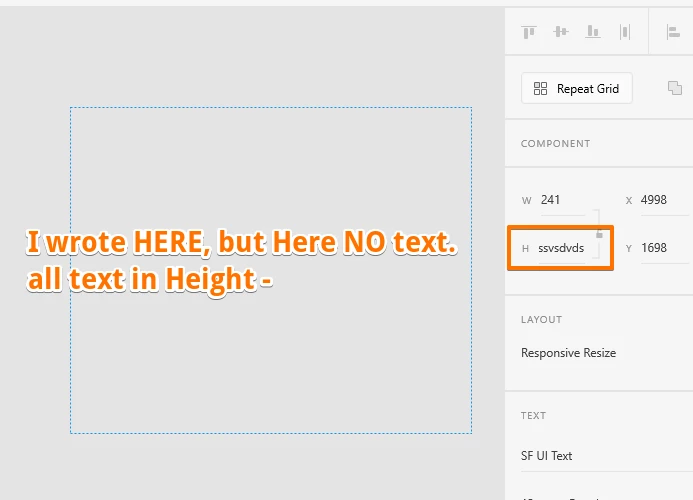
 

{Renamed By MOD}

This topic has been closed for replies.
Correct answer Derya5C29

Hi, here is a solution found on another forum regarding this issue : launch c:\Windows\System32\ctfmon.exe on Run or the explorer or the windows bar. Or you can find this fisher ctfmon.exe et launch it, it will solve the problem. 

This issue is due to severeal language pluged on the computor. Hope it will help

43 replies

Participant
June 27, 2021

Windows >  setting > time and language > language > scroll down to preffered languages.

make top language(Primary) as desired one. other just remove it. Keep one language pack.

Bests,


Participant
April 2, 2021

Text Area doesn't work at all for me. If I select the Text tool and click and drag to create a text area, the second I click into the area to type anything, the text area disappears. If I drag the box out and begin typing (without clicking inside the bounds) it turns into a regular text field. I don't even get the dotted bounding box that you would expect for a text area. It's a solid line. It's as if I'm still holding the Alt key but I'm not. 

I'm using MacOS 11.1 Big Sur with the latest version of XD 38.1.12


It appears this problem or similar problems have been going on for a while now. I can't work like this. I may switch to Figma soon or something like that. I'm sure I can find a photo shop replacement if I need to........This is unreasonable.

Participant
April 8, 2021

Turns out there is an auto-height feature that is on by default. Although it has some use cases that may help, I hate that it's on by default. To get the traditional Text Area to work the way it used to, I have to click and drag out my box. Then before it disappears type at least one character. If I click into the box it will still disappear so you need to type something first. Only then am I able to disable the auto-height feature. Then I can drag it out and add some lorem ipsum or some other text. This is very clunky. Poor implementation in my opinion

Participant
March 23, 2021

I have this exact same problem. 


Its become so disruptive for me I am considering moving to a differeent design package, its literally costing me money because I cant deliver my work efficiently.


The solution/workaround that I am currently using is to load ctfmon.exe each time the text has issues. It resolves it for a while then it starts coming back again. I have pinned a shortcut to this program on my taskbar so I can get to it easily.  While this does make the function usable (for the time being), I dont expect to have to run a hacky workaround for something as basic as using the text function within a piece of software that I pay for, its really unacceptable Adobe. 


Sort it out!


Known Participant
March 29, 2021

Same problem!!!!!!!

Participant
February 19, 2021

2021 and this is still a Issue. One thing that I spoted is when xd is overload with many projects (or two Sketch files...) this "bug" starting showing up.

Inspiring
February 19, 2021

I've just started using XD in Win 10 and am getting the same problem with the text tool. Somebody in the thread suggested Alt-tabbing away and back, and that works. However, I only get the problem if I Alt+drag to duplicate text, not if I enter text with the text tool. After duplication, none of the text on the artboards is editable until using the Alt+Tab work-around. Sombody in the thread suggested that XD is holding onto the Alt after dragging and that would certainly seem to be a possibility. If only Adobe would respond...

Mona Zaad
Participant
November 29, 2020

Hi,

I have the same problem and unfortunately, this solution (ctfmon.exe) does not work for me.

Participating Frequently
November 20, 2020

Hi,

since Version 34 of Adobe XD I have constant crashes and bugs. While crashes got better with the release of Version 35 I got even more problems with the Type Tool. After some minutes working in an XD-Document the Type Tool stopped working as I double clicked into an text box to edit it. Neither is any cursor set nor the typed letters are displayed. As I try to cancel the action with esc or and by clicking outside the artboard with the selection tool, nothing seems to happen. The Type Tool does not work anymore and I have to restart XD to fix that everytime. I read about fixing the type tool by minimizing and maximizing the application window but this did not work anymore (it worked in 34).


I allready re-installed XD which does not work either. Any suggestions. It is a really painful problem and costs time.


Also quick note: Sometimes XD does not show the Icons of the property panels anymore. This is a problem I encountered at work with the licencse of my employer but never on my version. Now I have the problem on both computers.


Thanks for any help!

Rishabh_Tiwari
Community Manager
Community Manager
November 20, 2020

Hi there,


Sorry to hear about the trouble. Could you please try the suggestion shared here: https://community.adobe.com/t5/adobe-xd/unable-to-enter-text-in-adobe-xd-bug/m-p/11612125?page=4#M40788


Let us know if this helps or if you need anything else.


Regards

Rishabh

Participating Frequently
November 28, 2020

Hello,


unfortunately, it does not help. Type Tool is still broken. I can not type anything into the Input fields after a few minutes. The only temporary solution for me is restarting XD every time.

Derya5C29Correct answer
Participant
November 20, 2020

Hi, here is a solution found on another forum regarding this issue : launch c:\Windows\System32\ctfmon.exe on Run or the explorer or the windows bar. Or you can find this fisher ctfmon.exe et launch it, it will solve the problem. 

This issue is due to severeal language pluged on the computor. Hope it will help

Participant
December 13, 2020

Hi, i tryed your solution, it didn'nt work for me. I am curently using this version.

but i did find a way to keep working without have to close xd everytime the bug happen. i just have to clic on another application and comme back to xd. this way just allow me to keep working, the bug is still there.


Participant
April 24, 2021

I am having the same issues on several different windows computers. After about 10 minutes I have exit xd because I cannot use type. 

Participant
November 19, 2020

I am new using this tool and I really believed it is my fault, I am feeling better seeing this issue is a common issue, please let me know I can get out from that ! 

SBRudy
Participating Frequently
October 23, 2020

Same bug is occurring with the latest update to Adobe XD as of October 23rd, 2020.

Participating Frequently
November 16, 2020

So this bug is known about since March and its only just being looked at..... That seems crazy.
Especially as we are paying for a product that does not work.

We are also having linking issues where nothing links without and error message.

Participating Frequently
November 19, 2020

Not since March but way earlier, it was an issue years ago, not fixed in years

mirna123456
Participant
September 6, 2020

This problem keeps occuring to me too and is wasting so much time. The system languages also keep changing as I type in adobe XD! Please fix it

HARSHIKA_VERMA
Community Manager
Community Manager
September 8, 2020

Hi Mirna,


Sorry to hear that. Could you please share the OS and XD version of your machine? Is it happening with every file or with a specific file?


We'll try our best to help.


Thanks,

Harshika

HARSHIKA_VERMA
Community Manager
Community Manager
September 9, 2020

Also it's the same reply over and over again, they seriously need to give more time for bugfixing on Windows, the amount of issues and bugs are unbearable now... Fonts are bugging, XD crashes or freezes randomly, etc. etc., over and over again. My biggest problem is I can't leave Adobe...


Hi All,


Thanks for your patience. Update on the logged bug, the team identified that it's a known issue with Mircosoft and they are working on it to fix the issue. The only workaround as of now is to change the focus from XD((like minimizing and maximizing the app). Let us know if that helps. 


We'll keep you updated.


Thanks,

Harshika